Table of Contents
If you’ve ever watched a mechanic plug a mysterious gadget into your car and instantly know what’s wrong, you’ve witnessed an OBD2 scanner in action. These diagnostic tools have evolved from professional garage equipment to affordable devices that anyone can use. For car owners in 2026, understanding your vehicle’s health doesn’t require a mechanical engineering degree or a four-figure investment—just a modest budget and the willingness to learn.
The world of budget OBD2 scanners under $100 offers surprising capabilities for beginners. Modern vehicles generate thousands of data points every second, and these affordable devices act as translators between your car’s computer and your understanding. Whether you’re trying to turn off that pesky check engine light, prepare for an emissions test, or simply learn more about how your vehicle operates, the right entry-level scanner can save you hundreds in diagnostic fees while empowering you with knowledge about your daily driver.
Top 10 OBD2 Code Readers
Detailed Product Reviews
1. ANCEL AD310 Classic Enhanced Universal OBD II Scanner Car Engine Fault Code Reader CAN Diagnostic Scan Tool, Read and Clear Error Codes for 1996 or Newer OBD2 Protocol Vehicle (Black)

Overview: The ANCEL AD310 is a bestselling entry-level OBD2 scanner endorsed by automotive influencer Scotty Kilmer. Designed for 1996+ vehicles, this compact tool reads and clears check engine lights, accesses live data, freeze frames, and I/M readiness monitors without requiring batteries or technical expertise.
What Makes It Stand Out: Its rock-solid build quality separates it from budget competitors. The thick 2.5-foot cable and robust housing withstand garage drops, while the large, clear display delivers readable results in any lighting. The endorsement from a trusted mechanic gives DIYers confidence in its reliability and accuracy.
Value for Money: Priced in the sub-$40 range, the AD310 delivers professional-grade functionality at a fraction of dealership diagnostic fees. It eliminates costly garage visits for basic CEL issues and pays for itself after a single use. Competing scanners at this price point often sacrifice build quality or protocol support.
Strengths and Weaknesses: Strengths:
- Supports all five OBD2 protocols (CAN, KWP2000, J1850 variants, ISO9141)
- Extremely intuitive interface with clearly labeled buttons
- No batteries required; powers directly from OBDII port
- Compact and lightweight for glovebox storage
- Fast reading and clearing of codes within seconds
Weaknesses:
- Limited to engine/emissions systems only (no ABS, SRS, or transmission support)
- Monochrome display lacks graphical data representation
- No advanced features like oxygen sensor testing or bi-directional control
Bottom Line: The AD310 is an essential home garage tool for basic diagnostics. Its durability, simplicity, and comprehensive protocol support make it the best value for casual DIYers who need reliable CEL troubleshooting without unnecessary complexity.
2. VDIAGTOOL VD10 OBD2 Scanner Code Reader Car Diagnostic Tool Engine Fault Code Reader for Turn Off CEL with Freeze Frame/I/M Readiness for All OBDII Protocol Cars, OBD2 Scanner Diagnostic Tool

Overview: The VDIAGTOOL VD10 positions itself as the ultimate DIY companion, offering straightforward check engine light diagnostics for novices. Compatible with all OBDII protocols and 1996+ vehicles, it provides core functions—code reading/clearing, live data, freeze frame, and I/M readiness—in a plug-and-play package.
What Makes It Stand Out: Its built-in DTC database containing over 3,000 code definitions eliminates time-consuming online searches. The VD10 instantly displays plain-English explanations on its TFT screen, making it uniquely accessible for users with zero mechanical background. The I/M readiness monitor provides clear pass/fail indicators for smog checks.
Value for Money: Retail pricing typically under $35 makes this one of the most affordable legitimate scanners available. It offers comparable functionality to smartphone app-based solutions without subscription fees or Bluetooth pairing hassles. The time saved from integrated code definitions alone justifies the cost.
Strengths and Weaknesses: Strengths:
- Comprehensive built-in code library with instant definitions
- Extremely user-friendly operation for absolute beginners
- Retrieves live sensor data (RPM, temperature, fuel trims)
- Freeze frame data helps diagnose intermittent issues
- Dedicated I/M readiness function for emissions testing
Weaknesses:
- Basic display without graphing capabilities
- Plastic construction feels less durable than premium alternatives
- No advanced diagnostics beyond standard OBD2 parameters
- Limited to English language support only
Bottom Line: The VD10 excels as a first-time scanner for budget-conscious drivers. While it lacks advanced features, its integrated code database and foolproof operation make it perfect for quick CEL checks and pre-smog inspections without technical frustration.
3. FOXWELL NT301 OBD2 Scanner Live Data Professional Mechanic OBDII Diagnostic Code Reader Tool for Check Engine Light

Overview: The FOXWELL NT301 targets serious DIYers and entry-level professionals with enhanced diagnostic capabilities beyond basic code reading. Supporting 1996+ OBDII vehicles, it offers live data graphing, freeze frame analysis, and I/M readiness with visual LED indicators for quick emissions status assessment.
What Makes It Stand Out: Live data graphing transforms raw sensor numbers into visual trends, allowing users to identify subtle performance issues that static readings miss. The tri-color LED system provides at-a-glance emissions readiness status, while VIN retrieval streamlines vehicle identification. These features typically appear in scanners costing twice as much.
Value for Money: Positioned around $50-60, the NT301 bridges the gap between basic readers and professional tools. The graphing functionality alone warrants the premium over entry-level models, offering diagnostic depth that prevents unnecessary parts replacement. It competes favorably with units priced $30 higher.
Strengths and Weaknesses: Strengths:
- Real-time data graphing and logging for trend analysis
- Intuitive red-yellow-green LED readiness indicators
- Fast processor delivers results within 3-5 seconds
- Ergonomic design with responsive navigation buttons
- Extensive protocol support for domestic and foreign vehicles
Weaknesses:
- Cannot diagnose ABS, SRS, or transmission systems
- No advanced service reset functions
- Display resolution is adequate but not exceptional
- Manual specifies ignition must be on for some functions, confusing novices
- Update process requires Windows PC and USB cable
Bottom Line: The NT301 is ideal for enthusiasts wanting professional-level data analysis without the professional price tag. Its graphing capabilities and visual indicators provide diagnostic insights that basic scanners miss, making it worth the modest premium for serious home mechanics.
4. MOTOPOWER MP69033 Car OBD2 Scanner Code Reader Engine Fault Scanner CAN Diagnostic Scan Tool for All OBD II Protocol Cars Since 1996, Yellow

Overview: The MOTOPOWER MP69033 distinguishes itself with a vibrant yellow housing and a generous 2.8-inch LCD display, offering standard OBD2 diagnostics for 1996+ vehicles. This scanner covers code reading/clearing, freeze frame, I/M readiness, live data, and vehicle information across nine protocols with multi-language support.
What Makes It Stand Out: The oversized display provides superior readability compared to competitors’ smaller screens, especially for users with visual impairments. Six-language support (English, German, Dutch, Spanish, French, Italian) makes it uniquely suitable for international users or multi-lingual households. The dedicated quick-query buttons for VIN and DTCs streamline frequently accessed functions.
Value for Money: Typically priced under $30, the MP69033 offers exceptional screen real estate and language options at a bargain price point. While functionally similar to basic scanners, its display advantage and broader language support deliver added value without premium pricing. It undercuts many monochrome competitors.
Strengths and Weaknesses: Strengths:
- Large 2.8-inch LCD with adjustable contrast and backlight
- Six-language support broadens user accessibility
- 2.5-foot durable cable provides good reach
- Quick-access buttons for VIN and fault codes
- Supports nine OBD2 protocols for wide vehicle coverage
Weaknesses:
- Yellow plastic housing feels lightweight and less professional
- No graphical data representation or logging
- Lacks advanced features like oxygen sensor testing
- Cannot read ABS, airbag, or service lights (clearly stated)
- Interface navigation is less intuitive than premium brands
Bottom Line: The MP69033 is perfect for users prioritizing display size and language flexibility on a tight budget. While it doesn’t offer advanced diagnostics, its superior screen and international support make it an outstanding value for basic troubleshooting and pre-inspection checks.
5. ANCEL AD410 Enhanced OBD2 Scanner, Vehicle Code Reader for Check Engine Light, Automotive OBD II Scanner Fault Diagnosis, OBDII Scan Tool for All OBDII Cars 1996+, Black/Yellow

Overview: The ANCEL AD410 builds upon the AD310’s foundation with enhanced diagnostics including O2 sensor and EVAP system testing. Featuring a 2.4-inch QVGA color display and 42,000 DTC lookups, this scanner serves intermediate DIYers needing deeper diagnostic capabilities for 1996+ OBDII vehicles without crossing into professional price territory.
What Makes It Stand Out: Integrated O2 sensor and EVAP leak tests provide functionality typically reserved for $100+ scanners, helping users diagnose fuel efficiency and emissions issues. The color display and redesigned UI improve readability and navigation, while the massive 42,000-code database eliminates virtually all external lookup needs. Scotty Kilmer’s endorsement adds credibility.
Value for Money: At approximately $60-70, the AD410 delivers mid-tier professional features at entry-level pricing. The EVAP and O2 tests alone can save hundreds in diagnostic fees, while the color interface enhances usability. It competes directly with scanners costing $30-40 more, offering superior feature density.
Strengths and Weaknesses: Strengths:
- Advanced O2 sensor and EVAP system testing capabilities
- Large 42,000-code built-in database with definitions
- 2.4-inch color TFT display with intuitive UI
- Supports all OBDII protocols and multilingual operation
- Powers directly from vehicle; no batteries required
Weaknesses:
- Still limited to engine systems; no ABS/SRS support
- USB cable is for updates only (no PC diagnostics)
- Color display is small compared to some competitors
- Setup menu can be confusing for first-time users
- Update software only compatible with Windows
Bottom Line: The AD410 is the sweet spot for serious DIYers wanting advanced diagnostics without professional pricing. Its EVAP and O2 testing capabilities provide genuine diagnostic depth, while the color display and extensive code library make it a worthwhile upgrade from basic scanners for those tackling complex issues.
6. BlueDriver Bluetooth Pro OBDII Scan Tool for iPhone & Android - No Subscription Fee - OBD2 Car Scanner and Code Reader - Diagnose Check Engine, ABS, SRS, Airbag & 7000+ Issues on Vehicles 1996+

Overview: The BlueDriver Bluetooth Pro transforms your smartphone into a professional-grade diagnostic scanner. This wireless OBDII tool eliminates cables while providing comprehensive vehicle diagnostics for 1996 and newer vehicles. By connecting via Bluetooth to a dedicated sensor, it offers real-time data monitoring and code reading capabilities that rival expensive professional equipment.
What Makes It Stand Out: Unlike traditional handheld scanners, BlueDriver’s smartphone integration delivers unlimited repair reports with detailed possible causes and fixes. The app includes a vast database of repair videos with step-by-step instructions, making complex diagnostics accessible to DIY enthusiasts. It reads not just check engine codes, but also ABS, SRS, airbag, and TPMS codes—functionality typically reserved for high-end scan tools. The live data feature provides health monitoring while driving, offering insights into vehicle performance in real-time.
Value for Money: At its price point, BlueDriver delivers exceptional value by eliminating subscription fees while offering capabilities found in tools costing hundreds more. Professional mechanics pay monthly fees for similar diagnostic databases, making this a one-time investment that pays for itself with a single avoided dealership visit. Compared to basic code readers, the enhanced diagnostics and repair guidance justify the premium.
Strengths and Weaknesses: Strengths include wireless convenience, comprehensive code coverage, user-friendly app interface, repair video library, and no ongoing costs. Weaknesses involve reliance on smartphone compatibility, potential Bluetooth connectivity issues in certain vehicles, and a steeper learning curve for non-tech-savvy users. Some users report slower data refresh rates compared to wired professional tools.
Bottom Line: For DIY mechanics seeking professional-level diagnostics without the professional price tag, BlueDriver is an outstanding choice. Its smartphone integration and repair guidance features make it ideal for those willing to learn, though traditionalists may prefer a dedicated handheld unit.
7. Y2 2.8’’ Color Graphing Screen OBD2 Scanner Diagnostic Tool,Enhanced PRO Check and Reset Engine Fault Code,DTC Lookup,O2 Sensor Test,Live Data,Freeze Frame,OBDII Code Reader Tool for All Cars

Overview: The Y2 OBD2 Scanner distinguishes itself with a vibrant 2.8-inch color graphing screen that brings smartphone-like intuitiveness to vehicle diagnostics. Designed as a “vehicle repair butler,” this handheld tool simplifies complex diagnostics for beginners while offering advanced features for experienced users. It provides immediate access to engine fault codes, live data monitoring, and I/M readiness without requiring a smartphone connection.
What Makes It Stand Out: The innovative icon-based interface and hotkey design enable one-click access to critical functions like DTC reading, VIN retrieval, and emissions monitoring. Enhanced capabilities include Freeze Frame analysis, O2 sensor testing, Mode 6 in-depth diagnostics, Mode 8 component testing, and battery performance evaluation—features rarely found in this price range. The graphical real-time data display with recording and playback functions significantly improves diagnostic accuracy.
Value for Money: This scanner strikes an impressive balance between affordability and functionality. While basic code readers offer minimal information, the Y2 provides professional-grade features like graphing displays and multiple test modes at a fraction of professional tool costs. The 99% vehicle compatibility ensures broad utility across personal and commercial fleets, making it a cost-effective solution for multi-vehicle households.
Strengths and Weaknesses: Strengths include the color graphing display, intuitive interface, comprehensive test modes, wide protocol support, and portability. The hotkey functionality streamlines workflow significantly. Weaknesses include a smaller screen than tablet-based solutions, potential limitations with manufacturer-specific codes, and a learning curve to master all advanced features. Build quality may not match premium brands.
Bottom Line: The Y2 scanner excels for users wanting a standalone device with advanced features without smartphone dependency. It’s particularly valuable for DIYers and small shops needing comprehensive diagnostics in a portable package.
8. WEJOWE OBD2 Scanner Diagnostic Tool, Check Engine Code Reader OBD2 Scanner with Reset, Mode 6, Mode 8 & I/M Readiness, Auto Check Engine Light Car Diagnostic Scan Tool for All OBDII Car Since 1996
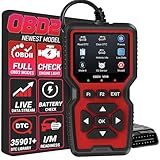
Overview: The WEJOWE OBD2 Scanner positions itself as a data powerhouse with an unprecedented built-in library of 35,901 diagnostic trouble codes. This compact diagnostic tool covers vehicles from 1996 onward, offering professional-grade code reading and clearing capabilities in a pocket-sized design. It eliminates the frustration of searching online for code definitions by providing comprehensive explanations directly on the device.
What Makes It Stand Out: The massive DTC database dwarfs competitors offering 3,000-10,000 codes, enabling precise fault identification across virtually any vehicle system. Unique printing functionality allows connection to a computer for hardcopy fault reports, empowering users to challenge repair shop estimates with documented evidence. Lifetime free upgrades ensure the tool evolves with new vehicle models and emerging diagnostic protocols, protecting your investment long-term.
Value for Money: With its extensive code library and upgrade policy, this scanner delivers exceptional long-term value. The ability to print diagnostic reports can save hundreds by preventing unnecessary repairs. While priced slightly above basic readers, the depth of information and future-proofing through updates make it more economical than replacing outdated tools. The included canvas storage bag and Type-C cable add practical value.
Strengths and Weaknesses: Strengths include the comprehensive DTC database, printing capability, lifetime upgrades, multi-language support, and compact portability. The device offers Mode 6 and Mode 8 testing alongside I/M readiness. Weaknesses include a basic display without graphing capabilities, reliance on computer connection for printing, and potentially overwhelming information for casual users. Setup for advanced features may require technical comfort.
Bottom Line: For data-driven DIYers and budget-conscious professionals, the WEJOWE scanner’s massive code library and printing features make it a standout choice. It’s ideal for those who value comprehensive information and long-term utility over flashy displays.
9. OBD2 Scanner, CGSULIT SC103 Car Code Reader Diagnose Check Engine Light Smog Check DTCs Scan Tool Live Data Stream Voltage Test for Vehicles Since 1996

Overview: The CGSULIT SC103 OBD2 Scanner earns credibility through endorsement by renowned mechanic Scotty Kilmer, positioning itself as a trusted check engine light specialist. This handheld diagnostic tool combines industrial-grade components with user-friendly operation for vehicles manufactured from 1996 onward. It delivers core diagnostic functions without subscription fees or complex setup procedures.
What Makes It Stand Out: The 2.8-inch TFT color screen displays data in both text and graphical formats simultaneously, offering superior visibility compared to monochrome competitors. The industrial-grade chip ensures rapid, accurate performance crucial for professional shops and serious DIYers. Real-time sensor monitoring includes voltage testing—a feature often omitted in budget scanners. The built-in comprehensive DTC library provides immediate code definitions without internet dependency.
Value for Money: As a mid-range scanner, it offers professional build quality and dual-format data display at a consumer price point. The Scotty Kilmer endorsement reflects real-world reliability, suggesting fewer compatibility issues than generic alternatives. For users seeking dependable check engine diagnostics without smartphone complexity, it represents excellent value versus both cheaper unreliable units and expensive professional tools.
Strengths and Weaknesses: Strengths include reputable brand endorsement, vibrant color display, dual data formats, industrial-grade durability, and broad protocol support. The tool offers I/M readiness, freeze frame data, and live data streaming. Weaknesses include limited advanced system coverage (focuses on engine codes), no wireless connectivity, and potential gaps with newest vehicle models. It lacks enhanced features like ABS or SRS code reading found in premium alternatives.
Bottom Line: The SC103 is a solid choice for DIY enthusiasts wanting reliable, straightforward engine diagnostics from a trusted brand. It’s best suited for users prioritizing durability and simplicity over wireless convenience or comprehensive system coverage.
10. Autel OBD2 Scanner MS309 Universal Car Engine Fault Code Reader, Check Engine Light and Emission Monitor Status, OBDII CAN Diagnostic Scan Tool

Overview: The Autel MS309 represents the entry-level gateway to professional diagnostic tools from a reputable manufacturer. This universal OBD2 scanner focuses on core functionality—reading and clearing check engine lights—for vehicles from 1996 onward. Its plug-and-play design requires no registration or battery power, making it immediately accessible to novice users.
What Makes It Stand Out: Autel integrates on-screen DTC definitions for over 1,000 codes directly into the device, eliminating time-consuming internet searches. The scanner retrieves freeze frame data and critical vehicle information including VIN, Calibration IDs, and CVNs—features invaluable when purchasing used vehicles to verify ECU authenticity. As a dedicated handheld unit, it operates independently of smartphones or computers, ensuring reliability in any garage environment.
Value for Money: Positioned as a budget-friendly option, the MS309 delivers essential diagnostics at a fraction of professional tool costs. While limited compared to feature-rich scanners, it excels at its primary function: quickly identifying check engine light causes. For casual DIYers or as a backup tool for professionals, its affordability and brand reputation justify the investment. However, users requiring advanced features should consider pricier Autel models.
Strengths and Weaknesses: Strengths include trusted brand reliability, instant DTC definitions, freeze frame capability, VIN retrieval, and true plug-and-play operation. The device is simple enough for absolute beginners. Weaknesses include severe limitations with FCA vehicles after 2017 due to security gateways, lack of advanced system support (no ABS/SRS), basic display without graphing, and a relatively small code database compared to competitors offering 35,000+ definitions.
Bottom Line: The MS309 serves as an excellent introductory scanner for basic check engine diagnostics. It’s ideal for budget-conscious users needing reliable core functionality, but those with newer FCA vehicles or requiring comprehensive system coverage must look elsewhere.
Understanding OBD2 Technology for Beginners
What OBD2 Actually Does
OBD2 (On-Board Diagnostics II) is your vehicle’s self-reporting system. Since 1996, all cars sold in the United States have been required to include this standardized diagnostic port, typically located under the dashboard. This system continuously monitors engine performance, emissions controls, and major components. When something malfunctions, it stores a specific trouble code that scanners can retrieve. Think of it as your car’s way of sending a text message when it’s feeling unwell.
Why Modern Vehicles Depend on OBD2 Systems
Today’s vehicles contain 30-100 electronic control units managing everything from fuel injection to transmission shifts. The OBD2 system serves as the central communication hub, ensuring these modules work together harmoniously. For beginners, this means your scanner isn’t just reading engine codes—it’s potentially accessing data from your transmission, ABS, airbags, and climate control systems, depending on the device’s capabilities and your vehicle’s configuration.
The Evolution from OBD1 to OBD2
Before 1996, OBD1 systems varied wildly between manufacturers, making universal scanners impossible. OBD2 standardized everything: connector shape, communication protocols, and trouble code definitions. This standardization is why a $50 scanner today can work on a 1998 Honda Civic and a 2025 Ford F-150. For budget-conscious buyers, this universality means you’re investing in a tool that remains useful across multiple vehicle purchases.
Why Budget-Friendly Options Make Sense
Breaking the Price Myth
Professional-grade scanners cost $2,000-$10,000 because they perform bi-directional controls, programming, and dealer-level functions. However, most beginners need only three core functions: reading codes, clearing codes, and viewing live data. Budget scanners excel at these basics. The price difference often reflects brand premium, ruggedized construction for daily shop use, and advanced features you’ll likely never touch as a DIY enthusiast.
What You Sacrifice (And Keep) at Lower Price Points
Sub-$100 scanners typically lack advanced coding capabilities, manufacturer-specific deep diagnostics, and future module programming. However, they retain essential code reading, generic and some manufacturer-specific codes, live data streaming, and emissions readiness checks. The key insight for beginners: you’re not sacrificing critical functionality—you’re simply avoiding professional features that require specialized training to use safely.
When Budget Scanners Are Perfect for Beginners
If you’re buying your first scanner to diagnose a check engine light, monitor basic engine health, or verify repair work, a budget option is ideal. These devices shine for pre-purchase inspections, routine maintenance verification, and learning diagnostic basics. The learning curve is gentler, interfaces are simpler, and the financial risk is minimal if you discover automotive diagnostics aren’t your passion.
Key Features to Evaluate Under $100
Code Reading Capabilities
Every scanner reads generic “P0” codes, but quality budget models also access some manufacturer-specific “P1” codes. Look for devices that display not just the alphanumeric code (like P0420) but also plain English descriptions. Some scanners show only codes, forcing you to Google definitions—an unnecessary hassle when many affordable options include built-in libraries with 3,000-7,000 code definitions.
Live Data Streaming
Live data transforms your scanner from a code reader into a diagnostic tool. This feature displays real-time sensor readings: oxygen sensor voltages, engine RPM, coolant temperature, and fuel trim percentages. For beginners, watching these values change as the engine warms up provides invaluable context about normal vs. abnormal operation. Prioritize scanners that refresh data quickly (every 100-500ms) and allow you to graph at least 2-4 parameters simultaneously.
Diagnostic Trouble Code Definitions
The best budget scanners include comprehensive code libraries with not just definitions but also potential causes and suggested repairs. This educational component accelerates your learning curve. Some devices offer basic troubleshooting tips like “check gas cap” for EVAP codes or “inspect wiring” for sensor faults. While not a substitute for service manuals, this guidance helps beginners understand whether a problem is a $10 fix or requires professional attention.
Emissions Readiness Status
For drivers in states with emissions testing, readiness monitors are crucial. These indicators show whether your vehicle’s self-tests have completed after a battery disconnect or code clearing. A good budget scanner displays the status of all readiness monitors (oxygen sensor, EGR, catalytic converter, etc.) and indicates if your car is ready to pass inspection. This feature alone can save you from a wasted trip to the testing station.
Vehicle Compatibility Considerations
While OBD2 is standardized, implementation varies. Most budget scanners work with all 1996+ gasoline vehicles and 2004+ diesel vehicles sold in the US. However, if you own a hybrid, electric vehicle, or European luxury car, verify compatibility. Some budget scanners struggle with CAN-FD protocols found in newer vehicles or have limited functionality with certain European makes. Check manufacturer compatibility lists before purchasing.
Display Quality and User Interface
A scanner’s screen determines your user experience. Monochrome LCDs with 128x64 resolution work fine for basic code reading, but color TFT displays with 320x240 resolution or higher make live data graphs and menus far more readable. Touchscreens are rare under $100, but well-organized button navigation matters. Look for devices with intuitive menu structures and backlit displays for under-dash use in dim lighting.
Update Policies and Software Support
Even budget scanners require occasional updates for new vehicle model years and bug fixes. Some manufacturers offer lifetime free updates via USB, while others charge $10-$20 annually after the first year. Investigate the update process: is it a simple download-and-install, or a convoluted registration nightmare? Avoid scanners with no update capability, as they may become obsolete when you purchase a newer vehicle.
Physical Design Factors That Matter
Cable Length and Connector Quality
The OBD2 port’s under-dash location varies between vehicles. A 2.5-foot cable might work in a truck but be too short in a compact car where the port sits deep under the steering column. Look for 4-6 foot cables with reinforced strain relief at both ends. The connector should feel solid, with smooth insertion and removal. Flimsy connectors break easily and can damage your vehicle’s OBD2 port.
Device Durability and Build
Budget doesn’t have to mean fragile. Quality scanners under $100 use impact-resistant housings that survive drops from engine bay height. Rubberized grips prevent slipping from oily hands. While you won’t get IP67 water resistance, decent build quality ensures your scanner lasts through years of occasional use. Check user reviews specifically mentioning drop tests and long-term reliability.
Button Layout and Ergonomics
When you’re contorted under the dashboard trying to navigate menus, button placement becomes critical. Well-designed scanners position arrow keys and select buttons where your thumb naturally rests. Avoid devices with tiny, closely-spaced buttons that require removing the unit from the port to see what you’re pressing. Backlit buttons are a bonus for dark garage work.
Storage and Portability
Consider where you’ll store your scanner. Compact units fit in glove boxes or center consoles, while larger ones with integrated cables require toolbox storage. Some scanners include padded cases that protect the device and organize cables. If you plan to carry it for roadside emergencies, prioritize pocket-sized models. For garage use, larger screens and dedicated storage matter more.
Connectivity Options Explained
Wired vs. Bluetooth Connections
Standalone scanners with integrated cables offer simplicity—no pairing, no batteries, no app dependence. Bluetooth scanners pair with your smartphone, leveraging your phone’s superior display and processing power. For beginners, standalone units eliminate technical friction. Bluetooth models appeal to tech-savvy users who want enhanced features through apps, but require more setup and may have ongoing subscription costs for premium app features.
App Integration and Smartphone Pairing
If you choose a Bluetooth scanner, investigate the companion app before buying. Free apps range from excellent to unusable. Look for apps with 4+ star ratings and 10,000+ downloads. Check if the app works offline (crucial in areas with poor cell service) and whether it stores vehicle history. Some apps push expensive subscriptions for features that should be included. Read recent app reviews to spot bait-and-switch tactics.
Standalone Units vs. Phone-Dependent Models
Standalone scanners work independently, making them reliable for emergency roadside use. Phone-dependent scanners become paperweights if your phone dies or the app stops working due to OS updates. However, phone-based systems receive more frequent software updates and can display data more beautifully. For a beginner’s only scanner, a standalone unit offers greater reliability. For a learning tool used primarily at home, phone-based systems provide richer data visualization.
Making Your Final Decision
Assessing Your Technical Comfort Level
Be honest about your tech skills. If you struggle with smartphone apps, choose a standalone scanner with simple menus. If you enjoy exploring data and graphs, a Bluetooth model with a robust app might engage you more deeply. The best scanner is the one you’ll actually use. A complex device that intimidates you will sit in a drawer, while a simple one you’ll grab for every mystery noise provides real value.
Matching Features to Your Vehicle Needs
List your primary use cases. Daily driver maintenance? Focus on code reading and clearing. Older vehicle restoration? Prioritize live data to diagnose intermittent issues. Pre-purchase inspections? Emissions readiness is key. Multiple family vehicles? Ensure broad compatibility. Project car tuning? Look for fast refresh rates and graphing. Your specific needs should drive feature prioritization, not marketing claims.
Future-Proofing Your Purchase
Consider your automotive future. Planning to buy a newer vehicle in 2-3 years? Choose a scanner with CAN-FD protocol support and a history of firmware updates. Staying with your current car long-term? Current compatibility matters more than future protocols. Thinking about deeper diagnostics later? Select a brand that offers upgrade paths to more advanced models, allowing you to leverage your learning investment.
Getting Started With Your First Scanner
Initial Setup Process
Most budget scanners work plug-and-play. Insert the connector into your OBD2 port (usually under the dash, near the steering column). Turn the ignition to “on” without starting the engine. The scanner powers up automatically. Follow the on-screen prompts to select your vehicle make, model, and year if required. Some units auto-detect this information. The first scan takes 30-90 seconds as the scanner queries all available modules.
Reading Your First Codes
When that check engine light appears, don’t immediately clear it. Connect your scanner, retrieve codes, and write them down along with freeze frame data (a snapshot of conditions when the code triggered). Research the codes using your scanner’s definitions, online forums, and repair manuals. This context helps determine if it’s a loose gas cap or a failing catalytic converter. Clearing codes before diagnosis erases valuable diagnostic information.
When to Seek Professional Help
Budget scanners empower DIY diagnosis but don’t replace professional expertise. If codes indicate transmission internal failure, ABS hydraulic problems, or airbag faults, involve a professional. Similarly, if you’ve replaced suspected parts and codes persist, a shop with manufacturer-specific tools can perform bi-directional tests you cannot. Use your scanner to gather information, but know your limits to avoid turning a small problem into a major repair.
Frequently Asked Questions
What does OBD2 stand for and why was it created?
OBD2 stands for On-Board Diagnostics II, a standardized system mandated by the EPA starting in 1996 to monitor vehicle emissions and engine performance. It replaced the fragmented OBD1 systems with universal connectors, protocols, and trouble codes, enabling any compliant scanner to work with any vehicle. This standardization helps ensure vehicles maintain clean emissions throughout their lifespan and allows consumers and technicians to diagnose problems efficiently.
Can a budget scanner really diagnose my problem accurately?
For most common issues triggering the check engine light, yes. Budget scanners accurately read generic diagnostic trouble codes (DTCs) and many manufacturer-specific codes. They’ll identify problems like oxygen sensor failures, evaporative emissions leaks, misfires, and catalyst efficiency issues. However, they may not access manufacturer-specific modules (like BMW’s transmission adaptations) or perform advanced tests. For basic engine and emissions diagnostics, budget scanners provide reliable, actionable information.
Will using an OBD2 scanner void my vehicle warranty?
No. The Magnuson-Moss Warranty Act prohibits manufacturers from voiding warranties simply because you used a diagnostic tool. Reading and clearing codes is considered normal owner maintenance, similar to checking oil level. However, if you use a scanner to modify parameters (like tuning software) and that modification causes damage, those specific repairs could be denied coverage. Passive code reading and clearing cannot void your warranty.
How often should I scan my vehicle if there’s no check engine light?
For preventative maintenance, scan every 3-6 months or before long trips. Some pending codes don’t trigger the light immediately but indicate developing issues. Also scan after any maintenance work involving electrical components, battery replacement, or sensor installations. Regular scanning establishes a baseline of what’s normal for your vehicle, making it easier to spot anomalies before they become expensive problems.
What’s the difference between generic codes and manufacturer-specific codes?
Generic codes (P0xxx, B0xxx, C0xxx, U0xxx) are standardized across all vehicles and cover common failures any manufacturer could experience. Manufacturer-specific codes (P1xxx, B1xxx, etc.) are proprietary to each automaker and often indicate brand-specific systems or advanced failures. Budget scanners typically read all generic codes and some manufacturer-specific codes, especially for common systems like emissions and engine management.
Can I leave a Bluetooth scanner plugged in all the time?
Technically yes, but it’s not recommended. Bluetooth scanners draw minimal power (typically 0.1-0.3 watts) but can drain your battery if the vehicle sits unused for weeks. More importantly, they create a potential security vulnerability—someone could potentially pair with your scanner and access vehicle data. For daily drivers, it’s fine, but unplug it for long-term storage or if you park in unsecured areas.
Why does my scanner show different codes than the auto parts store?
Different scanners have varying code libraries and manufacturer data access. A parts store might use a more advanced (and expensive) scanner that reads deeper manufacturer-specific codes. Additionally, some codes are stored in modules your budget scanner can’t access. The codes should be similar for engine and emissions issues, but transmission, ABS, or airbag codes might differ. Use the parts store scan as a second opinion, not as proof your scanner is wrong.
How do I know if my car is OBD2 compliant?
All gasoline vehicles sold in the United States from 1996 onward are OBD2 compliant. Diesel vehicles follow OBD2 standards from 2004 (for vehicles under 14,000 lbs). The easiest verification is locating the 16-pin OBD2 connector under your dashboard. It’s typically trapezoidal-shaped and has two rows of pins. If your vehicle meets these year requirements and has this connector, it’s OBD2 compliant and will work with any standard scanner.
What should I do if my scanner won’t connect to my vehicle?
First, verify the vehicle’s OBD2 port has power—some cars require the ignition in the “on” position. Check for bent pins in both the vehicle’s port and scanner connector. Try the scanner on a different vehicle to isolate whether the problem is the scanner or your car. If the vehicle port is dead, check fuses labeled “diagnostic,” “ECU,” or “cigarette lighter.” For Bluetooth scanners, ensure no other device is already paired to the scanner.
Are software updates really necessary for a basic code reader?
Yes, but less frequently than for advanced scanners. Updates add support for newer vehicle models, fix bugs, and occasionally expand code definitions. While a 2010 scanner will still read a 2025 car’s basic codes, it might misinterpret some new code definitions or struggle with updated communication protocols. Annual updates are sufficient for most users. Prioritize scanners with free or low-cost update policies to maximize your tool’s lifespan.
See Also
- 10 Best Budget OBD2 Code Readers Under $50 for Beginners in 2026
- 10 Best OBD2 Code Readers for Beginners Learning Auto Repair
- Best OBD2 Code Readers for Beginners: 10 Expert Picks for 2026
- How to Choose the 10 Best OBD2 Code Readers for Beginners in 2026
- Top 10 Best OBD2 Code Readers for DIY Mechanics in 2026