Table of Contents
That sinking feeling when your check engine light illuminates doesn’t have to trigger an immediate trip to the mechanic. For beginners looking to take control of their vehicle diagnostics without breaking the bank, budget OBD2 code readers have revolutionized how we interact with our cars. These pocket-sized devices transform confusing warning lights into actionable information, putting the same basic diagnostic power that professionals use directly into your hands for less than the cost of a single diagnostic fee.
The landscape of entry-level OBD2 scanners has evolved dramatically, with 2026 models offering surprisingly sophisticated features that were exclusive to professional-grade equipment just a few years ago. Whether you’re a curious car owner wanting to understand what that mysterious code means, a budget-conscious driver trying to avoid unnecessary repair bills, or a DIY enthusiast taking your first steps into automotive diagnostics, the sub-$50 market provides excellent starting points. This guide walks you through everything you need to know to choose the right tool for your needs while avoiding common pitfalls that trap first-time buyers.
Top 10 OBD2 Code Readers for Beginners
Detailed Product Reviews
1. ANCEL AD310 Classic Enhanced Universal OBD II Scanner Car Engine Fault Code Reader CAN Diagnostic Scan Tool, Read and Clear Error Codes for 1996 or Newer OBD2 Protocol Vehicle (Black)

Overview:
The ANCEL AD310 is a bestselling OBD2 scanner that has earned endorsements from professional mechanics like Scotty Kilmer. Designed for 1996 and newer vehicles, this compact tool reads and clears diagnostic trouble codes, accesses live data, freeze frames, and I/M readiness monitors. Weighing just 12 ounces with a 2.5-foot reinforced cable, it’s built to withstand garage environments while remaining portable enough for glovebox storage.
What Makes It Stand Out:
The AD310’s reputation stems from its exceptional reliability and broad protocol support—including KWP2000, J1850, and CAN—ensuring compatibility with virtually all post-1996 vehicles. Its thick, flexible cable prevents connection issues, while the clearly labeled buttons and bright display make navigation intuitive even for novices. The device powers directly from the OBDII port, eliminating battery concerns.
Value for Money:
Priced competitively in the entry-level segment, this scanner delivers professional-grade accuracy without the professional price tag. It eliminates costly dealer visits for basic diagnostics and pays for itself after just one or two uses. Compared to subscription-based apps or single-brand tools, the AD310 offers universal utility.
Strengths and Weaknesses:
Pros include robust construction, lightning-fast readings, extensive vehicle coverage, and true plug-and-play operation. Cons are limited to basic engine codes—no ABS, SRS, or transmission support—and a display that, while clear, lacks advanced graphing capabilities.
Bottom Line:
For DIY mechanics seeking a reliable, no-frills code reader, the ANCEL AD310 is an outstanding investment. It provides exactly what you need for routine diagnostics without unnecessary complexity.
2. VDIAGTOOL VD10 OBD2 Scanner Code Reader Car Diagnostic Tool Engine Fault Code Reader for Turn Off CEL with Freeze Frame/I/M Readiness for All OBDII Protocol Cars, OBD2 Scanner Diagnostic Tool

Overview:
The VDIAGTOOL VD10 positions itself as an essential diagnostic companion for car owners regardless of mechanical expertise. This OBD2 scanner quickly connects to your vehicle’s port to read and clear trouble codes, display live sensor data, and check emissions readiness status. Its built-in database of over 3,000 trouble codes eliminates the need for manual online searches, streamlining the diagnostic process.
What Makes It Stand Out:
The VD10’s integrated DTC lookup library is its signature feature, instantly displaying code definitions on its TFT screen rather than forcing users to reference external sources. The I/M readiness function is particularly valuable for owners in states with strict smog inspections, allowing pre-test verification of monitor status. Freeze frame data capture helps diagnose intermittent issues by showing exact conditions when faults occurred.
Value for Money:
This scanner sits in the budget-friendly category while offering features typically found in mid-range tools. The time saved on code research alone justifies its modest price, making it more cost-effective than basic readers that require separate code lookup. For annual inspection preparation, it’s invaluable.
Strengths and Weaknesses:
Pros include the comprehensive code database, user-friendly operation, effective live data streaming, and dedicated readiness monitoring. Cons include a basic monochrome display, limited graphing capabilities, and no advanced system support beyond engine diagnostics.
Bottom Line:
The VD10 is an excellent choice for budget-conscious drivers who want more than a barebones code reader. Its built-in code library and emissions focus make it particularly valuable for inspection-conscious owners.
3. FOXWELL NT301 OBD2 Scanner Live Data Professional Mechanic OBDII Diagnostic Code Reader Tool for Check Engine Light

Overview:
The FOXWELL NT301 elevates the standard OBD2 scanner with professional-oriented features while maintaining accessibility for serious DIYers. This tool reads and clears engine codes, retrieves VIN information, and provides comprehensive emissions readiness data. Its primary distinction lies in live data graphing and logging capabilities, allowing users to visualize sensor trends rather than just viewing static numbers.
What Makes It Stand Out:
The NT301’s graphing functionality transforms it from a simple code reader into a diagnostic tool capable of identifying subtle performance issues. Dedicated read/erase and I/M readiness hotkeys provide instant access to frequently used functions. The tri-color LED system and built-in speaker offer at-a-glance readiness status, crucial for smog check confidence. VIN retrieval simplifies vehicle identification for record-keeping.
Value for Money:
Positioned in the mid-range price bracket, the NT301 justifies its cost through data visualization features absent in budget scanners. For enthusiasts tracking performance modifications or diagnosing complex drivability issues, the graphing capability provides insights worth the premium over basic readers.
Strengths and Weaknesses:
Pros include live data graphing, intuitive LED indicators, VIN retrieval, and robust OBD2 protocol support. Significant cons are the lack of ABS, SRS, and transmission diagnostics, plus no special functions like battery registration or bi-directional controls—limitations that may disappoint users expecting full-system coverage.
Bottom Line:
The NT301 is ideal for DIY enthusiasts who need more than code reading but don’t require professional-grade bi-directional controls. Its graphing features make it a standout for troubleshooting intermittent drivability issues.
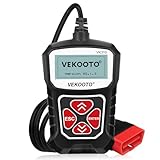
4. VEKOOTO VK310 OBD2 Scanner Diagnostic Tool – Check Engine Code Reader for All OBDII Protocols (CAN/KWP2000/J1850/ISO9141), Live Data, Freeze Frame, I/M Readiness, for 1996+ Cars, SUVs, Light Trucks
Overview:
The VEKOOTO VK310 embraces simplicity as its core philosophy, delivering essential OBD2 diagnostics without complexity. This scanner reads and clears check engine light codes for all 1996+ vehicles while supporting every major protocol including CAN, KWP2000, and J1850. Its plug-and-play design requires no batteries, apps, or Bluetooth pairing—just connect to the OBD2 port for instant operation.
What Makes It Stand Out:
The VK310’s uncompromising simplicity makes it uniquely approachable for absolute beginners intimidated by feature-heavy tools. The 2.5-inch LCD presents clear, straightforward readings without overwhelming menus or configurations. Real-time sensor data including RPM, coolant temperature, and fuel system status appears instantly, while freeze frame data provides context for fault occurrences. The 2.5-foot cable ensures comfortable access to ports in various vehicle locations.
Value for Money:
As one of the most affordable scanners in its class, the VK310 offers remarkable utility for minimal investment. It eliminates diagnostic fees for basic engine issues and provides emissions readiness data for inspection preparation. For users who only need occasional CEL checks, it’s more economical than smartphone apps requiring subscriptions or adapters.
Strengths and Weaknesses:
Pros include extreme ease of use, immediate operation, broad vehicle compatibility, and zero maintenance requirements. Cons are limited to basic engine diagnostics, no advanced features like ABS/SRS support, no data logging, and a small screen that displays minimal information simultaneously.
Bottom Line:
The VK310 is the perfect entry point for drivers wanting simple, reliable check engine light diagnostics without technical complexity. It delivers exactly what most casual users need at an unbeatable price.
5. BlueDriver Bluetooth Pro OBDII Scan Tool for iPhone & Android - No Subscription Fee - OBD2 Car Scanner and Code Reader - Diagnose Check Engine, ABS, SRS, Airbag & 7000+ Issues on Vehicles 1996+

Overview:
The BlueDriver Bluetooth Pro revolutionizes vehicle diagnostics by transforming your smartphone into a professional-grade scan tool. Unlike traditional handheld devices, this system pairs a Bluetooth OBD2 adapter with comprehensive iOS and Android apps to diagnose not just engine codes, but also ABS, SRS, airbag, and TPMS issues across 7,000+ vehicle-specific problems. It supports all 1996+ vehicles without subscription fees.
What Makes It Stand Out:
BlueDriver’s wireless connectivity eliminates cable clutter while providing repair reports with possible causes and fixes—functionality typically reserved for professional shop tools. The app integrates repair videos with step-by-step instructions, creating a complete diagnostic ecosystem. Real-time health monitoring during driving captures intermittent issues that static scans miss. Support for advanced systems like ABS and airbags far exceeds conventional code readers.
Value for Money:
While priced higher than basic scanners, BlueDriver delivers capabilities matching tools costing hundreds more. The absence of subscription fees, unlimited repair reports, and continuous app updates provide exceptional long-term value. For tech-savvy users, it replaces multiple diagnostic devices.
Strengths and Weaknesses:
Pros include comprehensive system coverage, wireless convenience, extensive repair database, video tutorials, and continuous data logging. Cons involve smartphone dependency, potential Bluetooth connectivity issues in certain vehicles, and a learning curve for non-tech users. The higher initial cost may deter casual users.
Bottom Line:
The BlueDriver is the ultimate choice for modern DIYers wanting professional capabilities with smartphone convenience. Its extensive system coverage and repair guidance justify the premium for serious enthusiasts.
6. ANCEL AD410 Enhanced OBD2 Scanner, Vehicle Code Reader for Check Engine Light, Automotive OBD II Scanner Fault Diagnosis, OBDII Scan Tool for All OBDII Cars 1996+, Black/Yellow

Overview: The ANCEL AD410 is an enhanced OBD2 scanner designed for comprehensive engine diagnostics on vehicles manufactured from 1996 onward. Endorsed by popular mechanic YouTuber Scotty Kilmer, this tool plugs directly into your car’s OBDII port, drawing power without needing batteries or charging. It focuses exclusively on engine-related issues, providing a straightforward solution for diagnosing check engine lights and emissions problems.
What Makes It Stand Out: With over 42,000 built-in DTC lookups, the AD410 eliminates time-consuming Google searches for code definitions. Its enhanced diagnostics include O2 sensor and EVAP system testing, helping optimize fuel efficiency and identify emissions leaks. The 2.4-inch TFT true-color display delivers clear results, while the intuitive UI design ensures accessibility for beginners and professionals alike.
Value for Money: Positioned in the mid-range price bracket, the AD410 offers exceptional value through its extensive code library and advanced testing capabilities typically found in more expensive units. The ability to perform smog test readiness checks and reset malfunction indicator lights can save hundreds in diagnostic fees, paying for itself after just one or two uses.
Strengths and Weaknesses: Strengths include wide protocol compatibility across US, EU, and Asian vehicles, robust DTC database, user-friendly interface requiring no manual, and direct OBDII power. The compact design enhances portability. Weaknesses are its limitation to engine systems only (no ABS, SRS, or transmission support) and the relatively small 2.4-inch screen compared to some competitors.
Bottom Line: The ANCEL AD410 is an excellent choice for DIY enthusiasts and home mechanics seeking more than basic code reading without professional-grade expense. Its combination of comprehensive DTC lookups, enhanced diagnostics, and trusted brand endorsement makes it a reliable investment for maintaining vehicle health and passing emissions tests.
7. MOTOPOWER MP69033 Car OBD2 Scanner Code Reader Engine Fault Scanner CAN Diagnostic Scan Tool for All OBD II Protocol Cars Since 1996, Yellow

Overview: The MOTOPOWER MP69033 is a compact, budget-friendly OBD2 scanner that covers essential diagnostic functions for vehicles from 1996 onward. This yellow code reader plugs directly into your car’s OBDII port for power, eliminating battery concerns. It provides fundamental troubleshooting capabilities for check engine lights, making it ideal for casual users seeking basic diagnostic information.
What Makes It Stand Out: The scanner features a relatively large 2.8-inch LCD display with white backlight and contrast adjustment for clear visibility. Its six-button interface includes dedicated quick-query buttons for VIN and DTC codes, streamlining common tasks. The 2.5-foot thick flexible cable provides durability and convenient access to the OBDII port in various vehicle configurations.
Value for Money: As one of the most affordable options in its category, the MP69033 delivers solid basic functionality for the price. It handles code reading, clearing, freeze frame, I/M readiness, and live data streams effectively. For users who only need occasional check engine light diagnostics, this represents significant savings compared to professional scanner rental fees.
Strengths and Weaknesses: Strengths include its low cost, straightforward operation, adequate display size, and self-powered design. The compact form factor with storage-friendly cable length is practical. Weaknesses include unspecified DTC library size (likely smaller than premium models), lack of advanced system tests, and no support for ABS or airbag codes, limiting its scope to basic OBDII functions.
Bottom Line: The MOTOPOWER MP69033 serves as an excellent entry-level scanner for drivers wanting to understand check engine lights without complexity. While it lacks advanced features, its affordability, ease of use, and reliable basic functions make it a smart purchase for occasional DIY diagnostics and pre-smog test checks.
8. BluSon YM319 OBD2 Scanner Diagnostic Tool with Battery Tester, Check Engine Fault Code Reader with Live Data, Cloud Printing, DTC Lookup, Freeze Frame, Scan Tool for All OBDII Protocol Cars Since 1996

Overview: The BluSon YM319 positions itself as your car’s personal doctor, combining traditional OBD2 scanning with innovative battery diagnostics. Compatible with all OBDII protocols from 1996 onward, this tool goes beyond basic code reading to offer continuous battery health monitoring and advanced system testing, making it a comprehensive companion for proactive vehicle maintenance.
What Makes It Stand Out: The exclusive one-click BAT battery diagnostic feature sets this scanner apart, continuously monitoring voltage to prevent unexpected failures. Its cloud printing capability allows generating and sharing professional diagnostic reports without printer connections. With 63,000+ fault codes, customizable F1/F2 shortcut keys, and a 2.4-inch HD color screen, it prioritizes both depth and convenience.
Value for Money: Though priced higher than basic scanners, the YM319 justifies its cost through unique battery testing and cloud connectivity features. The extensive DTC database and live data plotting capabilities offer professional-grade insights. For users managing multiple vehicles or wanting detailed maintenance records, these features translate to significant long-term savings and peace of mind.
Strengths and Weaknesses: Strengths include the innovative battery health monitor, massive 63,000-code library, cloud printing functionality, 13-language support, and efficient shortcut keys. The live data curve recording helps catch intermittent issues. Weaknesses are the smaller 2.4-inch screen size and potentially unnecessary cloud features for casual users who simply need basic code reading.
Bottom Line: The BluSon YM319 is ideal for tech-savvy DIYers and multi-vehicle households wanting battery diagnostics alongside comprehensive scanning. Its modern features and extensive code database make it a forward-thinking investment, though basic users may not utilize its full capabilities. The battery tester alone makes it worth considering.
9. ZMOON ZM201 Professional OBD2 Scanner Diagnostic Tool, Enhanced Check Engine Code Reader with Reset OBDII/EOBD Car Diagnostic Scan Tools for All Vehicles After 1996, 2026 Upgraded

Overview: The ZMOON ZM201 is a professional-grade OBD2 scanner engineered for comprehensive engine diagnostics across vehicles manufactured after 1996 (US), 2002 (EU), and 2008 (Asia). This upgraded 2026 model features a vibrant color display and lifetime free software updates, providing reliable diagnostic capabilities without the complexity of professional shop equipment.
What Makes It Stand Out: The scanner boasts a 2.8-inch color screen with adjustable brightness and light/dark modes, ensuring readability in any environment. Lifetime free updates guarantee long-term compatibility with newer vehicles. Live data stream graphing, freeze frame analysis, and onboard monitoring tests provide deep diagnostic insights typically reserved for more expensive tools.
Value for Money: Offering a compelling balance of features and affordability, the ZM201 delivers professional-level diagnostics at a fraction of dealership scanner costs. The lifetime update policy eliminates future upgrade expenses, while the 50,000+ DTC database helps users avoid unnecessary repair shop visits, quickly recouping the initial investment.
Strengths and Weaknesses: Strengths include the clear color display, lifetime free updates, live data graphing, intuitive UI with shortcut keys, and broad protocol support. The plug-and-play design delivers results in seconds. Weaknesses include engine-only diagnostics (no ABS/SRS support), later compatibility dates for EU/Asian vehicles, and PC printing limited to Windows systems only.
Bottom Line: The ZMOON ZM201 excels for DIY enthusiasts wanting a color display and long-term update support. Its user-friendly interface and comprehensive engine diagnostics make it a reliable choice for home mechanics. The lifetime update commitment ensures this scanner remains useful as vehicles evolve, providing excellent future-proofing value.
10. WEJOWE OBD2 Scanner Diagnostic Tool, Check Engine Code Reader OBD2 Scanner with Reset, Mode 6, Mode 8 & I/M Readiness, Auto Check Engine Light Car Diagnostic Scan Tool for All OBDII Car Since 1996
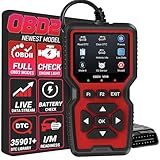
Overview: The WEJOWE OBD2 Scanner is a compact diagnostic tool featuring an impressive built-in library of 35,901 DTCs—substantially more than typical entry-level scanners. Designed for vehicles from 1996 onward, this professional-grade code reader supports Mode 6 and Mode 8 diagnostics, offering detailed fault analysis and convenient data printing capabilities for comprehensive maintenance documentation.
What Makes It Stand Out: Its massive DTC database covers tens of thousands of detailed fault definitions, eliminating online searches and providing precise diagnostic information. The scanner uniquely combines live data replay with printing functionality via PC connection, enabling users to generate physical reports for repair shop negotiations. A canvas storage bag and Type-C cable enhance portability and connectivity.
Value for Money: This mid-range scanner delivers exceptional value through its extensive code library and documentation features. The ability to print diagnostic reports empowers users to challenge unnecessary repair charges. With lifetime free updates and broad 98% vehicle compatibility, it offers professional capabilities without recurring costs, making it financially savvy for regular DIY mechanics.
Strengths and Weaknesses: Strengths include the enormous 35,901 DTC library, Mode 6/8 support, convenient printing function, compact portability with storage bag, and 10-language support. The Type-C connection ensures modern compatibility. Weaknesses include engine system limitations (no ABS/SRS), unspecified display quality (likely not color), and printing requiring PC connection rather than wireless options.
Bottom Line: The WEJOWE scanner is perfect for detail-oriented DIYers wanting comprehensive code definitions and documentation capabilities. Its extensive DTC library and printing features provide ammunition against unfair repair costs. While focused on engine diagnostics, its robust feature set and lifetime updates make it a wise investment for serious home mechanics.
What Is an OBD2 Code Reader and Why Do Beginners Need One?
Understanding the Basics of OBD2 Technology
Every vehicle manufactured for the US market since 1996 contains an On-Board Diagnostics II (OBD2) system—a standardized computer network that monitors your engine, transmission, and emissions systems. This universal protocol means that a single device can communicate with virtually any modern vehicle, reading sensor data and diagnostic trouble codes when something goes wrong. For beginners, this standardization eliminates guesswork and provides a consistent learning curve regardless of your car’s make or model.
How Budget Scanners Democratize Car Diagnostics
Before affordable OBD2 scanners, understanding your vehicle’s issues required either expensive professional equipment or blind trust in mechanic recommendations. Budget scanners have leveled the playing field, giving you the vocabulary to discuss repairs intelligently and the ability to distinguish between critical problems and minor issues. This empowerment helps prevent unnecessary service visits while ensuring you don’t ignore genuinely serious warnings that could lead to costly damage.
Key Features to Look for in Sub-$50 OBD2 Scanners
Basic Code Reading and Clearing Capabilities
At minimum, any scanner worth your money must read generic diagnostic trouble codes and clear them after repairs. This fundamental function allows you to identify why your check engine light activated and verify that your fix resolved the issue. Look for models that display both the alphanumeric code (like P0420) and a plain-English description, as this eliminates the need to constantly reference separate databases or manuals while you’re learning.
Live Data Streaming Essentials
Even budget models now offer basic live data streaming, displaying real-time information from sensors like oxygen levels, engine temperature, and RPM. This feature proves invaluable for diagnosing intermittent issues and understanding how different components interact while your vehicle runs. For beginners, watching these values change during a test drive provides hands-on education about your car’s operation that static code reading simply can’t match.
Compatibility with Your Vehicle
While OBD2 standardized the connection interface, not all scanners support every protocol or vehicle type. Confirm that any device you’re considering explicitly supports your car’s year, make, and model. Most budget scanners work with all OBD2-compliant vehicles (1996 and newer), but some struggle with hybrid systems, certain European models, or manufacturer-specific protocols. Checking compatibility before purchasing saves the frustration of a non-functional device.
Display Quality and User Interface
A scanner’s usefulness depends heavily on how easily you can interpret its information. Seek models with backlit displays that remain readable in direct sunlight and dim garage conditions. The menu navigation should feel intuitive, with clear icons and logical organization that doesn’t require constant manual consultation. For Bluetooth models, the companion app’s design matters equally—cluttered interfaces with poor translations can make simple diagnostics needlessly complicated.
Build Quality and Durability
Budget doesn’t have to mean flimsy. Quality entry-level scanners feature robust housing that survives drops from dashboard height and connectors that withstand repeated plugging and unplugging. The OBD2 port location often requires awkward angles and forceful insertion, so weak plastic casings crack easily. While you shouldn’t expect professional-grade armor, solid construction ensures your investment lasts beyond a few uses.
Update Frequency and Software Support
Automotive technology evolves constantly, and your scanner’s software needs to keep pace. Many budget models offer free lifetime updates, while others charge fees or abandon support after a year. Regular updates expand vehicle coverage, fix bugs, and occasionally add features. Before buying, investigate the manufacturer’s update policy and verify that they maintain an active support website—abandoned products quickly become obsolete as new vehicle models release.
Connectivity Options: Bluetooth vs. Wired
Wired handheld units plug directly into your OBD2 port and display information on a built-in screen, offering simplicity and independence from smartphones. Bluetooth dongles connect to your phone, providing larger displays and more sophisticated apps but requiring you to manage two devices. Your choice depends on whether you prefer standalone convenience or the enhanced visualization that smartphone apps provide.
Types of Budget OBD2 Scanners for Beginners
Standalone Handheld Units
These self-contained devices feature integrated screens and keypads, operating entirely independently of other electronics. For beginners intimidated by smartphone apps or those wanting a dedicated tool that lives in their glovebox, handheld units offer simplicity and reliability. They turn on automatically when plugged in and provide immediate feedback without pairing processes or battery concerns.
Bluetooth Dongles for Smartphone Integration
Tiny adapters that plug into your OBD2 port and transmit data to smartphone apps, Bluetooth dongles leverage your phone’s processing power and display. This approach delivers more sophisticated graphs, data logging, and internet-based code lookups than standalone units can offer. The trade-off involves managing app compatibility, dealing with occasional connectivity drops, and ensuring your phone remains charged during extended diagnostics.
Wi-Fi Enabled Adapters
Similar to Bluetooth models but creating their own wireless network, Wi-Fi adapters sometimes offer more stable connections and faster data transmission. They prove particularly useful for users who want to maintain internet access while scanning, as Bluetooth can interfere with cellular data on some devices. However, they typically consume more power and may drain your vehicle’s battery if left plugged in during long periods of inactivity.
App-Dependent Models
Some budget scanners ship as hardware that only functions with a specific proprietary app. While this locked ecosystem can provide optimized performance and unique features, it also creates dependency on the developer’s continued support. If the company abandons the app or fails to update it for new phone operating systems, your hardware becomes useless. Consider the developer’s reputation and track record before committing to these closed systems.
Understanding OBD2 Protocols and Vehicle Compatibility
The Five Main OBD2 Protocols Explained
Vehicles communicate using one of five primary protocols: ISO 9141-2, KWP2000, J1850 PWM, J1850 VPW, and CAN (Controller Area Network). Since 2008, all vehicles use CAN, but older models may employ any of the others. Quality budget scanners automatically detect and adapt to whichever protocol your vehicle uses, but some ultra-cheap models only support CAN, rendering them useless for pre-2008 cars. Verify multi-protocol support before purchasing.
Checking Your Vehicle’s OBD2 Compliance Year
While the 1996 mandate standardized OBD2 in the US, some vehicles phased it in gradually. A small number of 1995 models are OBD2 compliant, while certain 1996 vehicles still use older systems. Check your under-hood emissions label, which explicitly states OBD2 compliance if present. For complete certainty, consult your owner’s manual or verify with your manufacturer using your VIN before buying any scanner.
Regional Variations and What They Mean for You
European OBD (EOBD) and Japanese OBD (JOBD) standards closely mirror US OBD2 but include subtle differences. If you own an imported vehicle or purchased your car overseas, confirm that your chosen scanner supports these regional variants. Most modern budget scanners handle all three standards automatically, but some basic models only support the US protocol, potentially limiting functionality on certain imports.
Essential Functions Every Beginner Should Master
Reading Diagnostic Trouble Codes (DTCs)
Learning to retrieve codes marks your first step into vehicle diagnostics. After connecting your scanner and initiating a scan, the device communicates with your car’s computers and retrieves stored fault codes. Each code follows a standardized format: the first letter indicates the system (P for powertrain, B for body, C for chassis, U for network), while numbers specify the exact issue. Understanding this structure helps you categorize problems before researching specific solutions.
Clearing Codes and Resetting Check Engine Lights
Once you’ve addressed an issue, clearing the code resets your check engine light and allows you to verify the repair. However, this function requires responsibility—simply erasing codes without fixing underlying problems causes the light to return, often within minutes or miles. Additionally, clearing codes also resets readiness monitors, which can cause your vehicle to fail emissions testing until it completes sufficient drive cycles to retest all systems.
Interpreting Code Severity Levels
Not all check engine lights indicate catastrophic failure. Codes related to emissions systems (like loose gas caps) often allow continued driving, while misfire or overheating codes demand immediate attention. Learn to differentiate between pending codes (intermittent issues that haven’t recurred enough to trigger the light) and confirmed codes (active problems requiring action). This judgment helps you prioritize repairs and avoid panic over minor issues.
When to Seek Professional Help
Budget scanners have limits. When you encounter manufacturer-specific codes your device can’t interpret, multiple interrelated codes suggesting complex failures, or codes that return immediately after clearing, professional diagnostics become necessary. Consider your scanner a communication tool that informs conversations with mechanics rather than a replacement for their expertise. Knowing when you’ve reached your tool’s limits prevents wasted time and potential safety risks.
Advanced Features You Might Find in Budget Models
Smog Check and Emissions Readiness
Many sub-$50 scanners now include emissions readiness monitoring, indicating whether your vehicle’s systems have completed self-tests and are ready for inspection. This feature proves invaluable before emissions testing, as it prevents wasted trips to inspection stations when your car hasn’t finished its drive cycle monitoring. The scanner displays which monitors (catalyst, oxygen sensor, EGR, etc.) have completed, giving you confidence before official testing.
Freeze Frame Data Analysis
When your vehicle triggers a code, it captures a snapshot of sensor data at that exact moment—this freeze frame data provides context about conditions during the failure. Budget scanners increasingly include this feature, showing you engine temperature, vehicle speed, RPM, and other parameters when the code activated. This information helps distinguish between problems that only occur under specific conditions and those that persist constantly.
Limited Live Sensor Data
While professional scanners display dozens of live data parameters, budget models typically offer 15-20 essential sensors. You can monitor oxygen sensor voltages, fuel trim percentages, coolant temperature, and mass airflow readings in real-time. For beginners, this curated selection prevents information overload while still providing enough data to identify trends and spot anomalies during test drives or idle observation.
Vehicle Information Retrieval
Beyond diagnostics, OBD2 scanners can read your vehicle identification number (VIN), calibration IDs, and ECU information directly from the computer. This function proves surprisingly useful when verifying parts compatibility, documenting your vehicle’s exact specifications, or confirming that replacement computers have proper programming. It’s a simple feature that adds unexpected utility to budget devices.
Smartphone App Integration: What to Expect
Free vs. Paid App Features
Bluetooth scanners rely on apps, which typically follow a freemium model. Free versions usually include basic code reading, clearing, and limited live data. Paid upgrades unlock enhanced features like expanded code definitions, data logging, custom dashboards, and advanced graphing. For beginners, free versions often suffice initially, but factor potential upgrade costs into your total investment when comparing scanner prices.
iOS and Android Compatibility Considerations
Not all Bluetooth scanners work seamlessly with both platforms. iOS’s stricter Bluetooth protocols mean some Android-specific dongles won’t pair with iPhones, while certain iOS apps lack features available on Android. Verify explicit compatibility with your specific phone model and operating system version before purchasing. Reading recent app reviews reveals current compatibility issues that product descriptions might obscure.
App User Experience for Beginners
The best OBD2 apps for newcomers prioritize simplicity over overwhelming data dumps. Look for apps with clear navigation, helpful tutorials, and intuitive code explanations. Features like “likely fix” suggestions, repair cost estimates, and integrated maintenance reminders transform raw data into actionable guidance. Avoid apps with poor translations, confusing layouts, or excessive advertisements that hinder functionality.
Data Logging and Export Capabilities
Some apps allow you to record diagnostic sessions and export data for sharing with mechanics or online forums. This capability proves invaluable when dealing with intermittent issues that don’t trigger codes consistently. You can log hours of sensor data during normal driving, then review it later to spot anomalies or share the file with experts who can identify subtle problems your beginner’s eye might miss.
Common Limitations of Budget OBD2 Scanners
Bi-Directional Control Absence
Budget scanners read information but cannot send commands to vehicle systems. Professional tools can activate components for testing—like running fuel pump priming sequences or cycling ABS solenoids. This limitation means your sub-$50 scanner identifies problems but can’t perform active component testing. You’ll need to verify repairs through observation and road testing rather than commanded activation.
Advanced Manufacturer-Specific Codes
While OBD2 standardized generic codes (P0xxx), manufacturers maintain proprietary code sets (P1xxx) that provide more specific diagnostic information. Budget scanners often lack comprehensive databases for these manufacturer-specific codes, displaying them without definitions or with vague explanations. This gap sometimes necessitates internet searches or professional consultation for complete understanding, especially on newer or less common vehicles.
Programming and Coding Restrictions
Modern vehicles require module programming when replacing certain components—like registering new batteries to the charging system or coding replacement modules. Budget scanners cannot perform these functions, which require manufacturer-specific software and security access. If your repair plans involve component replacement beyond simple bolt-on parts, factor professional programming costs into your budget.
Professional-Level Diagnostics
Transmission, ABS, airbag, and other supplemental systems use separate computers that budget scanners may not access. Your sub-$50 tool excels at engine and emissions diagnostics but might ignore critical systems. Understanding this boundary prevents frustration when your scanner shows no codes despite obvious transmission or braking issues that require professional-grade equipment to diagnose.
Making Your Final Decision: A Buyer’s Checklist
Assessing Your Technical Comfort Level
Be honest about your technical aptitude. If smartphone apps intimidate you, a standalone handheld unit eliminates that learning curve. Conversely, if you enjoy technology and want rich visualizations, a Bluetooth dongle with a polished app better suits your style. Your scanner should reduce diagnostic anxiety, not add technological frustration to an already stressful situation involving car problems.
Defining Your Diagnostic Needs
Consider your primary use case. Are you simply curious about why your check engine light activates occasionally? Do you plan to perform your own repairs? Are you buying a used car and want to check for hidden issues? A basic code reader satisfies curiosity, while models with live data better support active troubleshooting. Match features to your actual intentions rather than buying capabilities you’ll never use.
Future-Proofing Your Purchase
While staying under $50, consider your future vehicle plans. If you’ll likely upgrade to a newer car soon, ensure your scanner supports the latest protocols and receives regular updates. If you maintain multiple family vehicles, confirm compatibility across all makes and models. A slightly more expensive scanner that covers your next vehicle saves money compared to buying a second tool later.
Warranty and Return Policy Importance
Even budget electronics can fail, and OBD2 connectors endure mechanical stress. Reputable manufacturers stand behind sub-$50 scanners with at least one-year warranties and responsive customer support. Generous return policies allow you to test compatibility with your specific vehicle risk-free. Factor these support structures into your decision—saving five dollars on a no-name brand loses its appeal when you need help and find no support channel.
Getting Started with Your First OBD2 Scanner
Physical Setup and Connection Process
Locating your OBD2 port represents the first challenge—it’s typically under the dashboard near the steering column, sometimes behind a small cover. With the ignition off, firmly plug the scanner into the 16-pin connector until it clicks. For Bluetooth models, pair the device with your phone before starting your vehicle. For handheld units, simply turn the ignition to the “on” position (without starting the engine) to power the scanner through the port.
Navigating Your First Scan
Once connected, navigate to “Read Codes” or “Scan” on your device. The scanner communicates with your vehicle’s computers for 30-60 seconds, retrieving all stored and pending codes. Don’t be alarmed if you see multiple codes—some may be historical or related to a single root cause. Write down all codes before clearing anything, as this list provides crucial diagnostic direction.
Understanding Your First Codes
Start with the code having the lowest number (like P0101 before P0420), as this often represents the primary failure that triggered subsequent codes. Research each code’s meaning using your scanner’s definitions, the vehicle’s service manual, and reputable online resources. Focus on understanding whether the issue affects safety, emissions, performance, or is merely informational before planning any repairs.
Best Practices for Ongoing Maintenance
Keep your scanner in your vehicle for roadside diagnostics and periodic health checks. Run a scan monthly even when no warning lights appear to catch pending codes before they become problems. Always scan before long trips to avoid breakdowns far from home. Document codes and repairs in a logbook to track your vehicle’s health history and identify recurring patterns that might indicate deeper issues.
Frequently Asked Questions
What vehicles will a budget OBD2 scanner work with?
Any scanner worth purchasing works with all OBD2-compliant vehicles, which includes most cars and light trucks sold in the US from 1996 onward. However, you should verify compatibility with your specific year, make, and model before buying, especially for hybrids, diesels, or certain European imports that may use modified protocols.
Can a sub-$50 scanner really be accurate?
Yes, for basic engine and emissions diagnostics. These devices read the same standardized codes and sensor data that professional scanners access. The primary differences involve speed, advanced system coverage, and bi-directional controls—not basic accuracy. For identifying why your check engine light is on, budget scanners provide completely reliable information.
Will using a scanner void my vehicle warranty?
Absolutely not. Federal law (the Magnuson-Moss Warranty Act) prohibits manufacturers from voiding warranties simply because you read diagnostic codes. In fact, many dealerships and mechanics appreciate when you arrive with code information, as it streamlines their diagnostic process. Just avoid modifying ECU programming or attempting repairs beyond your skill level.
How often should I scan my vehicle?
Scan monthly as preventive maintenance, even without warning lights. Always scan immediately when the check engine light illuminates. Additionally, scan before purchasing any used vehicle, before emissions testing, and after any repair to confirm the issue resolved. This routine helps you understand your vehicle’s normal behavior and catch problems early.
What’s the difference between generic and manufacturer-specific codes?
Generic codes (P0xxx) are standardized across all vehicles and indicate general system failures. Manufacturer-specific codes (P1xxx) provide detailed information about exact components and conditions. Budget scanners read both but often lack complete definitions for manufacturer codes, sometimes displaying them without explanations that require separate research.
Can I leave my Bluetooth scanner plugged in all the time?
While possible, it’s not recommended. The scanner draws minimal power but can drain your battery if the vehicle sits unused for weeks. More importantly, leaving it connected exposes it to temperature extremes and potential theft. Remove it after each diagnostic session and store it in your glovebox for longevity and security.
Why does my scanner show codes after I cleared them?
Some codes indicate persistent problems that return immediately because the fault remains active. Others require specific drive cycles to retest systems before clearing completely. If codes return within a few drive cycles, the underlying issue wasn’t resolved—clearing only resets the light temporarily. Persistent codes demand actual repair, not repeated clearing.
Do I need internet access to use an OBD2 scanner?
Standalone handheld units work completely offline. Bluetooth scanners require internet only for initial app downloads and updates—basic scanning functions work without connectivity. However, internet access greatly enhances the experience by providing detailed code definitions, repair videos, and forum advice that transform raw codes into actionable solutions.
What’s the learning curve for beginners?
Most users can perform their first successful scan within 15 minutes of unboxing. Interpreting codes and understanding sensor data requires several hours of study and practice. The steepest learning curve involves correlating multiple codes and understanding when professional help is needed. Fortunately, countless online resources and communities support beginners through their first diagnostic experiences.
Are there any hidden costs with budget scanners?
The scanner itself represents your primary expense. Potential additional costs include app upgrades ($5-20), replacement cables, or professional interpretation if you encounter complex issues. Some manufacturers charge for software updates after the first year. Read the fine print about update policies and factor any mandatory subscription costs into your total ownership calculation before purchasing.
See Also
- 10 Best Budget OBD2 Code Readers Under $100 for Beginners in 2026
- 10 Best OBD2 Code Readers for Beginners Learning Auto Repair
- Best OBD2 Code Readers for Beginners: 10 Expert Picks for 2026
- How to Choose the 10 Best OBD2 Code Readers for Beginners in 2026
- Top 10 Best OBD2 Code Readers for DIY Mechanics in 2026