Table of Contents
Ever stared helplessly at that ominous Check Engine Light glowing on your dashboard, feeling completely out of your depth? You’re not alone. For beginners diving into the world of car maintenance, that little warning symbol can trigger a wave of anxiety and expensive mechanic visits. But what if you could unlock the secrets your car is trying to tell you, right from your driveway? Understanding the basics of On-Board Diagnostics, specifically the OBD2 system mandated in all vehicles since 1996, is the first crucial step towards taking control of your vehicle’s health and saving significant time and money. It transforms you from a passive owner into an informed participant in your car’s care.
Think of an OBD2 scanner as your personal automotive translator. It bridges the communication gap between your vehicle’s complex computer systems and you, the driver. Instead of guessing what’s wrong or relying solely on a professional’s diagnosis (which is still vital for complex repairs), a scanner provides concrete data – diagnostic trouble codes (DTCs) – that pinpoint specific issues. For someone just starting their car maintenance journey, this tool demystifies problems, builds foundational knowledge, and empowers you to make smarter decisions about when a simple fix is possible yourself and when it’s truly time to call in the experts. Choosing the right scanner, however, is key to ensuring this experience is helpful, not overwhelming.
Top 10 OBD2 Scanners for Beginners
Detailed Product Reviews
1. MOTOPOWER MP69033 Car OBD2 Scanner Code Reader Engine Fault Scanner CAN Diagnostic Scan Tool for All OBD II Protocol Cars Since 1996, Yellow

Overview:
This entry-level OBD2 scanner offers essential diagnostics for post-1996 vehicles. It reads and clears engine fault codes, displays live data, and checks emissions readiness via a 2.8" LCD screen. Powered directly through the OBD port, it requires no external battery.
What Makes It Stand Out:
Its compact design, 2.5-foot cable, and built-in DTC lookup library (covering basic codes) simplify DIY troubleshooting. Supporting 9 protocols and 6 languages, it handles most OBD2-compliant cars globally. The real-time curve graphing for sensor data is rare at this price point.
Value for Money:
At a budget-friendly price, it outperforms ultra-cheap scanners with reliable code clearing and freeze frame viewing. While lacking advanced features like ABS diagnostics, it’s ideal for cost-conscious owners needing core engine diagnostics without app dependencies.
Strengths and Weaknesses:
Strengths: No batteries needed; intuitive button navigation; robust cable; accurate code reading for engine issues.
Weaknesses: Cannot read ABS/airbag codes; limited DTC definitions compared to premium models; no data printing or PC connectivity.
Bottom Line:
A no-frills, dependable tool for basic engine diagnostics. Perfect for beginners tackling check-engine lights but insufficient for complex multi-system issues. Highly recommended for its simplicity and value.
2. OBD2 Scanner Diagnostic Tool, Check Engine Code Reader OBD2 Scanner with Reset, Mode 6, Mode 8 & I/M Readiness, Auto Check Engine Light Car Diagnostic Scan Tool for All OBDII Car Since 1996

Overview:
This professional-grade scanner excels with an extensive 35,901 DTC library, covering nuanced fault codes most tools miss. It reads/clears codes, checks I/M readiness, and offers live data streaming for post-1996 vehicles across 10 languages.
What Makes It Stand Out:
The massive DTC database eliminates online code searches, while Mode 6/8 testing and PC connectivity for printable reports empower users to challenge repair shop diagnoses. Lifetime free upgrades and a canvas storage bag add long-term value.
Value for Money:
Priced moderately higher than basic scanners, it justifies cost through comprehensive diagnostics and money-saving features like data printing. The 98% vehicle compatibility and multilingual support make it a versatile investment for frequent users.
Strengths and Weaknesses:
Strengths: Unmatched DTC coverage; data printing; 10-language support; compact and portable.
Weaknesses: Setup for PC printing may confuse beginners; no ABS/SRS diagnostics; cable length not specified.
Bottom Line:
A top choice for enthusiasts seeking detailed diagnostics without professional tools. Its reporting capabilities and expansive database offer exceptional ROI for proactive vehicle maintenance. Highly recommended.
3. VDIAGTOOL VD10 OBD2 Scanner Code Reader Car Diagnostic Tool Engine Fault Code Reader for Turn Off CEL with Freeze Frame/I/M Readiness for All OBDII Protocol Cars, OBD2 Scanner Diagnostic Tool

Overview:
Designed for DIYers, this scanner delivers straightforward engine diagnostics via a color TFT screen. It reads/clears codes (including manufacturer-specific DTCs), shows live sensor data, and checks emissions readiness for OBD2 vehicles since 1996.
What Makes It Stand Out:
Its plug-and-play simplicity—no app or Bluetooth—makes it accessible to novices. The 3,000+ built-in DTC definitions display instantly, while freeze frame analysis aids in diagnosing intermittent issues. The focus on user-friendliness mirrors popular subscription-based tools.
Value for Money:
Competitively priced, it offers core professional features (freeze frame, I/M readiness) absent in cheaper scanners. Though less advanced than high-end models, it balances cost and capability for occasional home mechanics.
Strengths and Weaknesses:
Strengths: Intuitive interface; instant DTC definitions; freeze frame retrieval; reliable code clearing.
Weaknesses: Limited to engine diagnostics (no ABS/transmission); smaller DTC library than rivals; no PC connectivity.
Bottom Line:
An excellent starter tool for non-mechanics tackling check-engine lights. Its simplicity and accurate diagnostics justify the price, though enthusiasts may outgrow it. Strongly recommended for casual use.
4. VEKOOTO VK310 OBD2 Scanner Diagnostic Tool – Check Engine Code Reader for All OBDII Protocols (CAN/KWP2000/J1850/ISO9141), Live Data, Freeze Frame, I/M Readiness, for 1996+ Cars, SUVs, Light Trucks
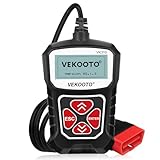
Overview:
This no-nonsense scanner supports all OBDII protocols (including CAN) for universal 1996+ vehicle compatibility. It reads/clears codes, displays live data, and checks emissions readiness via a 2.5" LCD, requiring zero setup or power sources beyond the OBD port.
What Makes It Stand Out:
True plug-and-play operation—no app, Bluetooth, or batteries—makes it ideal for quick diagnostics. The clear live data display (RPM, coolant temp, etc.) and I/M readiness checks ensure smog test readiness without complications.
Value for Money:
As one of the most affordable comprehensive scanners, it outperforms app-dependent alternatives. Its rugged build and immediate functionality deliver unmatched convenience for basic diagnostics at a minimal cost.
Strengths and Weaknesses:
Strengths: Universally compatible; zero learning curve; durable; real-time data clarity.
Weaknesses: No DTC definitions display; limited to engine diagnostics; basic monochrome screen.
Bottom Line:
The ultimate “grab-and-go” tool for instant check-engine light resolution. While lacking advanced features, its reliability and simplicity make it a must-have for every glovebox. Best value for basic needs.
5. ANCEL AD410 Enhanced OBD2 Scanner, Vehicle Code Reader for Check Engine Light, Automotive OBD II Scanner Fault Diagnosis, OBDII Scan Tool for All OBDII Cars 1996+, Black/Yellow

Overview:
A premium scanner trusted by experts like Scotty Kilmer, the AD410 features a 2.4" color display and advanced diagnostics for OBD2 vehicles. It reads/clears codes (with 42,000 DTCs), tests EVAP/O2 systems, and checks emissions readiness.
What Makes It Stand Out:
Enhanced diagnostics like EVAP leak tests and O2 sensor monitoring optimize fuel efficiency and reduce emissions—features rare below $100. The QVGA display and multilingual UI cater to global users, while YouTube endorsements bolster credibility.
Value for Money:
Priced higher than basics, it justifies cost through professional-grade diagnostics that prevent costly repairs. EVAP/O2 testing alone can save hundreds in fuel and emissions fines, making it a savvy long-term investment.
Strengths and Weaknesses:
Strengths: EVAP/O2 system testing; expansive DTC library; intuitive color UI; smog-test readiness checks.
Weaknesses: No ABS/SRS support; cannot clear codes without fixing underlying issues; USB cable only for updates.
Bottom Line:
The standout choice for serious DIYers prioritizing engine health and efficiency. Its specialized tests and expert approval deliver unparalleled value for proactive maintenance. Highly recommended for committed owners.
6. BlueDriver Bluetooth Pro OBDII Scan Tool for iPhone & Android - No Subscription Fee - OBD2 Car Scanner and Code Reader - Diagnose Check Engine, ABS, SRS, Airbag & 7000+ Issues on Vehicles 1996+

Overview:
The BlueDriver Bluetooth Pro is a wireless OBD2 scanner that connects to smartphones via Bluetooth, enabling comprehensive vehicle diagnostics for Check Engine, ABS, SRS, and 7,000+ issues on 1996+ vehicles. It eliminates subscription fees, positioning itself as a professional-grade tool for DIYers.
What Makes It Stand Out:
Its standout feature is extensive system coverage beyond basic engine codes, including ABS, airbag, and TPMS diagnostics—rare in consumer tools. The app delivers unlimited repair reports with step-by-step fixes and links to repair videos, transforming complex codes into actionable insights. Wireless convenience and live data streaming during drives further enhance usability.
Value for Money:
Priced higher than entry-level scanners, it justifies cost through no recurring fees and broad diagnostic capabilities typically reserved for mechanics. Alternatives like basic code readers lack ABS/SRS support, while subscription-based apps become costly long-term. This is a one-time investment for serious DIYers.
Strengths and Weaknesses:
Strengths: Comprehensive system coverage; intuitive app with repair guidance; no subscriptions; robust live data; cross-platform (iOS/Android).
Weaknesses: Requires smartphone dependency; initial pairing can be finicky; limited to Bluetooth-enabled devices.
Bottom Line:
Ideal for tech-savvy owners needing professional-level diagnostics without subscriptions. Its depth and repair resources make it worth the premium over basic scanners for thorough vehicle health management.
7. FOXWELL NT301 OBD2 Scanner Live Data Professional Mechanic OBDII Diagnostic Code Reader Tool for Check Engine Light

Overview:
The FOXWELL NT301 is a wired OBD2 scanner targeting DIYers and mechanics for reading/clearing engine codes and live data on 1996+ US and 2000+ global vehicles. It emphasizes ease of use for emissions testing and basic diagnostics but lacks advanced system support.
What Makes It Stand Out:
Its live data graphing and logging provide visual trend analysis for sensors, aiding in pinpointing intermittent issues. The I/M readiness status LEDs simplify emissions test prep, while plug-and-play operation requires no app or phone. It’s a streamlined tool for core engine diagnostics.
Value for Money:
An affordable mid-tier option ($50–$70), it outperforms ultra-budget scanners with reliable code reading and graphing. However, it’s less valuable than Bluetooth tools like BlueDriver for those needing ABS/SRS diagnostics. Best for users focused solely on engine light resolution and emissions checks.
Strengths and Weaknesses:
Strengths: Clear live data visualization; simple interface; no smartphone dependency; effective for emissions readiness; durable build.
Weaknesses: Wired connection limits mobility; no ABS/SRS/transmission support; incompatible with some newer protocols; limited repair guidance.
Bottom Line:
A solid choice for budget-conscious users needing reliable engine diagnostics and emissions checks, but avoid if ABS/SRS diagnostics or wireless convenience are priorities. Stick to basic engine issues.
8. ANCEL AD310 OBD2 Scanner Guide for Beginners & Car Owners: How to Read & Clear Engine Codes, Diagnose Check Engine Lights on 1996+ OBD2 Vehicles

Overview:
The ANCEL AD310 is a no-frills, entry-level OBD2 scanner designed explicitly for beginners. It focuses solely on reading and clearing engine fault codes for 1996+ vehicles, prioritizing simplicity over advanced features.
What Makes It Stand Out:
Its standout trait is extreme user-friendliness: a straightforward menu system and clear display make it accessible for novices with zero technical knowledge. The compact size and plug-and-play operation require no apps or setup, ideal for quick check-engine light checks.
Value for Money:
At $30–$40, it’s one of the most affordable scanners. While lacking live data or system coverage beyond engine codes, it delivers exceptional value for casual users needing only basic code reading/clearing—far cheaper than tools with unused features.
Strengths and Weaknesses:
Strengths: Very low cost; effortless operation; reliable for basic code reading/clearing; portable; no phone/app required.
Weaknesses: No live data or system diagnostics (ABS/SRS); no repair guidance; outdated interface; limited vehicle compatibility details.
Bottom Line:
Perfect for absolute beginners or occasional users needing a cheap, simple code reader. Not suitable for diagnostics beyond the check engine light—opt for pricier tools if deeper analysis is required.
9. FIXD Bluetooth OBD2 Scanner for iPhone & Android - Diagnostic Scan Tool for Repairs and Car Buying - Check Engine Code Reader & Enhanced Codes - (1 Pack w/Free 14-Day FIXD Premium Bundle)

Overview:
FIXD is a Bluetooth OBD2 sensor paired with a smartphone app, translating complex codes into plain-English explanations. It targets everyday drivers for diagnostics, maintenance tracking, and pre-purchase checks on 1996+ gasoline/hybrid and 2006+ diesel vehicles.
What Makes It Stand Out:
The app’s strength is intuitive problem interpretation—replacing cryptic codes with actionable alerts (e.g., “Catalytic Converter Failing”). The 14-day Premium trial offers repair cost estimates and mechanic support, while multi-vehicle management and maintenance reminders add long-term utility.
Value for Money:
Priced modestly ($30–$50), the free app and trial Premium features deliver outsized value. It’s cheaper than subscription tools long-term but less powerful than BlueDriver for deep diagnostics. Best for users prioritizing simplicity over pro-level data.
Strengths and Weaknesses:
Strengths: Exceptional code explanations; maintenance tracking; multi-vehicle support; compact always-plugged sensor; free app.
Weaknesses: Limited live data depth; Premium features require subscription post-trial; no ABS/SRS diagnostics; Bluetooth range limitations.
Bottom Line:
Highly recommended for beginners seeking hassle-free diagnostics and maintenance help. Avoid if you need advanced system scans—this excels at making car health understandable, not professional repairs.
10. MOTOPOWER MP69033 Pro OBD2 Scanner Code Reader Check Engine Fault Light Diagnostic Scan Tool with Battery Tester

Overview:
The MOTOPOWER MP69033 merges OBD2 diagnostics with a built-in battery/alternator tester in a standalone handheld unit. It covers engine codes, live data, and electrical system health for 1996+ global vehicles, targeting DIYers and mechanics.
What Makes It Stand Out:
Its dual functionality as a battery tester is unique in this segment, diagnosing voltage, starting performance, and alternator ripple. The 2.8-inch color screen, 6x faster processing, and 8-language support enhance usability without smartphone dependency—ideal for garage use.
Value for Money:
At $60–$80, it competes with mid-range scanners while adding critical battery diagnostics. Alternatives like FOXWELL lack electrical testing, and Bluetooth tools require phones. This justifies cost for users needing comprehensive electrical + engine checks in one device.
Strengths and Weaknesses:
Strengths: Integrated battery/alternator testing; fast color screen; no app/phone needed; multi-language; extended cable for tight spaces.
Weaknesses: Bulky design; no ABS/SRS support; live data less detailed than Bluetooth tools; battery test accuracy varies with temperature.
Bottom Line:
A top pick for those prioritizing electrical system health alongside engine diagnostics. Its all-in-one capability and standalone operation offer strong value, though Bluetooth enthusiasts may prefer app-based alternatives.
Understanding OBD2 and Why It Matters for New Mechanics
What Exactly is OBD2 and How Does It Work?
OBD2 (On-Board Diagnostics, Second Generation) is a standardized system built into every car and light truck sold in the US since 1996. Its primary purpose is emissions monitoring, but it evolved into a comprehensive diagnostic network. Essentially, your vehicle’s numerous computers (ECUs) constantly monitor sensors and critical systems. When something operates outside predefined parameters, the system logs a specific Diagnostic Trouble Code (DTC) and often triggers a dashboard warning light. The OBD2 port, usually located under the driver’s dash, is the universal access point for retrieving these codes and other real-time data.
The Core Benefits for the DIY Enthusiast
For beginners, the value of OBD2 scanning extends far beyond just reading the Check Engine Light. It provides immediate insight into potential issues before they escalate into major, costly repairs. Understanding the basic codes helps you communicate more effectively with mechanics, avoiding unnecessary diagnostics fees and potential upselling. More importantly, it serves as an incredible hands-on learning tool. Seeing how specific problems (like a loose gas cap) manifest as specific codes builds practical automotive knowledge in a way manuals alone cannot. It turns abstract concepts into tangible data you can interact with.
Debunking Common Beginner Myths
Many newcomers believe OBD2 scanners are only for professionals or that they can magically fix any problem. Neither is true. While professional-grade tools exist, affordable scanners designed for consumers provide immense value for diagnosis, not repair. Another myth is that scanners can cause harm; reading codes is entirely passive and safe. Worrying that scanning might void a warranty is also unfounded – manufacturers designed the system for access. Understanding these realities removes unnecessary fear and sets realistic expectations for your learning journey.
Essential Features to Prioritize as a New User
Diagnostic Depth: Basic Code Reading vs. Advanced Capabilities
The absolute minimum capability you need is the ability to read and clear standard OBD2 codes (P0xxx, P2xxx, etc.). This solves the most common beginner need: deciphering the Check Engine Light. However, consider if “freeze frame data” is important – this captures the exact engine conditions (RPM, speed, temperature) when the code was set, providing crucial context. While advanced bi-directional controls (like activating components) are powerful, they are generally overkill and potentially risky for true beginners; stick to read/clear functionality initially.
Interface and Ease of Use: Your Biggest Success Factor
This is paramount for beginners. A scanner with a tiny, confusing screen or cryptic menus will quickly end up in a drawer. Prioritize large, clear displays with intuitive navigation. Simple, well-labeled buttons are preferable to complex touchscreen interfaces that might be fiddly under the dash. Consider the physical ergonomics – is it comfortable to hold while you look at your car? Avoid tools requiring extensive setup or complicated software installations on your phone for basic functions. Your first scanner should feel effortless to connect and use.
Connectivity Options: Wired, Wireless, or Smartphone App?
Handheld scanners with direct wired connections to the OBD2 port are often the most beginner-friendly. They are self-contained, reliable, and don’t drain your phone battery. Bluetooth or Wi-Fi adapters that pair with smartphone apps offer larger screens and potentially more data visualization but introduce dependency on your phone, app reliability, and battery life. For absolute simplicity and reliability when starting out, a dedicated handheld unit often wins, though a well-reviewed app-based system can work if the app is exceptionally user-friendly.
Must-Have Beginner-Friendly Features
Look for features that actively support learning. Built-in code definitions explaining what common DTCs actually mean in plain language are invaluable. A simple, clear help section or quick-start guide is essential. Long battery life (or the ability to run directly from the car’s port) prevents frustration. Compatibility with all OBD2 protocols (there are several) ensures it works with your specific vehicle – most modern scanners do, but it’s worth confirming. Avoid scanners overloaded with features you won’t understand or use yet.
Navigating Physical Design and Practical Considerations
Portability and Durability for Home Garage Use
Your scanner will likely live in your glove compartment or toolbox. Consider its size and weight – a bulky device is less likely to be grabbed quickly. While you don’t need military-grade toughness, it should withstand the occasional bump in the garage. A protective case or clip is a nice bonus. Think about where you’ll store the cable; a scanner with a wrap or clip helps keep things tidy and prevents tangles or damage.
Cable Length and Connector Quality
The cable needs to comfortably reach from your OBD2 port (usually under the dash near the steering column) to where you stand or kneel. A cable that’s too short (less than 3 feet) becomes frustratingly awkward. Ensure the connector plugs securely into the port without excessive wobble; a flimsy connection leads to unreliable readings or constant disconnections. A slightly angled connector can sometimes make plugging in easier in tight spaces.
Power Source: Avoiding Mid-Scan Failures
Most basic scanners draw power directly from the OBD2 port, which is ideal – no batteries to die unexpectedly. Some handheld units use internal batteries; if choosing one, prioritize models known for long life or easy battery replacement. Avoid scanners requiring external power bricks for basic operation. Nothing kills the learning momentum like your tool dying halfway through retrieving a code.
Building Your Knowledge with the Right Tool
Starting Simple: Focus on Code Reading and Clearing
Your primary goal with your first scanner should be mastering the basics: connecting it, retrieving stored codes, understanding what the code generally indicates (using the scanner’s definitions or a reliable online resource), and knowing when it’s safe to clear the code (e.g., after fixing a loose gas cap). Resist the urge to dive into complex live data streams immediately. Solidifying this foundation builds confidence and prevents information overload.
Leveraging Freeze Frame Data for Better Diagnosis
Once comfortable with basic codes, explore the freeze frame data feature. This snapshot taken at the moment the code triggered is gold for diagnosis. Was the engine cold? Running at high RPM? Seeing this context helps you correlate the code with your actual driving experience (“Oh, the light came on right after I accelerated hard uphill!”). It transforms a vague code into a more specific clue about the failure condition.
Understanding the Limits: When to Seek Professional Help
A crucial part of using any diagnostic tool is recognizing its boundaries. Scanners tell you what the system detected as a problem (a sensor reading out of range, a circuit issue), but not always the root cause (a faulty sensor vs. a wiring problem vs. a failing component the sensor monitors). Beginners often misdiagnose based solely on the code. Your scanner is a powerful first step, but interpreting the data correctly and performing safe, effective repairs often requires deeper mechanical knowledge or professional assistance. Knowing when you’ve hit your limit is a sign of smart maintenance.
Avoiding Common Beginner Pitfalls
Overpaying for Unnecessary Professional Features
The market is full of scanners boasting capabilities far beyond a beginner’s needs – advanced manufacturer-specific codes, extensive bi-directional controls, module programming. These features significantly increase the price but offer little value when you’re just learning to read basic OBD2 codes. Investing in overly complex hardware upfront is a common and costly mistake. Start with the essentials and upgrade only when your skills and needs genuinely outgrow your current tool.
Misinterpreting Codes and Causing Further Issues
Seeing a code like P0171 (System Too Lean) might lead a novice to immediately replace an oxygen sensor. However, the actual cause could be a simple vacuum leak, a dirty air filter, or even bad fuel injectors. Replacing parts based solely on the code without proper diagnosis wastes money and can create new problems. Always use the code as a starting point for investigation, not the definitive answer. Research common causes for your specific vehicle before making repairs.
Neglecting Safety and Proper Procedure
While reading codes is safe, clearing a code before understanding and fixing the underlying problem can be dangerous. The Check Engine Light often indicates issues that could lead to further damage (like a misfire damaging the catalytic converter) or even safety concerns (like certain ABS or airbag faults). Never clear a code just to turn off the light without addressing the cause. Always follow safe battery disconnection procedures if required for certain resets, and never probe electrical systems while the engine is running unless explicitly instructed for a safe procedure.
Maximizing Your Learning Experience
Pairing Scanning with Reputable Repair Information
A scanner is most powerful when combined with accurate repair information. Use the codes retrieved as keywords to search for reliable, vehicle-specific repair guides from trusted sources (manufacturer service manuals via subscription services, well-regarded independent repair databases, or forums dedicated to your exact make/model). Understanding the systems involved deepens your knowledge far beyond just the code itself.
Documenting Your Findings and Repairs
Keep a simple log: date, codes found, freeze frame data if available, actions taken (e.g., “cleared after tightening gas cap”), and the outcome (light stayed off). This builds your personal knowledge base, helps track recurring issues, and provides valuable history if you later need professional help. It transforms individual scanning sessions into cumulative learning.
Starting with Simple, Safe Diagnostic Tasks
Begin with non-critical systems. Practice reading codes after intentionally triggering a common, harmless fault (like a loose gas cap, which usually sets a P0455 or similar evaporative system code). Learn to monitor basic live data like engine RPM or coolant temperature – seeing how these change as you rev the engine builds fundamental understanding. Gradually progress to more complex data as your confidence grows, always prioritizing safety.
Frequently Asked Questions
Frequently Asked Questions
Can using an OBD2 scanner damage my car? No, basic code reading and clearing using a standard consumer scanner is completely passive and safe. The scanner only requests and receives data; it doesn’t send commands that could alter vehicle operation (except for the clear command, which is safe when used appropriately after fixing the cause).
Will scanning my car void the manufacturer warranty? Absolutely not. The OBD2 port and system were mandated by law specifically for access. Using a standard scanner to read diagnostic information is a normal part of vehicle ownership and maintenance and does not affect your warranty.
Do I need different scanners for different car brands? For basic OBD2 code reading (the primary function for beginners), a single standard OBD2 scanner works on all gasoline-powered cars and light trucks sold in the US from 1996 onwards, regardless of make or model. Some advanced features might require brand-specific tools, but not for core diagnostics.
What’s the difference between generic and manufacturer-specific codes? Generic OBD2 codes (starting with P0, P2, P3, B0, C0, U0) are standardized across all vehicles. Manufacturer-specific codes (starting with P1, P3, B1, B2, C1, C2, U1, U2) provide deeper, brand-specific diagnostics. Beginners should focus on understanding generic codes first; manufacturer-specific codes often require more advanced tools and knowledge.
Can an OBD2 scanner tell me exactly what part to replace? No, and this is a critical point. The scanner identifies a fault detected by the system (e.g., “O2 Sensor Circuit Low Voltage”). It does not diagnose the root cause (e.g., a faulty sensor, a wiring short, a vacuum leak affecting mixture). Proper diagnosis requires interpreting the code within the context of the vehicle’s symptoms and systems.
Is a Bluetooth scanner better than a handheld unit for beginners? Not necessarily. Handheld units are often simpler, more reliable (no phone battery/app issues), and faster to use for basic tasks. Bluetooth scanners depend on your phone and app quality. If the app is exceptionally intuitive and you prefer the larger screen, it can work, but dedicated handhelds frequently offer a smoother beginner experience.
What does “freeze frame data” actually help me with? Freeze frame data captures the exact engine conditions (RPM, speed, load, temperature, etc.) at the precise moment the diagnostic trouble code was set. This context is invaluable for diagnosis, as it shows how the car was being driven when the fault occurred, helping to pinpoint intermittent issues.
Can I reset the “Service Engine Soon” light permanently with a scanner? You can clear the code that causes the light to illuminate, but if the underlying problem still exists, the car’s computer will detect it again during its next drive cycle and the light will return. Clearing the light without fixing the cause is only a temporary measure and not recommended.
Are cheap OBD2 scanners from online marketplaces reliable? Reliability varies wildly. Extremely cheap scanners often have poor build quality, inaccurate readings, limited code definitions, or compatibility issues. Investing in a mid-range scanner from a reputable brand known for consumer tools is usually worth it for basic accuracy and durability, avoiding frustration.
How can I learn what the diagnostic trouble codes mean? Reputable scanner apps or devices include basic code definitions. For deeper understanding, use trusted online resources like the official OBD2 code databases, manufacturer service information (sometimes accessible via subscription), or well-moderated car-specific forums where experienced owners discuss common codes and causes for your model. Always cross-reference information.