Table of Contents
That sinking feeling when your car’s check engine light suddenly glows amber on the dashboard—it’s enough to make any new car owner’s heart skip a beat. You might immediately imagine worst-case scenarios: expensive repairs, confusing jargon from mechanics, or being stranded with a mystery problem. But here’s the good news: modern technology has put powerful diagnostic tools directly in your hands. An OBD2 scanner isn’t just for professionals anymore; it’s become an essential, user-friendly companion for anyone navigating car ownership today. Understanding what’s happening under the hood no longer requires a degree in automotive engineering, and that peace of mind is priceless when you’re still getting to know your vehicle.
For new drivers stepping into the world of car maintenance, the idea of tackling diagnostics might seem intimidating. You’ve got enough to learn about insurance, fuel efficiency, and basic upkeep without diving into technical codes. Yet, having a reliable OBD2 scanner transforms you from a passive passenger in your car’s health journey into an informed advocate. It demystifies those cryptic warning lights, helps you avoid unnecessary repair costs, and builds confidence in communicating with service centers. In 2026, with vehicles becoming increasingly complex yet more connected, choosing the right scanner is less about technical prowess and more about finding a tool that simplifies your life. Let’s explore how to pick one that fits seamlessly into your routine without overwhelming you.
Top 10 OBD2 Scanners for New Car Owners
Detailed Product Reviews
1. VDIAGTOOL VD10 OBD2 Scanner Code Reader Car Diagnostic Tool Engine Fault Code Reader for Turn Off CEL with Freeze Frame/I/M Readiness for All OBDII Protocol Cars, OBD2 Scanner Diagnostic Tool

Overview:
The VDIAGTOOL VD10 is a straightforward OBD2 scanner designed for DIY car owners seeking essential diagnostics. It reads and clears engine fault codes (including manufacturer-specific ones), displays DTC definitions instantly via its built-in database, and offers live sensor data, freeze frame retrieval, and I/M readiness checks. Its plug-and-play operation targets users with minimal mechanical experience.
What Makes It Stand Out:
Its standout feature is the comprehensive built-in DTC database (3,000+ codes), eliminating online searches for definitions. The TFT screen clearly presents freeze frame data and live parameters like fuel trims and RPM, aiding in diagnosing intermittent issues. I/M readiness functionality ensures users can verify emission system compliance before inspections, a critical feature for smog checks.
Value for Money:
Positioned as an affordable entry-level tool, the VD10 delivers core OBD2 functions without subscription fees. It outperforms ultra-basic scanners by including freeze frame and I/M checks, though it lacks advanced system coverage (ABS/SRS). For routine engine diagnostics and CEL management, it offers solid value versus pricier multi-system scanners.
Strengths and Weaknesses:
Strengths: Intuitive interface; robust DTC lookup; freeze frame support; I/M readiness; no ongoing costs. Weaknesses: Limited to powertrain/Emissions systems (no ABS/SRS); basic TFT display lacks graphing; cable length could be longer for some engine bays.
Bottom Line:
Ideal for budget-conscious DIYers needing reliable engine diagnostics and smog check prep. Avoid if you require ABS or airbag diagnostics; otherwise, it’s a capable, no-fuss tool for essential OBD2 tasks.
2. FOXWELL NT301 OBD2 Scanner Live Data Professional Mechanic OBDII Diagnostic Code Reader Tool for Check Engine Light

Overview:
The FOXWELL NT301 is a no-frills OBD2 scanner focused on core engine diagnostics for mechanics and serious DIYers. It reads/clears DTCs, checks I/M readiness, retrieves VIN, and displays live sensor data with graphing. Designed strictly for OBD2-compliant systems (1996+ US, 2000+ EU/Asian vehicles), it excludes advanced modules like ABS or SRS.
What Makes It Stand Out:
Real-time data graphing and logging distinguish it, allowing users to visualize sensor trends (e.g., fuel trims, RPM) for precise diagnostics. The traffic-light LED system (red/yellow/green) simplifies I/M readiness checks, providing instant visual feedback for smog test preparation. Its rugged build targets professional use.
Value for Money:
As a dedicated OBD2 tool, it’s competitively priced for its graphing capability and reliability. Cheaper scanners lack data logging, while multi-system tools cost significantly more. However, its single-system focus means you’ll need additional tools for ABS/SRS diagnostics, limiting value for comprehensive workshops.
Strengths and Weaknesses:
Strengths: Accurate live data graphing; intuitive I/M readiness LEDs; durable construction; broad OBD2 protocol support. Weaknesses: No ABS/SRS/transmission coverage; limited to basic OBD2 functions; no Bluetooth/app integration; manual vehicle selection can be cumbersome.
Bottom Line:
A dependable, graphing-equipped scanner for engine-specific diagnostics and smog checks. Best for users prioritizing powertrain analysis over full-vehicle coverage; skip if you need multi-system scanning.
3. BlueDriver Bluetooth Pro OBDII Scan Tool for iPhone & Android - No Subscription Fee - OBD2 Car Scanner and Code Reader - Diagnose Check Engine, ABS, SRS, Airbag & 7000+ Issues on Vehicles 1996+

Overview:
BlueDriver is a wireless Bluetooth OBD2 scanner that pairs with iOS/Android devices, transforming your phone into a professional-grade diagnostic tool. It reads/clears codes across multiple systems (engine, ABS, SRS, airbag), provides detailed repair reports, live data streaming, and access to repair videos—eliminating wires and subscription fees.
What Makes It Stand Out:
Its seamless app integration delivers unparalleled depth: unlimited repair reports with fixes, multi-system coverage (including ABS/SRS), and step-by-step repair videos. The wireless design and intuitive interface make it uniquely user-friendly, while the “no subscription” model offers long-term savings over competitors requiring recurring payments.
Value for Money:
Priced higher than basic scanners, BlueDriver justifies cost with comprehensive diagnostics (7,000+ issues), multi-system support, and lifetime software updates. It rivals shop-level tools costing hundreds more, especially given included repair guidance. For frequent DIYers, it’s a cost-effective alternative to professional services.
Strengths and Weaknesses:
Strengths: Wireless convenience; ABS/SRS coverage; repair reports/videos; no subscriptions; regular updates. Weaknesses: Requires smartphone/tablet; occasional Bluetooth pairing issues; app-dependent (no standalone use); limited offline functionality.
Bottom Line:
The top choice for tech-savvy users wanting pro-level diagnostics, repair guidance, and multi-system access without recurring fees. Essential for serious DIYers but overkill for one-time CEL checks.
4. MOTOPOWER MP69033 Car OBD2 Scanner Code Reader Engine Fault Scanner CAN Diagnostic Scan Tool for All OBD II Protocol Cars Since 1996, Yellow

Overview:
The MOTOPOWER MP69033 is a budget-friendly, wired OBD2 scanner with a 2.8" LCD display. It handles core functions like reading/clearing DTCs, live data viewing, freeze frame, I/M readiness, and vehicle info. Supporting 9 protocols and 6 languages, it targets cost-conscious users needing basic diagnostics for 1996+ OBD2 vehicles.
What Makes It Stand Out:
Its bright, adjustable LCD screen ensures readability in all lighting, while the thick 2.5-foot cable offers flexible placement. The built-in DTC lookup library (no phone needed) and direct power from the OBD2 port enhance reliability. Compact size and multi-language support broaden its accessibility for casual users.
Value for Money:
Exceptional value under $30, outperforming ultra-cheap scanners with freeze frame and I/M readiness. It matches pricier tools in core OBD2 functionality but lacks wireless or multi-system features. For occasional diagnostics, it’s unbeatable; however, ABS/SRS limitations may necessitate future upgrades.
Strengths and Weaknesses:
Strengths: Affordable; clear LCD display; no batteries/app required; freeze frame/I/M support; sturdy cable. Weaknesses: No ABS/SRS coverage; basic live data (no graphing); limited to OBD2 systems; screen resolution lacks detail for complex data.
Bottom Line:
A reliable, no-nonsense entry-level scanner perfect for first-time DIYers or emergency CEL checks. Choose this for essential OBD2 tasks on a tight budget, but avoid for advanced diagnostics.
5. FOXWELL Car Scanner NT604 Elite OBD2 Scanner ABS SRS Transmission, Check Engine Code Reader for Cars and Trucks, Diagnostic Scan Tool with SRS Airbag, Automotive Diagnostic Tool with Live Data

Overview:
The FOXWELL NT604 Elite is a professional-grade scan tool covering OBD2, ABS, SRS, and transmission systems. It reads/clears codes, displays live data, checks I/M readiness, and retrieves VIN via AUTOVIN—all without software downloads. Designed for car owners tackling complex issues beyond the check engine light.
What Makes It Stand Out:
Its “5-in-1” capability (OBD2 + ABS/SRS/transmission) is rare at this price point. AUTOVIN instantly identifies vehicles, while the protective case (unlike competitors’ flimsy bags) ensures durability. Lifetime updates and 60+ global makes support provide long-term versatility, and live data graphing aids deep diagnostics.
Value for Money:
Mid-priced but exceptional value for multi-system diagnostics. Cheaper scanners (e.g., $50–$100) only handle OBD2, while NT604 matches tools costing 2–3x more. The included case and free updates eliminate hidden costs, making it ideal for enthusiasts needing comprehensive diagnostics without shop-tool expenses.
Strengths and Weaknesses:
Strengths: Multi-system coverage (ABS/SRS/transmission); robust build with protective case; AUTOVIN; lifetime updates; graphing live data. Weaknesses: No bi-directional controls (e.g., SRS reset); complex menu navigation; no Bluetooth; occasional slow response on older vehicles.
Bottom Line:
The best mid-range scanner for serious DIYers requiring ABS/SRS diagnostics. Its breadth of coverage and durability justify the investment—skip only if you need bi-directional functions or wireless connectivity.
6. BLCKTEC 460T OBD2 Scanner Car Code Reader Engine ABS SRS Transmission Diagnostic Tool, 12 Reset Services, Oil/TPMS/EPB/BMS/SAS/DPF/Throttle Reset, ABS Bleeding, Battery Test, Auto VIN, Free Update

Overview: The BLCKTEC 460T is a professional-grade wired OBD2 scanner targeting both DIYers and workshops. It delivers comprehensive diagnostics across engine, transmission, ABS, and SRS systems, plus 12+ advanced reset services, positioning itself as a near-dealer-level tool for serious car maintenance.
What Makes It Stand Out: Its standout feature is the extensive suite of 12+ reset functions (EPB, DPF, SAS, etc.), rare at this price point. AutoVIN recognition, 3X faster scanning, and inclusion of the free RepairSolutions2 app—providing OEM-level repair guides and cloud storage—add significant value beyond basic code reading.
Value for Money: Priced mid-to-high range, it justifies cost through professional capabilities typically found in more expensive tools. The free lifetime software updates and included RS2 app eliminate recurring subscription fees, making it more economical long-term than app-dependent Bluetooth scanners requiring paid subscriptions.
Strengths and Weaknesses:
Strengths: Extensive reset functions; fast, thorough diagnostics; robust live data/graphing; free professional repair app; no subscription fees.
Weaknesses: Wired design limits convenience; complex features have a steep learning curve; some functions vehicle-dependent (requires pre-purchase compatibility check).
Bottom Line: An excellent investment for intermediate/advanced users needing dealer-level reset capabilities without recurring costs. Ideal for workshops or dedicated DIYers, but overkill for basic check-engine-light clearing. Verify vehicle compatibility first.
7. ZIMISI OBD2 Scanner Reader, Car Code Reader Connect to Phone, Auto Diagnostic Scan Tool, OBD2 Scanner for Reset/Clear Car Engine Error Code, Fits iPhone & Android

Overview: The ZIMISI OBD2 Scanner is a Bluetooth-enabled, phone-connected diagnostic tool designed for simplicity and affordability. Targeting casual users and beginners, it focuses on interpreting engine codes, providing repair suggestions, and offering visual data through a companion app for iOS/Android.
What Makes It Stand Out: Its user-friendly app excels in translating complex DTCs into plain-language severity assessments and actionable fix suggestions with tutorials. The visual graphing of live data (RPM, coolant temp) and broad language support make diagnostics accessible without technical expertise.
Value for Money: Positioned as a budget-friendly entry point, it offers solid core functionality (code reading/clearing, basic resets, live data) at a low cost. The free app and broad compatibility provide good value for occasional users, though lacking advanced reset functions of pricier tools.
Strengths and Weaknesses:
Strengths: Intuitive app with repair guidance; clear data visualization; compact/portable; broad vehicle compatibility; multi-language support.
Weaknesses: Limited to basic resets (no EPB/DPF/etc.); app-dependent (no standalone screen); less robust live data analysis than dedicated scanners; Bluetooth pairing can occasionally be finicky.
Bottom Line: A highly recommended, cost-effective starter tool for novices needing straightforward code reading and basic diagnostics. Avoid if you require advanced reset services; perfect for saving on simple garage visits.
8. UJS 2026 Bluetooth OBD2 Scanner for iPhone & Android - AI Powered Wireless Car Diagnostic Scan Tool, Check Engine Code Reader with Real-Time Data, No Subscription Fee for All Cars and Trucks 1996+

Overview: The UJS 2026 is an ultra-compact, AI-powered Bluetooth OBD2 scanner that pairs with a smartphone app. It emphasizes simplicity and advanced insights, using AI to transform raw diagnostic data into easy-to-understand health reports and repair advice for all 1996+ OBD2 vehicles.
What Makes It Stand Out: Its AI-driven health reports demystify complex diagnostics, offering actionable repair steps without mechanic knowledge. The truly wireless, “leave-in” design (0.98 oz) and Bluetooth 5.4 connectivity enable 24/7 monitoring, while real-time data visualization helps catch intermittent issues missed by basic code readers.
Value for Money: Excellent value for its price tier. The free lifetime app updates with 35,901+ codes, zero subscription fees, and AI analysis rival features found in more expensive tools. Its compactness and passive monitoring justify the cost for regular users.
Strengths and Weaknesses:
Strengths: AI-generated repair insights; ultra-portable “leave-in” design; intuitive real-time data graphs; no subscription fees; universal compatibility; one-tap full scans.
Weaknesses: Requires phone for all functions (no standalone use); AI interpretations may lack nuance for complex issues; limited active testing/reset functions compared to pro scanners.
Bottom Line: The top choice for tech-savvy DIYers wanting smart, effortless diagnostics. Its AI clarity and passive monitoring make it indispensable for proactive car care, though professionals may need more advanced reset tools.
9. TOPDON Bidirectional Scan Tool, 2026 New ArtiDiag900 Lite Automotive Diagnostic Tool for Full System, Scanner for Car with Active Test, 8 Reset, Wireless OBD2 Scanner Diagnostic Tool for All Vehicles

Overview: The TOPDON ArtiDiag900 Lite is a premium, Android-based bidirectional scan tool designed for professional workshops and serious enthusiasts. It combines a large touchscreen, powerful hardware, and bidirectional control to actively command vehicle systems for precise diagnostics across all major modules.
What Makes It Stand Out: True bidirectional control is its game-changer, allowing active testing of components (injectors, windows, lights) by sending commands to ECUs—dramatically speeding up fault isolation. The 8-inch screen, 12-hour battery, and OE-level full-system diagnostics (including DTC repair guides) cater to professional workflows.
Value for Money: Justifies its high price for professionals through time savings from bidirectional testing and workshop efficiency. The wireless range (33 ft), included VCI cables, and free DTC repair guides add value, but it’s overpriced for casual DIYers compared to simpler tools.
Strengths and Weaknesses:
Strengths: Industry-leading bidirectional control; comprehensive OE-level diagnostics; large touchscreen; robust battery life; wireless flexibility; DTC repair guides.
Weaknesses: Very expensive; bulky for casual use; DTC repair guides limited to select brands (Chrysler/Fiat); steep learning curve for beginners.
Bottom Line: A workshop powerhouse essential for mechanics needing active diagnostics and deep system control. Not cost-effective for home users—choose only if bidirectional testing is critical to your workflow.
10. BLCKTEC 440 Bluetooth OBD2 Scanner Diagnostic Tool - Car Code Reader and Scanner for Car - Comes with Live Data - Battery/Charging System Test - Works for All OBD Compliant Cars 1996 & Newer
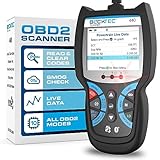
Overview: The BLCKTEC 440 is a mid-range wired OBD2 scanner featuring a built-in 2.8" color screen, live data graphing, and dedicated smog test preparation tools. Aimed at DIYers and mobile mechanics, it balances standalone functionality with printer compatibility for emissions testing and basic diagnostics.
What Makes It Stand Out: Its integrated color screen and I/M readiness hotkeys with color-coded LEDs simplify smog test prep—a rarity in its class. The live data graphing, battery/charging system tests, and printer support offer professional touches without requiring a smartphone, appealing to users avoiding app dependency.
Value for Money: Offers strong value as a reliable, screen-equipped scanner. The free lifetime updates, mechanic endorsements, and smog-specific features provide more utility than basic Bluetooth dongles, though it lacks advanced resets found in the BLCKTEC 460T at a similar price.
Strengths and Weaknesses:
Strengths: Built-in color screen; superb smog test readiness display; live data graphing; printer compatibility; no phone/app needed; robust build quality.
Weaknesses: Wired design (less convenient than Bluetooth); limited to basic resets (no EPB/DPF); fewer advanced functions than 460T; live data less customizable than pro tools.
Bottom Line: The ideal choice for DIYers prioritizing smog testing ease and standalone screen use. A dependable, no-nonsense tool for code reading and emissions prep, but skip if you need deep reset capabilities.
Understanding OBD2 Basics for Beginners
Before diving into features, it’s crucial to grasp what OBD2 actually is and why it matters for your daily drive. This standardized system, mandatory in all cars sold in the U.S. since 1996, acts as your vehicle’s built-in health monitor. It continuously tracks engine performance, emissions, and critical systems, logging diagnostic trouble codes (DTCs) whenever something falls outside normal parameters. For new owners, this means the scanner isn’t just a gadget—it’s your direct line to understanding what those dashboard warnings truly mean, turning anxiety into actionable insight.
What OBD2 Reveals About Your Car
Your car’s OBD2 port (usually near the steering column) is a treasure trove of real-time data. Beyond just identifying why the check engine light is on, it can show live engine RPM, coolant temperature, fuel system status, and even oxygen sensor performance. This isn’t about performing complex repairs yourself; it’s about knowing whether that warning indicates a minor issue like a loose gas cap or something urgent requiring professional attention. For new drivers, this transparency prevents panic and empowers smarter decisions about when—and how—to seek help.
Why New Owners Benefit Most
As a new car owner, you’re still learning your vehicle’s quirks and maintenance rhythms. An OBD2 scanner helps you establish a baseline for normal operation, making it easier to spot deviations early. It also builds trust in service interactions—you’ll understand exactly what a mechanic is testing for, reducing the risk of unnecessary upsells. Most importantly, it shifts your relationship with your car from reactive (“What’s wrong now?”) to proactive (“Let’s keep this running smoothly”), which is invaluable when you’re building long-term ownership habits.
Critical Features for First-Time Scanner Users
When you’re new to diagnostics, simplicity isn’t just nice to have—it’s non-negotiable. A scanner overloaded with advanced features can feel like trying to read a textbook in a foreign language. Focus instead on tools designed with intuitive navigation and clear, jargon-free explanations. Look for devices that prioritize user-friendliness through thoughtful design, such as color-coded alerts for severity levels or one-touch code clearing. Remember, your goal isn’t to become a diagnostic expert overnight; it’s to gain quick, reliable clarity when warnings pop up.
Intuitive Interface Essentials
The screen layout makes or breaks the experience for beginners. Prioritize scanners with large, high-contrast displays and physical buttons (not just touchscreens) that are easy to press while driving or in low-light conditions. Menus should follow a logical flow—think “Read Codes” as the primary option on startup, not buried under submenus. Bonus points for backlighting and font sizes that don’t require reading glasses. If the interface feels cluttered during a quick test at the store, it’ll frustrate you when you actually need it.
Clear Code Definitions and Guidance
Generic code readers spit out alphanumeric strings like “P0171” with no context—a dead end for new owners. Seek tools that translate these into plain English explanations (“System Too Lean (Bank 1)”) and, even better, offer basic troubleshooting tips. Does it suggest checking common fixes like air filter replacements or vacuum leaks? Does it distinguish between urgent issues and non-critical warnings? This layer of interpretation turns raw data into practical knowledge, helping you decide whether to reset the light yourself or book a service appointment.
Connectivity Options Explained Simply
Modern OBD2 scanners connect to your devices in different ways, each with trade-offs for convenience and functionality. Wired options (Bluetooth or USB) require pairing with your phone or tablet but offer robust, stable connections. Wireless models provide freedom from cables but depend on your device’s battery life. For new owners prioritizing ease, Bluetooth-enabled scanners are often the sweet spot—they work with apps that leverage your phone’s screen and processing power, delivering richer visuals without extra hardware.
Bluetooth vs. Wi-Fi Scanners Compared
Bluetooth scanners dominate the entry-level market for good reason: they’re affordable, energy-efficient, and pair seamlessly with smartphones. Range is typically limited to 10–30 feet, which is perfect for reading codes from your driver’s seat. Wi-Fi models broadcast their own network, allowing multiple devices to connect simultaneously—useful for comparing data with a friend—but drain your car’s battery faster and often cost more. As a new owner, Bluetooth’s simplicity and lower price point usually outweigh the niche benefits of Wi-Fi unless you’re deep into data sharing.
App Integration Quality Matters
The companion app is where your scanner’s true value shines. A great app transforms dry codes into visual graphs, historical logs, and step-by-step repair guides tailored to your car’s make and model. Test apps in the store if possible: swipe through menus to see if data is presented clearly, check if updates are free, and verify compatibility with your phone’s OS. Avoid tools with apps riddled with ads or requiring paid subscriptions for basic features—your diagnostic experience shouldn’t feel like a bait-and-switch.
Software Capabilities Beyond Basic Codes
Don’t underestimate the software’s role—it’s the brain that makes hardware useful. Entry-level scanners often only read and clear generic powertrain codes (those starting with “P”), but modern vehicles generate codes for transmissions, ABS, airbags, and more. For comprehensive coverage, ensure your tool supports all five OBD2 code types (P, B, C, U, and manufacturer-specific). This future-proofs your purchase as cars add more computerized systems, saving you from needing an upgrade within a year.
Real-Time Data Monitoring Benefits
Watching live sensor data might sound technical, but it’s surprisingly practical. Imagine seeing your fuel trim adjust in real-time when accelerating—this helps identify inefficient driving habits or developing issues before lights illuminate. For new owners, features like freeze frame data (capturing conditions when a fault occurred) provide concrete evidence for mechanics, speeding up diagnoses. Prioritize scanners that log this data automatically; you won’t need to interpret it daily, but having it on hand builds a valuable maintenance history.
Updates and Long-Term Reliability
Car software evolves, and your scanner should too. Choose models with free, over-the-air firmware updates that add support for newer vehicles or refine code interpretations. Check manufacturer websites for update frequency—brands that refresh software quarterly demonstrate commitment to longevity. Avoid tools requiring manual updates via PC; as a new owner, you want hassle-free maintenance, not extra steps. Also, verify warranty terms; a 2+ year coverage period signals confidence in durability.
Price Ranges and Value Assessment
OBD2 scanners span $20 to $300+, but price alone doesn’t dictate suitability for beginners. Ultra-budget models under $30 often lack critical features like clear code descriptions or live data, leaving you more confused than informed. Mid-range options ($50–$120) typically strike the best balance, offering robust app integration and full code coverage without pro-level complexity. Splurging over $150 rarely benefits new owners unless you’re tackling advanced diagnostics—which, let’s be honest, you’re not signing up for right now.
What You’re Really Paying For
Break down costs: under $40 buys basic code reading with minimal software. $50–$90 gets you accurate live data, user-friendly apps, and multi-system coverage. Above $100 adds features like cloud storage or guided repairs that most beginners won’t utilize. Invest in reliability—not bells and whistles. A $70 scanner with stellar app support delivers more daily value than a $150 “pro” tool with half-used functionality. Remember, your car’s OBD2 system has limits; no scanner can magically diagnose mechanical failures like worn brakes.
Avoiding Costly Mistakes
Beware of “too good to be true” deals on marketplaces. Counterfeit scanners often fail within months or misread codes, risking misdiagnosis. Stick to reputable retailers and check return policies—your first scanner should feel like a risk-free trial. Also, resist upgrading prematurely; if your current tool clears lights and explains codes simply, it’s doing its job. Save advanced features for when you’ve outgrown basics, which might take years.
Setup and Usability Considerations
Your scanner should take minutes, not hours, to start using. Ideal models include plug-and-play setup: insert into the OBD2 port (under the dash), download the app, and pair via Bluetooth. Avoid units requiring complex calibrations or obscure app permissions. Physical design matters too—a compact, rubberized body won’t roll off your seat, and a swiveling connector eases insertion in tight spaces. For new owners, every unnecessary step adds friction to an already stressful situation.
First-Time User Experience Tips
When testing scanners, simulate real-world use: try pairing while seated in a demo car, note how quickly it connects, and observe if the app guides you through initial steps. Does it auto-detect your vehicle? Can you clear a code in three taps? Tools that remember your car’s VIN after first use save repeated entry. Also, check cable length—if wireless, ensure the dongle stays visible (not buried under dash materials). Small touches like these define whether you’ll actually use the device or let it collect dust.
Common Setup Pitfalls to Avoid
Some scanners fail if your car’s ignition isn’t in “run” mode (not fully started), confusing newcomers. Others drain phone batteries rapidly due to poor Bluetooth optimization. Research user reviews specifically mentioning “ease of setup” and “battery drain.” If multiple beginners complain about pairing issues, skip it—your time is better spent elsewhere. Also, verify app permissions; tools demanding unnecessary access (like contacts) raise privacy red flags.
Compatibility Across Vehicle Models
Not all scanners work equally well across brands. While OBD2 is standardized, manufacturers add proprietary codes and protocols. A scanner perfect for domestic trucks might struggle with European luxury cars. Always confirm compatibility with your specific make, model, and year—especially for vehicles under three years old, which often use newer communication standards. Reputable brands publish compatibility lists online; cross-reference yours before buying.
Handling Older vs. Newer Cars
Cars from 1996–2010 generally work with any basic scanner, but post-2015 models increasingly use CAN-FD protocols for faster data. Ensure your tool supports CAN-FD if you drive a recent vehicle—this isn’t optional for full functionality. For older cars, avoid overpriced “next-gen” scanners; simpler tools suffice. Hybrid/electric vehicle owners need scanners explicitly supporting high-voltage system diagnostics, which many budget options omit.
Universal vs. Brand-Specific Tools
Generic scanners cover 90% of needs for most new owners, but brand-specific tools (e.g., for Toyota or Ford) offer deeper insights into unique systems like hybrid batteries. Unless you’re loyal to one marque, universal devices provide better value. Check if the scanner supports “enhanced codes”—manufacturer-specific diagnostics beyond standard OBD2—which add useful context without locking you into a single brand.
Maximizing Your Scanner’s Everyday Utility
Treat your scanner as a routine maintenance partner, not just an emergency tool. Use it monthly to check for pending codes (early warnings before lights illuminate) and monitor fuel trims for efficiency trends. After refueling, clear any temporary codes to ensure accuracy. For new owners, this habit builds familiarity and catches small issues—like a failing oxygen sensor—that could hurt fuel economy over time. Consistency turns diagnostics from a chore into a confidence booster.
Preventative Maintenance Applications
Scan before long trips to preempt breakdowns, or after noticing performance changes (rough idling, sluggish acceleration). Some scanners track maintenance intervals based on mileage—helpful when you’re new to service schedules. Compare live data against manufacturer specs (easily found online) to verify repairs post-service. This isn’t about DIY fixes; it’s about verifying professionalism and understanding your car’s evolving needs.
When to Call a Professional
Your scanner identifies symptoms, not root causes. If it flags persistent emissions issues or safety-related codes (ABS, airbag), seek expert help immediately—these require specialized tools and training. Use your scanner to provide mechanics with precise data: “Code P0302 appeared three times during highway driving,” not “the car feels weird.” This speeds diagnoses and builds trust, often reducing labor costs.
Avoiding Common New Owner Errors
Over-reliance on code clearing is the top mistake. Resetting a light without fixing the underlying problem might pass emissions tests temporarily, but it won’t solve mechanical faults and could cause further damage. Similarly, ignoring “pending” codes (soft warnings before lights activate) misses early intervention opportunities. Approach diagnostics with curiosity, not panic—most issues develop gradually, giving you time to research before acting.
Misinterpreting Code Severity
Not all codes are equal. A “P0420” (catalyst efficiency) might just need premium fuel, while “P0300” (random misfire) demands urgent attention. Learn to prioritize: focus first on drivability symptoms (stalling, hesitation) over abstract codes. If your car runs fine but a code appears, monitor it for recurrence before spending on repairs. Your scanner’s severity indicators (critical/warning/notice) are your best guide—trust them over internet forums.
Skipping Basic Checks First
Before diagnosing complex faults, rule out simple fixes. A loose gas cap triggers “EVAP system” codes in 30% of cases—tighten it and rescan. Low coolant levels can mimic sensor failures. New owners often overlook these because scanners don’t mention them, assuming technology handles everything. Always check fluid levels, tire pressure, and visible hoses first; your scanner is one tool in a broader toolkit.
Future-Proofing Your Investment
Car connectivity is evolving rapidly, with more vehicles adopting telematics and over-the-air updates. Choose scanners with modular software that can adapt—look for brands actively adding support for emerging protocols like DoIP (Diagnostic over IP). Avoid devices tied to outdated app ecosystems; check developer update frequency. A scanner purchased today should remain relevant for 3–5 years, especially if it leverages your phone’s upgrade cycle for interface improvements.
Preparing for Electric Vehicle Trends
Even if you drive a gas-powered car now, understanding EV diagnostics is prudent. Many modern scanners already support basic hybrid functions, but full EV compatibility (battery health, charging diagnostics) requires specialized hardware. As new owners transition to electrified fleets, prioritize tools with roadmap commitments to EV features. This ensures your purchase won’t become obsolete as the market shifts.
Building Your Diagnostic Knowledge Gradually
Start with foundational skills: reading codes, clearing non-critical warnings, and monitoring fuel trims. As confidence grows, explore advanced features like graphing live data or interpreting misfire counts. Free online resources from automotive educators make learning approachable—your scanner is a gateway, not a destination. Remember, mastery comes from consistent, low-pressure practice, not cramming technical manuals.
Frequently Asked Questions
Frequently Asked Questions
Can I really diagnose my car accurately with a consumer-grade scanner?
Yes, for most common issues like check engine lights, you can identify the general problem and get clear explanations. However, complex electrical or mechanical faults often require professional tools and expertise—your scanner is for awareness, not comprehensive repair guidance.
Will an OBD2 scanner work on my car if it’s older than 1996?
No, OBD2 became mandatory in the U.S. for all gasoline vehicles starting in 1996. Pre-1996 cars use older OBD1 systems with brand-specific connectors and codes, requiring different tools. Check your vehicle’s manual to confirm compatibility.
Do I need technical knowledge to use these scanners effectively?
Not at all. Modern consumer scanners are designed for beginners, with plain-language code explanations and intuitive apps. If you can use a smartphone, you can operate these tools—no automotive training required.
Can using a scanner void my new car warranty?
Absolutely not. Federal law (the Magnuson-Moss Warranty Act) prohibits dealers from denying warranty coverage simply because you used an aftermarket diagnostic tool. Scanners only read data; they don’t modify vehicle software.
How often should I scan my car as a new owner?
Monthly checks are ideal for catching early warnings, but scan immediately if dashboard lights appear or performance changes occur. After any repair, verify codes are cleared to ensure the fix was successful.
Are wireless scanners reliable in all weather conditions?
Generally yes, as Bluetooth signals penetrate most car interiors. However, extreme cold can reduce battery life in both the scanner and your phone. Keep devices charged and avoid leaving scanners exposed to direct sun or freezing temperatures long-term.
Can scanners improve my fuel efficiency?
Indirectly, yes. By monitoring live data like fuel trims and oxygen sensor performance, you’ll spot inefficiencies early—such as a dirty air filter—and adjust driving habits. Some apps even provide eco-driving tips based on your scan history.
What’s the difference between generic and enhanced codes?
Generic codes (starting with P0) are standardized across all vehicles. Enhanced codes (P1, P2, etc.) are manufacturer-specific and provide deeper system insights. Full-featured scanners read both, giving a more complete diagnostic picture.
Will my phone’s operating system updates break scanner compatibility?
Reputable brands regularly update their apps to maintain compatibility. Check developer responsiveness in app store reviews—if updates lag after iOS/Android releases, choose a different tool. Most established brands patch issues within weeks.
Can I use one scanner for multiple cars in my household?
Yes, nearly all modern scanners automatically detect and store VINs for different vehicles. Just pair the scanner once, then select the correct car profile in the app when switching between vehicles—no re-pairing needed.
See Also
- 10 Best Budget OBD2 Scanners Under $50 for First-Time Car Owners
- 10 Game-Changing Touchscreen OBD2 Scanners for Modern Car Owners in 2026
- 10 Essential Car Diagnostic Scanners Every New Car Owner Needs in 2026
- 10 Best OBD2 Code Readers for Classic Car Owners in 2026
- The 10 Best Car Diagnostic Tools for New Car Owners in 2026