Table of Contents
Imagine popping the hood of your modern car and feeling utterly lost. That’s the reality for many drivers today, where complex computer systems have replaced the familiar mechanical parts we once knew. But here’s the empowering twist: you don’t need a mechanic’s degree or a shop full of expensive gear to understand what’s happening under the dashboard. The humble OBD2 scanner, especially its sleek touchscreen evolution, has transformed from a niche diagnostic tool into an indispensable co-pilot for every car owner. In 2026, these devices are no longer just for reading cryptic engine codes; they’re your personal gateway to vehicle health, performance insights, and even preventative maintenance alerts, all presented in an interface as intuitive as your smartphone.
Gone are the days of squinting at tiny LED displays or wrestling with clunky button menus. Touchscreen OBD2 scanners have fundamentally reshaped the DIY automotive landscape, putting sophisticated diagnostics squarely in the palm of your hand. They bridge the gap between your car’s intricate computer network and your need for clear, actionable information. Whether you’re troubleshooting a mysterious check engine light, monitoring real-time fuel efficiency, or simply wanting to understand your vehicle better before a costly dealership visit, a well-chosen touchscreen scanner empowers you. It turns technical jargon into plain English and complex data streams into easily digestible charts and graphs, making proactive car care not just possible, but genuinely accessible for the modern driver.
Top 10 Touchscreen OBD2 Scanners
Detailed Product Reviews
1. OBD2 Scanner TOPDON AD600S Scan Tool, Code Reader, Diagnostics Scanner for ABS/SRS/AT/Engine, 9 Reset Services, Oil/Brake/BMS/SAS/DPF/TPMS/ETS Reset/ABS Bleeding/Injector Coding, Free Lifetime Upgrade

Overview: The TOPDON AD600S is a versatile OBD2 scanner targeting DIYers and professionals, focusing on comprehensive reset services and multi-system diagnostics for vehicles from 1996 onward. It excels in routine maintenance and fault identification.
What Makes It Stand Out: Its nine reset functions—including the unique Injector Coding addition—surpass competitors like the AD600. The 5-inch touchscreen with Android 11.0 ensures smooth operation, while one-click lifetime Wi-Fi updates and automatic VIN detection streamline diagnostics. Compatibility spans 90+ brands, including diesel (12V) and gasoline vehicles.
Value for Money: Priced competitively, it delivers exceptional utility with no hidden software fees. The expanded reset capabilities and robust compatibility justify its cost, especially compared to basic code readers lacking SAS/BMS/DPF services.
Strengths and Weaknesses: Strengths: Extensive reset options; intuitive interface; lifetime updates; broad protocol support (OBD2/EOBD/CAN-FD). Weaknesses: AutoVIN inconsistency; incompatible with 5G networks; some features vehicle-dependent.
Bottom Line: Ideal for home mechanics needing reliable reset functions and diagnostics. Its balance of features and affordability makes it a top-tier mid-range scanner for preventative maintenance.
2. Launch OBD2 Scanner CRP123X V3.0 Elite, 2026 Lifetime Free WiFi Update Scan Tool, FCA SGW, CANFD&DoIP, SAS/Throttle/Brake/BMS/D-P-F/Oil/ABS Service Multi Systems Car Scanner, Battery Test, Auto VIN

Overview: This elite scanner offers deep diagnostics for 1996–2026 vehicles, emphasizing FCA compatibility and advanced protocols like CAN-FD/DoIP. It targets users requiring dealership-level functionality without recurring fees.
What Makes It Stand Out: Integrated FCA AutoAuth enables diagnosis of 2018+ SGW-equipped Chrysler models—a rarity in this segment. Seven reset functions (e.g., DPF Regeneration, ABS Service) and multi-graph live data analysis (including 4-in-1 waveforms) provide professional-grade insights.
Value for Money: Justifies its premium price with monthly software updates, 90+ brand coverage, and no subscription costs. Outperforms rivals like the Foxwell NT614 in protocol support, though the required CAN-FD cable adds minor expense.
Strengths and Weaknesses: Strengths: FCA AutoAuth; robust CAN-FD/DoIP support; detailed health reports; Android 8.1 speed. Weaknesses: Additional cable needed for newer protocols; complex menus for beginners; limited battery life.
Bottom Line: A must-have for FCA owners or technicians servicing modern fleets. Its protocol breadth and reset versatility offer unmatched value for serious DIYers and small shops.
3. TOPDON Bidirectional Scan Tool, 2026 New ArtiDiag900 Lite Automotive Diagnostic Tool for Full System, Scanner for Car with Active Test, 8 Reset, Wireless OBD2 Scanner Diagnostic Tool for All Vehicles

Overview: The 2026-upgraded ArtiDiag900 Lite is a wireless bidirectional diagnostic powerhouse designed for workshops, featuring active testing and full-system coverage across all vehicle modules.
What Makes It Stand Out: Bluetooth 5.0 enables 33-foot wireless operation, while bidirectional control allows ECU command execution (e.g., testing injectors or windows). The 8-inch screen, 12-hour battery, and DTC repair guides for Chrysler/Fiat models set it apart from button-based scanners.
Value for Money: Slightly pricier but justified by workshop-grade functionality. The wireless freedom, OE-level diagnostics, and Android 11.0 speed reduce diagnostic time significantly—outperforming cable-bound alternatives like the Launch CRP123X.
Strengths and Weaknesses: Strengths: True wireless operation; bidirectional testing; exceptional battery life; comprehensive module access. Weaknesses: DTC guide limited to specific brands; no built-in cellular; bulky form factor.
Bottom Line: Essential for professional mechanics prioritizing efficiency. Its bidirectional capabilities and wireless convenience make it a premium investment for frequent use.
4. OBD2 Scanner, MUCAR 632 Elite AI-Assisted OBD2 Bidirectional Scan Tool, Oil/Throttle/SAS/TPMS/BMS/EPB Car Scanner Diagnostic Tool with 15+ Resets, CANFD Protocol, Autoauth for FCA SGW, Lifetime Update

Overview: MUCAR’s 632 Elite revolutionizes diagnostics with AI-powered analysis, supporting 15+ reset services and FCA AutoAuth for modern vehicles. It bridges the gap between affordability and advanced tech.
What Makes It Stand Out: MUAI technology provides instant repair suggestions for fault codes and answers direct queries via its Intelligent Assistant—unique in this category. Fifteen reset functions (e.g., Key Matching, Gear Learning) and CAN-FD compatibility exceed most rivals.
Value for Money: Highly cost-effective given its AI features and extensive resets. Lifetime updates and FCA support rival pricier tools like the TOPDON AD600S, though self-registration for FCA accounts is a minor drawback.
Strengths and Weaknesses: Strengths: AI troubleshooting; unmatched reset variety; 6.2-inch responsive screen; free updates. Weaknesses: FCA requires user account setup; Android 8.1 lags behind newer OS versions; compatibility checks essential.
Bottom Line: Perfect for tech-savvy DIYers needing AI guidance. Its intelligent diagnostics and reset breadth offer exceptional versatility at a mid-range price.
5. ANCEL DS100 OBD2 Scanner - ABS, SRS, Transmission & Check Engine Code Reader with 7 Reset, Oil/Brake/BMS/SAS/ETS Reset, ABS Auto Bleeding, Gear Learning, Lifetime Free Update, Online Customer Service

Overview: The ANCEL DS100 simplifies diagnostics with a focus on usability, offering seven core resets and streamlined reporting for entry-level users maintaining 1996+ 12V vehicles.
What Makes It Stand Out: One-tap access to seven resets (e.g., ABS Auto Bleeding, Gear Learning) and AutoVIN identification eliminate complex menus. Professional PDF report generation via Bluetooth/email is ideal for quick technician collaboration.
Value for Money: Budget-friendly without sacrificing essentials. Lifetime updates and 100+ brand coverage deliver reliable performance, though it lacks advanced features like bidirectional control found in pricier models.
Strengths and Weaknesses: Strengths: Intuitive interface; fast AutoVIN; exportable reports; broad compatibility. Weaknesses: Limited to seven resets; no wireless capabilities; basic live data visuals.
Bottom Line: The best entry-level choice for casual users. Its simplicity and reporting tools make it ideal for basic diagnostics and maintenance tracking without overwhelming complexity.
6. OBD2 Scanner TOPDON AD500, Oil SAS Throttle TPMS BMS EPB Reset, Engine ABS SRS Transmission, Diagnostic Scan Tool, AutoVIN, Car Check Engine Code Reader with Battery Test, Lifetime Wi-Fi Free Update

Overview: The TOPDON ArtiDiag500 is a mid-tier OBD2 scanner designed for DIYers seeking professional-grade diagnostics beyond basic code reading. It covers essential vehicle systems while integrating maintenance resets and real-time data visualization.
What Makes It Stand Out: Its compelling blend of 4-system diagnostics (engine, transmission, ABS, SRS), 6 critical reset functions (oil, SAS, TPMS, BMS, EPB, throttle), and real-time data charting sets it apart. AutoVIN simplifies vehicle identification, while lifetime Wi-Fi updates and global support for 67+ brands/10,000+ models ensure long-term relevance. Battery voltage monitoring adds proactive health checks.
Value for Money: Priced competitively, it outperforms entry-level scanners ($50–$100) by offering reset capabilities typically found in pricier tools. The lifetime updates eliminate recurring fees, making it cost-effective versus subscription-based alternatives. Ideal for frequent DIYers needing more than code clearing.
Strengths and Weaknesses: Strengths: Comprehensive reset suite; intuitive chart-based data; robust brand compatibility; no update costs. Weaknesses: Lacks injector coding/DPF regen (vs. premium tools); real-time data limited to 4 streams; reset depth may vary by vehicle.
Bottom Line: A versatile, future-proof investment for serious DIY mechanics. It balances professional functionality with affordability, excelling in diagnostics and common resets—just verify specific reset compatibility for your vehicle.
7. FOXWELL Car Scanner NT604 Elite OBD2 Scanner ABS SRS Transmission, Check Engine Code Reader for Cars and Trucks, Diagnostic Scan Tool with SRS Airbag, Automotive Diagnostic Tool with Live Data

Overview: The FOXWELL NT604 Elite is a streamlined diagnostic tool focused on core system scanning for car owners tackling warning lights. It emphasizes ease of use and reliability for foundational diagnostics without advanced resets.
What Makes It Stand Out: Its “out-of-the-box” readiness with preloaded 2026 software and robust AutoVIN feature simplify setup. The 5-in-1 functionality (OBD2, ABS, SRS, transmission, engine) covers critical systems, while live data streaming, DTC lookup, and I/M readiness checks add depth. The included protective case is rare at this price.
Value for Money: An excellent budget-friendly option for basic diagnostics, undercutting professional tools while avoiding the limitations of ultra-cheap scanners. Lifetime updates and the durable case enhance longevity, though it lacks reset services—saving costs if you only need diagnostics.
Strengths and Weaknesses: Strengths: Plug-and-play simplicity; broad 60+ brand coverage; solid build with protective case; no hidden fees. Weaknesses: No reset/maintenance functions (e.g., oil, TPMS); SRS/ABS diagnostics limited to reading/clearing codes; less suited for complex repairs.
Bottom Line: Perfect for beginners or owners needing reliable, no-frills diagnostics. Skip if you require reset functions, but highly recommended for straightforward code reading and system checks.
8. TOPDON Upgraded AD600S OBD2 Scanner, Diagnostic Tool, ABS SRS Transmission Engine Code Reader, 9 Reset Services Scan Tool, Oil/Brake/BMS/SAS/DPF/TPMS/ETS Reset, Injector Coding, Lifetime Free Update

Overview: The TOPDON AD600S elevates DIY diagnostics with a refined Android-based interface, expanded storage, and professional reset capabilities. It targets users demanding deeper functionality than entry-level scanners.
What Makes It Stand Out: The upgraded 5-inch HD display and Android 11 OS deliver a smoother experience, while 9 reset services—including injector coding and DPF regen—address advanced needs. DTC Lookup demystifies codes, and broad compatibility (67+ brands/10,000+ models) ensures versatility. Lifetime Wi-Fi updates keep it current.
Value for Money: Justifies its price with near-professional reset features absent in cheaper tools. The 32GB ROM and injector coding rival units costing significantly more, making it ideal for enthusiasts tackling oil changes, brake services, or DPF issues independently.
Strengths and Weaknesses: Strengths: Extensive 9 resets; clear HD display; injector coding/DPF support; seamless updates. Weaknesses: Injector coding depth may not match dealer tools; DPF regen effectiveness varies by vehicle; requires pre-purchase compatibility checks.
Bottom Line: A powerhouse for intermediate DIYers. If you perform frequent maintenance or need injector coding, it’s a superb value—just confirm compatibility for your specific resets.
9. XTOOL D5S OBD2 Scanner - 2026 Code Reader for Cars & Trucks with 16 Resets, Crank Sensor Relearn, Throttle Relearn, EPB, FCA AutoAuth, CAN FD for GM, Engine ABS SRS Transmission Car Diagnostic Tool

Overview: The XTOOL D5S is a feature-rich scanner targeting DIYers and small shops, boasting extensive reset capabilities and modern protocol support (CAN FD) for newer vehicles.
What Makes It Stand Out: Its 16 reset functions—including crank sensor relearn, FCA AutoAuth, and ABS bleeding—are exceptional for its class. Full-system diagnostics (engine, ABS, SRS, transmission) with 4-PID graphing and real-time monitoring cater to complex repairs. CAN FD ensures compatibility with late-model GM and European cars.
Value for Money: Outshines competitors with reset depth at a mid-range price. The 16 resets (e.g., EPB, DPF, injector coding) save repeated shop visits, paying for itself quickly. Lifetime updates add long-term value, though verify compatibility for niche functions.
Strengths and Weaknesses: Strengths: Unmatched reset variety; CAN FD/FCA support; intuitive live data; robust ABS/SRS diagnostics. Weaknesses: Reset success not universal (vehicle-dependent); smaller screen than AD600S; some functions require technical know-how.
Bottom Line: A top pick for hands-on users needing advanced resets. Its breadth justifies the cost if you own newer vehicles—just confirm critical functions for your make/model.
10. ANCEL DS200 Full System OBD2 Scanner with 15+ Reset Services - Oil/BMS/Brake Reset, DPF Regen, Injector Coding, ABS Bleeding, Free Lifetime Updates, Online Customer Service
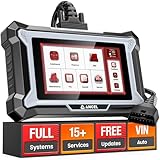
Overview: The ANCEL DS200 positions itself as a professional-grade scanner for budget-conscious mechanics, emphasizing full-system access and dealer-level resets without recurring fees.
What Makes It Stand Out: It delivers true full-system diagnostics across all ECUs (not just major systems), plus 15+ resets like DPF regen and ABS bleeding. Unique live expert support via in-tool chat provides real-time troubleshooting—a rarity. Lifetime updates and universal 12V coverage broaden its appeal.
Value for Money: Exceptional for the price, undercutting $400+ pro tools while offering comparable functionality. The reset suite eliminates costly dealer trips, and live support reduces downtime. Ideal for pros or serious DIYers prioritizing depth over brand prestige.
Strengths and Weaknesses: Strengths: Comprehensive ECU access; extensive reset library; live technical support; no update fees. Weaknesses: Interface less polished than TOPDON/XTOOL; support response times may vary; injector coding less refined than dealer tools.
Bottom Line: The smartest investment for those needing shop-grade diagnostics affordably. If resets and full-system scans are critical, it’s unmatched—especially with live support as a safety net.
Why Touchscreen Matters in Modern OBD2 Diagnostics
The shift from button-based interfaces to touchscreens isn’t just about keeping up with tech trends; it’s a critical evolution driven by the sheer complexity of today’s vehicles and the volume of data they generate. Trying to navigate through layers of menus and sub-menus with physical buttons to access live sensor data or advanced system tests is cumbersome and error-prone. A responsive touchscreen fundamentally changes the user experience, making interaction faster, more intuitive, and significantly less frustrating, especially when you’re dealing with a potential problem.
Intuitive Navigation and Reduced Learning Curve
A well-designed touchscreen interface mimics the familiarity of smartphones and tablets, drastically lowering the barrier to entry. Instead of memorizing complex button sequences, users can simply tap, swipe, and pinch to zoom. This intuitive navigation means you can find the specific diagnostic function you need – whether it’s viewing live oxygen sensor readings or resetting a maintenance interval – in seconds, not minutes. This ease of use is paramount for non-technical owners who just want quick answers without diving into a manual.
Visualizing Complex Data Clearly
Modern cars generate mountains of data. A touchscreen excels at presenting this information visually. Imagine seeing a color-coded graph of your engine’s fuel trim values over time, or a clear map pinpointing misfire occurrences by cylinder, all displayed dynamically on a single screen. Static text lists on older scanners simply can’t compete with the clarity and immediacy of visual data representation that touchscreens enable, turning abstract numbers into understandable insights.
Enhanced Interaction with Advanced Features
As OBD2 scanners incorporate more sophisticated features like guided diagnostics, video repair guides, or integration with cloud-based repair databases, the touchscreen becomes essential. Tapping a highlighted component in a wiring diagram, scrolling through step-by-step instructions with embedded videos, or easily selecting specific vehicle modules for deep scans is only practical with a responsive touch interface. It transforms the scanner from a passive code reader into an active diagnostic assistant.
Key Features to Prioritize When Choosing Your Scanner
Selecting the right touchscreen OBD2 scanner requires looking beyond just the shiny screen. The market offers a wide spectrum of capabilities, and understanding which features truly deliver value for your needs is crucial. Don’t be swayed solely by screen size or price tag; focus on the functionality that aligns with how you intend to use the device, whether it’s basic check engine light checks or deep system analysis.
Screen Size, Resolution, and Outdoor Visibility
While larger screens (5-7 inches) offer more real estate for data, ensure the resolution is sharp enough for clear text and graphs, especially when viewing fine details in wiring diagrams. Crucially, assess the screen’s performance in bright sunlight – matte finishes and high-nit brightness ratings are non-negotiable for reliable use in the driveway or garage. A beautiful screen that washes out in daylight is practically useless when you need it most.
Processing Power and Memory Capacity
Don’t underestimate the importance of internal hardware. A scanner needs sufficient processing speed to handle real-time data streaming from multiple vehicle modules simultaneously without lag or freezing. Adequate RAM ensures smooth multitasking (e.g., viewing live data while referencing a repair guide), and sufficient internal storage is vital for saving scan results, vehicle profiles, and potentially large software updates or map data for advanced features.
Build Quality and Ergonomics
This tool will live in your glovebox or center console, subject to bumps, temperature swings, and occasional drops. Prioritize a robust, durable casing, preferably with some water or dust resistance (look for IP ratings). Consider the weight and shape – it should feel comfortable to hold for extended periods, especially when using it one-handed while connected under the dash. A secure, non-slip grip is a small detail that makes a big difference in daily use.
Connectivity Options: Beyond the OBD2 Port
The physical connection to your car’s OBD2 port is just the starting point. Modern scanners leverage multiple connectivity methods to enhance functionality, provide updates, and integrate with your broader digital life. Understanding these options helps you choose a device that fits seamlessly into your workflow and offers the flexibility you need now and in the future.
Wireless Connectivity: Bluetooth vs. Wi-Fi
Bluetooth (especially Bluetooth 5.0+) is the standard for connecting to your smartphone or tablet, enabling you to use the scanner’s companion app on your larger, more familiar device screen. This is often the most practical setup. Dedicated Wi-Fi connectivity (less common) allows the scanner to create its own hotspot, connecting directly to tablets or laptops without needing your phone, which can be advantageous for workshops or when phone battery is low. Consider your preferred usage scenario.
Smartphone App Integration Depth
The companion app is where much of the magic happens. Evaluate how deeply the scanner integrates with its app. Does the app merely mirror the scanner’s screen, or does it unlock advanced cloud-based features, access to larger repair databases, community forums, or vehicle-specific technical service bulletins? Seamless syncing of scan results and notes between the scanner and your phone is a significant productivity booster.
Future-Proofing with Emerging Tech
Look towards the horizon. Some scanners are beginning to incorporate 5G or enhanced cellular connectivity options, enabling real-time data streaming to professional mechanics for remote diagnostics or instant access to massive, constantly updated cloud repair libraries. While perhaps not essential today, considering the device’s potential for future connectivity upgrades can extend its useful lifespan significantly.
Decoding Software Capabilities and Updates
The hardware is only half the story. The software – the intelligence driving the scanner – is where the real diagnostic power lies. Outdated software means missing critical codes, misinterpreting data, or lacking support for the latest vehicle models and complex systems found in 2026’s cars. Prioritizing a scanner with robust, regularly updated software is non-negotiable for accuracy and longevity.
Coverage Depth: Beyond Generic OBD2
All scanners read basic emissions-related trouble codes (P0xxx). The true differentiator is coverage of manufacturer-specific codes (P1xxx, P2xxx, etc.) and access to advanced systems like ABS, airbags, transmission, body control modules, and hybrid/electric vehicle components. Ensure the scanner explicitly supports the makes and models you own or anticipate working on, delving deep into all vehicle systems, not just the engine.
Update Frequency and Cost Structure
How often does the manufacturer release meaningful software updates? Monthly? Quarterly? Is there a subscription fee for lifetime updates, or are major version updates sold separately? Be wary of “one-time purchase” scanners with infrequent or paywalled updates; your $200 device could become obsolete in two years. Transparent, affordable, and frequent update policies are essential for maintaining relevance with evolving car technology.
User Interface Design Philosophy
A powerful engine is useless with a confusing interface. Evaluate how information is presented. Is the menu structure logical? Can you easily customize data displays (e.g., creating your own live data PIDs screen)? Does it offer clear explanations of codes and potential causes, not just a code definition? Look for software that prioritizes user experience, offering contextual help and minimizing technical jargon where possible, making complex diagnostics approachable.
Practical Usage Scenarios and Real-World Value
Understanding how you’ll actually use the scanner helps pinpoint the right features. Are you primarily interested in quick check engine light checks, or do you want to monitor performance for tuning? Different usage patterns demand different capabilities. Evaluating scanners through the lens of your daily driving and maintenance habits ensures you invest in functionality you’ll genuinely leverage.
Troubleshooting the Infamous Check Engine Light
This is the most common use case. A capable touchscreen scanner should instantly retrieve codes, provide clear, plain-English explanations of likely causes (not just generic definitions), and crucially, offer step-by-step guided tests. Seeing live data streams related to the fault (e.g., oxygen sensor voltages, fuel trims) directly alongside the code explanation on the touchscreen allows for much more informed initial diagnosis before deciding on professional help.
Proactive Maintenance and Performance Monitoring
Smart owners use scanners for more than just fixing problems. Monitor real-time fuel economy, track engine load during different driving conditions, or check coolant and oil temperatures for anomalies. Some advanced scanners can track maintenance intervals based on actual usage, not just mileage, and alert you before a service is due. This proactive use, visualized clearly on the touchscreen, can prevent costly breakdowns and optimize vehicle longevity.
Pre-Purchase Vehicle Inspections
Considering a used car? A thorough OBD2 scan is a critical, non-invasive inspection step. A good touchscreen scanner quickly reveals stored codes (even if the light is off), checks for readiness monitors (essential for emissions testing), and provides a snapshot of the vehicle’s overall computer health. Seeing this comprehensive data presented clearly helps uncover potential hidden issues before you sign on the dotted line.
Compatibility Considerations for 2026 Vehicles
The automotive landscape evolves rapidly. Ensuring your scanner works flawlessly with your specific vehicle – especially newer models packed with advanced tech – is paramount. Compatibility isn’t just about the OBD2 port; it’s about speaking the complex digital language of modern cars, including hybrids, electrics, and vehicles with sophisticated driver-assistance systems.
Year, Make, Model, and Trim Level Specificity
Generic OBD2 coverage isn’t enough. Scanners vary wildly in their depth of support for specific makes (e.g., deep Toyota vs. basic Ford coverage) and crucially, for specific model years and even trim levels. High-end trims often have additional modules and features. Verify the scanner manufacturer’s detailed compatibility list for your exact vehicle before purchasing, paying attention to notes about hybrid or plug-in hybrid support if applicable.
Handling Hybrid and Electric Powertrains
Diagnostics for hybrid (HEV), plug-in hybrid (PHEV), and battery electric vehicles (BEV) are fundamentally different and more complex. Not all scanners, even advanced ones, can properly interface with high-voltage systems or read critical battery health and regenerative braking data. If you own or service electrified vehicles, confirm the scanner explicitly lists comprehensive support for these powertrain types and understands the unique safety protocols involved.
VIN-Specific Configuration and Calibration Data
Top-tier scanners can read the vehicle’s VIN and automatically configure the interface for that specific model, pulling up the most relevant data streams and diagnostic procedures. Some even access calibration data stored within the car’s modules. This level of integration ensures you’re not wading through irrelevant menus and get the most precise diagnostics possible for your unique vehicle.
Data Management and Integration Potential
The value of diagnostic data extends far beyond the moment you plug in the scanner. How easily you can save, analyze, share, and integrate this data with other tools significantly impacts the scanner’s long-term utility, turning isolated readings into a valuable historical record of your vehicle’s health.
Saving and Organizing Scan Results
The ability to save full diagnostic reports – including all codes, freeze frame data, and live PID snapshots – is essential. Look for scanners that allow you to categorize these saves by date, vehicle, or issue type. Cloud backup options add an extra layer of security, ensuring your diagnostic history isn’t lost if the scanner is damaged. Easy export to common formats (PDF, CSV) is vital for sharing with mechanics.
Long-Term Trend Analysis
Advanced scanners can track specific parameters (like fuel trims or coolant temperature) over multiple scans. Visualizing this data as trends on the touchscreen helps identify gradual degradation that might not trigger a fault code yet – a slight but consistent increase in fuel trim could indicate a slow vacuum leak developing. This predictive capability is a powerful tool for preventative maintenance.
Integration with Maintenance Logs and Telematics
Consider how the scanner data can feed into broader vehicle management. Does it sync with popular maintenance log apps? Can it integrate with your car’s built-in telematics (if available) or aftermarket tracking systems? Seamless data flow creates a unified picture of your vehicle’s performance, usage, and health, moving beyond isolated diagnostics to holistic vehicle management.
Balancing Budget with Long-Term Investment
Touchscreen OBD2 scanners span a vast price range. It’s tempting to grab the cheapest option, but understanding the true cost of ownership versus upfront price is key. A scanner that becomes obsolete quickly due to poor updates or limited coverage is ultimately a false economy. Conversely, paying for features you’ll never use wastes money. Striking the right balance is an investment in your vehicle’s care.
Understanding the Value Proposition
Break down what you’re paying for. Is the higher price justified by deeper software coverage, more frequent updates, superior build quality, or essential advanced features (like bi-directional controls for component testing)? Compare the features that matter to you against the price, not just the headline cost. Sometimes a modest premium unlocks significantly more utility and longevity.
Subscription Models vs. One-Time Purchases
Be crystal clear on the total cost. A low upfront price might hide mandatory subscription fees for critical updates or cloud features. Conversely, a higher one-time purchase might include lifetime updates. Calculate the potential 3-5 year cost: (Upfront Price) + (Annual Subscription x Years). This reveals the true long-term value and prevents unpleasant surprises down the road.
Resale Value and Future-Proofing
Consider the scanner’s potential resale value. Devices from reputable brands with strong update policies and broad compatibility tend to hold value better. Features like modular design (e.g., swappable communication dongles) or guaranteed software support for several future vehicle model years also enhance future-proofing, protecting your investment against rapid technological changes in the automotive world.
Safety and Reliability: Non-Negotiable Aspects
While features and price grab attention, safety and reliability are the bedrock of any diagnostic tool. A scanner that causes electrical issues, misdiagnoses critical problems, or fails when you need it most isn’t just frustrating – it can be dangerous or lead to expensive mistakes. Prioritizing these aspects protects both you and your vehicle.
Electrical Safety and Certification
Ensure the scanner carries relevant safety certifications (like CE, FCC, RoHS). It must be designed to safely interface with your vehicle’s sensitive computer systems without causing voltage spikes, short circuits, or grounding issues that could damage expensive control modules. Cheap, uncertified scanners pose a genuine risk; this is one area where cutting corners is never worth it.
Diagnostic Accuracy and Data Integrity
The scanner’s primary job is to report accurate data. Research reviews focusing on reliability – does it consistently read and clear codes correctly? Is the live data stream stable and trustworthy? Misinterpreted sensor data can lead to incorrect repairs, wasted time, and money. Look for scanners known for data integrity; accuracy isn’t a feature, it’s the fundamental requirement.
Build Durability for Real-World Conditions
Your scanner will face heat, cold, dust, and the occasional bump. A flimsy device with a screen that cracks easily or buttons that malfunction after minor drops is a liability. Prioritize ruggedized designs, quality connectors, and proven reliability in independent testing. A scanner that survives daily life in your car is infinitely more valuable than a fragile one that looks impressive in the box.
Maximizing Your Scanner’s Potential Through Learning
Owning a powerful touchscreen OBD2 scanner is only the first step. True value comes from understanding how to interpret the data it provides and applying that knowledge effectively. The best scanners include educational resources, but cultivating your own diagnostic literacy turns the tool from a novelty into an indispensable asset for confident car ownership.
Leveraging Built-in Learning Resources
Look for scanners that go beyond basic code definitions. The best include integrated repair manuals, step-by-step diagnostic flowcharts, explanatory videos for common issues, and clear descriptions of what sensor data actually means (e.g., “What is Short Term Fuel Trim telling me?”). These resources, accessible directly on the touchscreen, transform the device into a mobile learning platform, empowering you to make informed decisions.
Connecting with Community Knowledge
Many scanner platforms have active user forums or community features within their apps. Tapping into this collective wisdom – seeing how others diagnosed similar symptoms on the same vehicle model – is invaluable. A good scanner ecosystem facilitates this knowledge sharing, allowing you to learn from real-world experiences and avoid common pitfalls, making your diagnostic journey less isolating.
Developing a Diagnostic Mindset
A scanner shows symptoms (codes, data), not necessarily the root cause. Learning to correlate data streams (e.g., seeing how oxygen sensor readings change with fuel trim) and understanding basic automotive systems is crucial. Use the scanner as a tool to ask better questions, not just get instant answers. This mindset shift, fostered by consistent, informed use, is where the real game-changing potential for the modern car owner truly lies.
Frequently Asked Questions
Frequently Asked Questions
Can a touchscreen OBD2 scanner fix my car? No, it’s a diagnostic tool, not a repair device. It identifies problems by reading codes and sensor data, providing information to help you understand the issue or communicate effectively with a mechanic. It cannot perform physical repairs.
Will any touchscreen scanner work with my 2026 hybrid/electric vehicle? Not necessarily. Hybrid and electric vehicles require specific diagnostic protocols. You must verify that the scanner explicitly lists comprehensive compatibility and support for your vehicle’s exact make, model, year, and powertrain type (HEV, PHEV, BEV).
Are free updates really free for the life of the scanner? This varies significantly by manufacturer. Some offer truly free updates, others charge for major version upgrades, and some operate on a subscription model. Always clarify the update policy and potential long-term costs before purchasing; “free updates” often have limitations.
Can I use the scanner’s touchscreen while it’s connected to my car? Yes, that’s a primary advantage. Modern wireless scanners (Bluetooth/Wi-Fi) connect to the OBD2 port and then communicate with the touchscreen device (scanner itself or your phone/tablet via app), allowing full interaction while the car is running or key is on.
How often should I update my scanner’s software? Ideally, update whenever a new version is released by the manufacturer, especially if you own a newer vehicle. Monthly or quarterly updates are common for reputable brands. Staying current ensures compatibility with the latest car models and diagnostic procedures.
Is a larger touchscreen always better? Not always. While larger screens (6-7") show more data, they can be cumbersome in tight spaces. A 5-inch screen often offers the best balance of visibility and portability. Prioritize screen quality (brightness, resolution, sunlight viewability) over sheer size.
Can I trust the diagnostic explanations the scanner provides? They are a valuable starting point, but treat them as guidance, not absolute truth. Scanner interpretations can sometimes be generic. Use the data (codes, live PIDs) alongside your observations and potentially community forums or professional advice for the most accurate diagnosis.
Will using a scanner void my new car warranty? Generally, no. Simply reading diagnostic data with an OBD2 scanner is non-invasive and should not affect your warranty. However, performing certain advanced functions (like reflashing modules) could potentially cause issues; stick to basic diagnostics unless you are qualified.
Do I need a separate app, or is everything on the scanner’s screen? This depends on the model. Some scanners have fully self-contained operating systems on their built-in screen. Others primarily function as a Bluetooth/Wi-Fi bridge, requiring you to use their companion app on your smartphone or tablet for the main interface. Check the device’s primary usage method.
Can touchscreen scanners perform bi-directional controls (like actuating components)? Advanced professional-grade scanners can, but most consumer touchscreen models focused on diagnostics cannot. Bi-directional control (e.g., testing a solenoid or opening a valve) requires deeper, manufacturer-specific access and is typically found in higher-end, specialized tools, not standard consumer units. Always verify feature lists carefully.
See Also
- 10 Game-Changing Touchscreen OBD2 Scanners for Modern Vehicles in 2026
- 10 Best Budget OBD2 Scanners Under $50 for First-Time Car Owners
- 10 Game-Changing Universal OBD2 Scanners for Multi-Vehicle Use in 2026
- 10 Game-Changing OBD2 Scanners with Diagnostic Lights for Night Repairs in 2026
- 10 Game-Changing OBD2 Scanners with Diagnostic Lights for Nighttime Repairs in 2026