Table of Contents
Fuel prices keep climbing, and every trip to the pump feels like a hit to your wallet. In 2026, drivers are more focused than ever on squeezing every possible mile from each gallon, turning vehicle diagnostics from a mechanic’s tool into an everyday driver’s necessity. An OBD2 code reader with fuel efficiency monitoring capabilities has become the modern driver’s co-pilot, transforming cryptic engine data into actionable insights that can save hundreds of dollars annually.
But not all OBD2 scanners are created equal when it comes to tracking fuel economy. While basic models simply read trouble codes, sophisticated devices provide real-time MPG data, fuel trim analysis, and driving behavior feedback that directly impacts your bottom line. This comprehensive guide walks you through everything you need to know to select the perfect OBD2 code reader for fuel efficiency monitoring—no technical background required.
Top 10 OBD2 Code Readers for Fuel Efficiency
Detailed Product Reviews
1. FOXWELL NT301 OBD2 Scanner Live Data Professional Mechanic OBDII Diagnostic Code Reader Tool for Check Engine Light

Overview: The FOXWELL NT301 positions itself as a professional-grade OBDII scanner designed for mechanics and serious DIY enthusiasts. This handheld tool delivers core diagnostic functions including reading and clearing diagnostic trouble codes (DTCs), checking I/M emissions readiness, retrieving live sensor data, and accessing VIN information. It supports all major OBDII protocols and works with most 1996+ US vehicles and 2000+ EU/Asian models, making it broadly compatible for standard engine diagnostics.
What Makes It Stand Out: Unlike basic code readers, the NT301 offers live data graphing and logging capabilities, allowing users to monitor sensor trends and identify intermittent issues. The dedicated I/M readiness hotkeys and tri-color LED indicators provide at-a-glance emissions test status, streamlining smog check preparation. Its ability to graph data streams in real-time sets it apart from entry-level models, giving users professional diagnostic insight without laptop software.
Value for Money: Priced in the mid-range category, the NT301 offers excellent value for users who need more than basic code clearing. The live data logging feature alone justifies the premium over budget scanners. While it lacks advanced system coverage, its professional build quality and graphing capabilities match tools costing significantly more, making it a smart investment for home mechanics performing regular diagnostics.
Strengths and Weaknesses: Pros: Real-time live data graphing and logging; Professional-grade build quality; Intuitive LED readiness indicators; Fast processor with minimal lag; Comprehensive OBDII protocol support. Cons: Does not support ABS, SRS, or transmission systems; No advanced service functions; Menu navigation can be complex for beginners; Limited to engine-related codes only.
Bottom Line: The FOXWELL NT301 is an ideal choice for intermediate to advanced DIYers and mobile mechanics who prioritize live data analysis over all-system coverage. Its graphing capabilities and robust construction make it a reliable workhorse for engine diagnostics, though beginners may prefer a more streamlined interface.
2. VDIAGTOOL VD10 OBD2 Scanner Code Reader Car Diagnostic Tool Engine Fault Code Reader for Turn Off CEL with Freeze Frame/I/M Readiness for All OBDII Protocol Cars, OBD2 Scanner Diagnostic Tool

Overview: The VDIAGTOOL VD10 is an entry-level OBD2 scanner engineered for absolute beginners and casual car owners. This plug-and-play device eliminates diagnostic complexity by providing essential functions—reading and clearing codes, viewing freeze frame data, checking I/M readiness, and monitoring live data—through a straightforward interface. Its built-in database of 3,000+ codes delivers instant definitions without internet searches, making it accessible for those with minimal mechanical knowledge.
What Makes It Stand Out: The VD10’s primary distinction is its deliberate simplicity, positioning itself as a “Fixd-like” alternative that demystifies vehicle diagnostics. The scanner automatically displays code definitions on its TFT screen, removing the guesswork for novices. Its one-touch code clearing and readiness monitoring make pre-smog checks effortless, while the compact design stores easily in a glove compartment for on-the-road emergencies.
Value for Money: As one of the most affordable scanners in its class, the VD10 delivers exceptional value for money. It provides all essential OBDII functions that 90% of car owners actually need, without charging for professional features they’ll never use. For the price of a single diagnostic shop visit, users gain unlimited code reading capability, making it a financially sound purchase for budget-conscious drivers.
Strengths and Weaknesses: Pros: Extremely user-friendly for beginners; Instant DTC definitions on-screen; Compact and highly portable; No batteries required; Excellent price point. Cons: Limited 3,000-code database may miss obscure manufacturer codes; Basic live data display without graphing; Cannot diagnose ABS, SRS, or transmission issues; Plastic construction feels less durable than premium models.
Bottom Line: The VD10 is the perfect gateway scanner for car owners who simply want to understand why their check engine light is on. While it won’t satisfy advanced users, its affordability and simplicity make it an invaluable tool for basic troubleshooting and pre-inspection checks without technical overwhelm.
3. BluSon YM319 OBD2 Scanner Diagnostic Tool with Battery Tester, Check Engine Fault Code Reader with Live Data, Cloud Printing, DTC Lookup, Freeze Frame, Scan Tool for All OBDII Protocol Cars Since 1996

Overview: The BluSon YM319 distinguishes itself as a technologically advanced OBD2 scanner that merges traditional diagnostics with modern connectivity features. Beyond standard code reading and live data capabilities, it integrates a one-click battery health tester, cloud-based report printing, and an expansive 63,000-code database. The 2.4-inch HD color screen and customizable shortcut keys create a premium user experience for both DIYers and professional technicians seeking comprehensive engine analysis.
What Makes It Stand Out: The integrated battery diagnostic function continuously monitors voltage and health status, preventing unexpected failures—a feature rarely found in dedicated scanners at this price. Its cloud printing capability generates professional diagnostic reports without physical printer connections, enabling seamless sharing with mechanics or record-keeping. The F1/F2 programmable hotkeys provide instant access to frequently used functions, significantly improving diagnostic workflow efficiency.
Value for Money: The YM319 punches above its weight class by bundling battery testing and cloud connectivity typically reserved for professional-grade tools costing twice as much. While slightly pricier than basic scanners, these unique features deliver tangible value, especially for users managing multiple vehicles or seeking documented maintenance histories. The massive DTC database ensures comprehensive coverage across domestic and import vehicles.
Strengths and Weaknesses: Pros: Integrated battery voltage and health testing; Cloud printing for professional reports; 63,000-code database with detailed definitions; Customizable function keys; 2.4" color display with brightness adjustment. Cons: Cloud features require initial setup and internet connectivity; May be over-featured for casual users; Menu system has moderate learning curve; No ABS/SRS system support.
Bottom Line: The BluSon YM319 is a standout choice for tech-savvy users and multi-vehicle households wanting more than basic code reading. Its battery testing and cloud reporting capabilities justify the modest price premium, making it a forward-thinking diagnostic tool that grows with your mechanical expertise.
4. ANCEL AD410 Enhanced OBD2 Scanner, Vehicle Code Reader for Check Engine Light, Automotive OBD II Scanner Fault Diagnosis, OBDII Scan Tool for All OBDII Cars 1996+, Black/Yellow

Overview: The ANCEL AD410 is an enhanced OBDII scanner that balances professional capabilities with user-friendly design, earning endorsement from automotive expert Scotty Kilmer. This tool focuses on comprehensive engine diagnostics, offering 42,000 built-in DTC definitions, O2 sensor testing, EVAP system leak detection, and I/M readiness monitoring. Its 2.4-inch QVGA true-color display and intuitive UI design make complex diagnostics accessible to beginners while satisfying experienced mechanics seeking quick, reliable results.
What Makes It Stand Out: The AD410’s EVAP system testing capability allows users to perform fuel tank integrity tests—a professional feature uncommon in this price range. The O2 sensor monitoring helps diagnose fuel mixture problems that affect efficiency and emissions. Its multilingual support and direct OBDII power (no batteries needed) enhance convenience for international users and garage mechanics alike. The vibrant 262K-color display renders data clearly in various lighting conditions.
Value for Money: Positioned as a mid-tier scanner, the AD410 offers tremendous value by delivering enhanced diagnostics without the premium price of professional tools. The EVAP and O2 testing features alone can save users hundreds in diagnostic fees, while the extensive code database eliminates time-consuming online research. For DIYers wanting more than basic scanning without complexity, it hits the sweet spot of capability versus cost.
Strengths and Weaknesses: Pros: EVAP system leak testing capability; O2 sensor performance monitoring; 42,000-code onboard library; Crisp color display with intuitive interface; Direct OBDII power; Multilingual support. Cons: Engine system only—no ABS, SRS, or transmission diagnostics; Cannot perform bi-directional controls; Code clearing requires manual post-repair reset; Cable-only operation limits mobility.
Bottom Line: The ANCEL AD410 excels as an engine-focused diagnostic tool for serious DIYers who appreciate professional features without professional complexity. Its EVAP and O2 testing capabilities provide genuine diagnostic depth, making it a worthwhile upgrade from basic code readers for those committed to home auto maintenance.
5. BlueDriver Bluetooth Pro OBDII Scan Tool for iPhone & Android - No Subscription Fee - OBD2 Car Scanner and Code Reader - Diagnose Check Engine, ABS, SRS, Airbag & 7000+ Issues on Vehicles 1996+

Overview: The BlueDriver Bluetooth Pro revolutionizes vehicle diagnostics by transforming smartphones into powerful scan tools via wireless connectivity. Unlike traditional handheld scanners, this system provides comprehensive coverage across engine, ABS, SRS, airbag, and TPMS systems—diagnosing over 7,000 vehicle issues. The free iOS/Android app delivers unlimited repair reports with verified fixes, live data monitoring, and access to a vast database of repair videos, eliminating subscription fees that plague competitors.
What Makes It Stand Out: BlueDriver’s wireless design liberates users from cable constraints while offering system coverage unmatched by comparably priced handheld units. The app’s Repair Reports feature, compiled by certified mechanics, provides specific fixes rather than generic code definitions. Real-time health monitoring during driving captures intermittent faults that static scans miss. The ability to diagnose safety systems (ABS/SRS) makes it a complete solution, not just an engine code reader.
Value for Money: While priced higher than basic scanners, BlueDriver delivers professional-shop capabilities at a fraction of the cost. The absence of subscription fees, combined with lifetime app updates and repair database access, makes it exceptionally economical long-term. For users needing ABS/SRS diagnostics, it’s substantially cheaper than professional tools or repeated shop visits, paying for itself with a single comprehensive diagnosis.
Strengths and Weaknesses: Pros: Wireless Bluetooth connectivity; Comprehensive ABS, SRS, airbag, and TPMS coverage; Unlimited repair reports with verified fixes; Live data monitoring while driving; No subscription fees; Extensive repair video library. Cons: Requires compatible smartphone; Higher initial cost than wired scanners; Bluetooth connection can occasionally lag; Some advanced bi-directional functions not supported.
Bottom Line: The BlueDriver Bluetooth Pro is the ultimate diagnostic solution for modern car owners seeking professional-grade, multi-system coverage without the professional price tag. Its wireless convenience, comprehensive system support, and expert repair guidance make it the best overall value for anyone serious about DIY diagnostics and vehicle safety system monitoring.
6. MOTOPOWER MP69033 Car OBD2 Scanner Code Reader Engine Fault Scanner CAN Diagnostic Scan Tool for All OBD II Protocol Cars Since 1996, Yellow

Overview: The MOTOPOWER MP69033 is a practical entry-level OBD2 scanner designed for DIY mechanics seeking essential diagnostic capabilities without complexity. This compact tool reads and clears check engine lights across most 1996+ US vehicles and 2000+ EU/Asian imports, powered directly through the OBDII port. Its straightforward interface makes it ideal for troubleshooting basic engine issues at home, offering built-in DTC lookup and six-language support for English, German, Dutch, Spanish, French, and Italian users.
What Makes It Stand Out: This scanner distinguishes itself with a 2.8-inch LCD featuring white backlight and contrast adjustment for clear visibility in any lighting. The 2.5-foot thick, flexible cable ensures durability, while six intuitive buttons enable quick VIN and fault code queries. Its multi-function capability includes freeze frame viewing, I/M readiness checks, and real-time data streaming for vehicle speed, load values, and coolant temperature—comprehensive features rarely found at this price point.
Value for Money: Priced competitively in the budget segment, the MP69033 delivers core OBDII functionality that rivals scanners costing twice as much. While professional-grade tools offer deeper system access, this device provides exceptional ROI for homeowners who only need engine diagnostics, eliminating costly dealer visits for simple code clearing. The direct vehicle power design removes battery replacement costs entirely.
Strengths and Weaknesses: Strengths include wide protocol support for nine OBDII standards, plug-and-play operation, robust physical design, and a built-in code library. The clear display enhances usability for novices. However, it cannot read ABS or airbag codes—a significant limitation for modern vehicles. The lack of advanced graphical displays may frustrate experienced users seeking deeper analysis capabilities.
Bottom Line: The MOTOPOWER MP69033 is an excellent choice for budget-conscious drivers needing reliable engine diagnostics. Its limitations are clearly stated, making it perfect for basic troubleshooting but inadequate for comprehensive vehicle analysis across all systems.
7. VEKOOTO VK310 OBD2 Scanner Diagnostic Tool – Check Engine Code Reader for All OBDII Protocols (CAN/KWP2000/J1850/ISO9141), Live Data, Freeze Frame, I/M Readiness, for 1996+ Cars, SUVs, Light Trucks
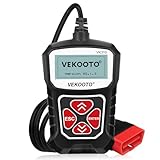
Overview: The VEKOOTO VK310 is an ultra-simplified OBD2 scanner engineered for absolute beginners intimidated by complex diagnostic tools. Compatible with all 1996+ OBDII vehicles across US, European, and Asian markets, this device focuses exclusively on check engine light diagnostics. Its minimalist design eliminates batteries, apps, and Bluetooth connectivity for pure plug-and-play functionality that provides instant power and diagnosis upon connection.
What Makes It Stand Out: This scanner’s standout feature is its uncompromising simplicity—no setup, no pairing, no learning curve. It provides immediate access to freeze frame data, I/M readiness status, and live sensor readings including RPM and coolant temperature. The 2.5-inch LCD presents information in a clean, digestible format that demystifies vehicle diagnostics for first-time users while supporting all OBDII protocols including KWP2000, J1850 VPW/PWM, ISO9141, and CAN.
Value for Money: As one of the most affordable scanners available, the VK310 offers remarkable value for money. It sacrifices advanced capabilities for rock-solid reliability in core functions, making it a smart purchase for drivers who simply want to understand why their check engine light activated without investing in professional equipment or subscription services.
Strengths and Weaknesses: Strengths include universal OBDII protocol support, immediate operation upon connection, intuitive interface perfect for novices, and compact glove-box-friendly size. However, the small screen limits data visibility, and the lack of graphical displays or built-in code definitions requires manual lookup. Advanced users will quickly outgrow its capabilities, and it cannot diagnose non-engine systems.
Bottom Line: The VEKOOTO VK310 is the ideal gateway scanner for car owners taking their first steps into DIY diagnostics. It performs its limited functions flawlessly, though experienced mechanics will need more sophisticated tools for comprehensive vehicle analysis.
8. Innova 5210 OBD2 Scanner & Engine Code Reader, Battery Tester, Live Data, Oil Reset, Car Diagnostic Tool for Most Vehicles, Bluetooth Compatible with America’s Top Car Repair App

Overview: The Innova 5210 represents a significant step up from basic scanners, merging OBD2 diagnostics with battery testing capabilities. Designed for serious DIY enthusiasts, this tool reads engine and ABS codes (coverage varies) while monitoring alternator health. Its Bluetooth connectivity to the RepairSolutions2 app provides access to ASE-certified repair guidance for most 1996+ domestic and import vehicles, including Toyota, Ford, Honda, and Chevrolet.
What Makes It Stand Out: This scanner uniquely combines code reading with battery and alternator diagnostics, preventing roadside surprises. The oil reset function adds maintenance convenience, while the free app integration delivers verified fixes, parts suggestions, and cost estimates without subscription fees. Live data monitoring includes fuel trims and oxygen sensor readings essential for smog test preparation, trusted by over 4 million users nationwide.
Value for Money: Positioned in the mid-range price bracket, the 5210 justifies its cost through multifunctionality. Competing scanners require separate battery testers or paid app subscriptions, making this an economical all-in-one solution for home mechanics wanting professional-level insights without recurring fees. The oil reset feature saves additional service costs.
Strengths and Weaknesses: Strengths include comprehensive battery testing, oil light reset capability, and invaluable app-based repair guidance. The ABS code support expands diagnostic reach beyond basic scanners. However, ABS coverage is inconsistent across vehicle makes, requiring pre-purchase verification via Innova’s Coverage Checker. The higher price may deter casual users who only need basic code reading without advanced features.
Bottom Line: The Innova 5210 is a powerhouse for dedicated DIY mechanics seeking more than code reading. Its battery testing and app integration provide exceptional utility, though buyers should confirm ABS compatibility for their specific vehicles before purchasing.
9. OBD2 Scanner, CGSULIT SC103 Car Code Reader Diagnose Check Engine Light Smog Check DTCs Scan Tool Live Data Stream Voltage Test for Vehicles Since 1996

Overview: The CGSULIT SC103 is a professional-grade OBD2 scanner endorsed by renowned mechanic Scotty Kilmer, designed for users demanding more than basic functionality. This tool reads and clears check engine lights while providing voltage testing and live data streaming for vehicles from 1996+ (US), 2003+ (EU), and 2008+ (Asian). Its industrial-grade chip ensures rapid, accurate diagnostics for both shops and serious DIYers tackling complex engine issues.
What Makes It Stand Out: The SC103’s 2.8-inch TFT color screen displays data in both text and graphical formats, a rarity in this price class. This visualization helps users spot trends in RPM, coolant temperature, and load values. The built-in voltage test monitors electrical system health, while freeze frame comparison with real-time data enables sophisticated troubleshooting of intermittent issues. The comprehensive DTC library and I/M readiness features streamline smog check preparations.
Value for Money: Offering professional features at a mid-tier price, the SC103 delivers outstanding value. The color display and graphical data streaming typically cost significantly more, making this an intelligent investment for enthusiasts wanting advanced capabilities without professional scanner pricing. The Scotty Kilmer endorsement validates its reliability.
Strengths and Weaknesses: Strengths include the vibrant color screen, graphical data display, voltage testing, and comprehensive DTC library. The industrial build quality ensures longevity. However, Asian vehicle compatibility only begins in 2008, limiting utility for owners of earlier import models. It lacks ABS/airbag support, and the brand recognition trails industry leaders like Innova and Autel.
Bottom Line: The CGSULIT SC103 excels for intermediate users seeking professional visualization tools. Its graphical displays and voltage testing surpass basic scanners, though compatibility limitations require verification before purchase for owners of older Asian vehicles.
10. CrysGuard Professional OBD2 V519 Scanner - 2026 Upgraded OBDII + CAN Code Reader, Live Data, Battery Test, 40000+ DTC Library, I/M Readiness, Check Engine Light & Smog Test - All Vehicles After 1996

Overview: The CrysGuard V519 is a flagship 2026-upgraded scanner engineered for professional mechanics and advanced DIYers requiring complete OBDII system access. Supporting all 10 OBDII modes including advanced Mode 6 component monitoring and Mode 8 active tests, this tool diagnoses EVAP leaks, misfires, and oxygen sensor failures with dealership-level precision for all 1996+ vehicles across US, European, and Asian markets.
What Makes It Stand Out: This scanner’s standout capability is diagnostic session recording and playback, allowing users to analyze intermittent faults that disappear during testing. The 40,000+ DTC library provides instant definitions without internet connectivity. Battery voltage monitoring tracks both pre-crank and charging states with clear pass/fail thresholds, while 11-monitor I/M readiness ensures smog compliance. Multi-language support for 10 languages makes it globally versatile.
Value for Money: As a premium-priced scanner, the V519 competes with professional-grade tools costing hundreds more. Its comprehensive mode access, data playback, and extensive code library deliver exceptional ROI for shop owners and serious enthusiasts who require complete diagnostic control. The 2026 upgrades ensure future compatibility with evolving vehicle systems.
Strengths and Weaknesses: Strengths include full OBDII mode support, data playback functionality, extensive code library, and robust battery diagnostics. The smog test guarantee feature provides pre-inspection confidence. However, the sophisticated interface presents a steep learning curve for beginners. Casual users may find the feature set overwhelming and the price unjustified for simple code reading tasks.
Bottom Line: The CrysGuard V519 is the ultimate choice for professionals demanding complete vehicle diagnostics. Its advanced modes and playback capabilities justify the premium price, though novices should consider simpler alternatives that match their skill level and needs.
Understanding OBD2 Technology for Fuel Monitoring
What OBD2 Actually Measures
Your vehicle’s On-Board Diagnostics II system continuously monitors dozens of sensors throughout the engine and emissions system. For fuel efficiency tracking, the most critical parameters include short-term and long-term fuel trims, mass airflow sensor readings, oxygen sensor voltages, and throttle position data. These measurements reveal exactly how your engine adjusts its fuel delivery in response to driving conditions, altitude, temperature, and engine wear.
The Fuel Efficiency Data Pipeline
The magic happens when your OBD2 reader captures these data streams and applies algorithms to calculate instantaneous and average fuel consumption. Quality devices sample data at 5-10 times per second, providing granular enough detail to correlate specific driving behaviors—like rapid acceleration or extended idling—with immediate MPG impacts. Understanding this pipeline helps you recognize which specs matter when comparing devices.
2026 Protocol Updates to Know
The automotive world is gradually adopting OBD3 standards, but in 2026, OBD2 remains the universal language. However, newer vehicles now support enhanced protocols like CAN FD (Flexible Data-Rate) that transfer data 8-10 times faster than traditional CAN bus systems. Forward-thinking scanners support these emerging standards, ensuring compatibility with 2025 and 2026 model year vehicles that increasingly rely on high-speed data for precision fuel management.
Essential Features for Fuel Economy Tracking
Real-Time MPG Displays
Look for devices that calculate and display instantaneous miles per gallon with minimal lag—ideally updating every 100-200 milliseconds. This real-time feedback creates a powerful psychological tool, training your right foot to maintain efficient throttle pressure. The best implementations show both instant and average MPG simultaneously, helping you understand how current behavior affects your overall tank average.
Fuel Trim Analysis Capabilities
Short-term and long-term fuel trims reveal whether your engine is running rich or lean. A quality scanner displays these as percentages—positive numbers indicate the computer is adding fuel (running lean), while negative numbers show fuel reduction (running rich). For fuel efficiency, you want a device that can log these values over time, revealing trends that might indicate dirty injectors, vacuum leaks, or oxygen sensor degradation before they severely impact economy.
Trip Computer Integration
Advanced OBD2 readers essentially replace your factory trip computer with far more detailed analytics. They should track multiple trip profiles simultaneously—think “daily commute,” “highway road trip,” and “city errands”—each with separate MPG calculations, fuel costs, and carbon footprint estimates. This segmentation reveals which routes and driving patterns hurt or help your wallet most.
Long-Term Data Logging
The real value emerges over weeks and months of data collection. Ensure your chosen device stores at least 30 days of detailed driving data internally or in a companion app. This historical view identifies slowly developing efficiency drains, like gradual tire pressure loss or air filter clogging, that daily observations might miss.
Display and Interface Design
Screen Readability While Driving
If you opt for a standalone unit rather than a smartphone app, prioritize high-contrast displays with automatic brightness adjustment. Transflective LCD screens remain visible in direct sunlight without excessive backlight power drain. For night driving, ensure the display can dim sufficiently to avoid distraction while maintaining readability.
Mobile App vs. Standalone Unit
Smartphone apps offer superior display real estate and touch interface flexibility, but they introduce battery drain and potential distraction. Dedicated hardware units provide always-on visibility and physical buttons that work with gloves. Consider your tech comfort level and whether you want fuel data integrated into your existing phone ecosystem or prefer a separate, purpose-built device.
Customizable Gauge Layouts
Fuel efficiency monitoring isn’t one-size-fits-all. Maybe you care most about instant MPG and throttle position, while another driver prioritizes engine load and air-fuel ratio. The ability to drag-and-drop gauge positions, resize critical readouts, and create multiple screen profiles for different driving scenarios transforms a generic scanner into your personal efficiency coach.
Visual and Audio Alert Systems
Subtle audio cues—like a gentle tone when you exceed your target RPM—reinforce efficient habits without requiring constant visual monitoring. Visual alerts should use color coding wisely: green for efficient operation, yellow for moderate waste, red for fuel-guzzling behavior. The best systems let you set custom thresholds based on your vehicle and goals.
Vehicle Compatibility Deep Dive
OBD2 Protocol Support
All post-1996 US vehicles use OBD2, but they communicate through different protocols: ISO 9141, KWP2000, J1850 PWM/VPW, and various CAN standards. A truly universal scanner auto-detects and supports all protocols without manual switching. For 2026, prioritize devices advertising “protocol auto-detection” and “legacy support” to ensure they work with everything from your classic 1998 Honda to a brand-new hybrid.
Hybrid and EV Considerations
Fuel efficiency monitoring for hybrids requires additional parameters: battery state of charge, electric motor assist percentage, and regeneration efficiency. If you drive a hybrid or plug-in hybrid, verify the scanner specifically supports hybrid powertrain data beyond basic OBD2 codes. Pure EVs use a different diagnostic standard entirely, so OBD2 readers won’t provide meaningful efficiency data for fully electric vehicles.
Vintage Car Adaptability
Pre-1996 vehicles used OBD1 systems with proprietary connectors and codes. Some advanced OBD2 readers include adapter cables and software modes for popular OBD1 vehicles from manufacturers like Ford, GM, and Toyota. If you monitor a classic car’s efficiency, this backward compatibility proves essential.
Future-Proofing Your Purchase
2026 vehicles increasingly encrypt certain data streams for cybersecurity. Look for scanners from manufacturers with strong software update histories and stated commitments to supporting new vehicle models for at least 3-5 years. Check user forums for patterns of devices becoming obsolete when new model years release.
Connectivity Technologies
Bluetooth Low Energy Benefits
Bluetooth 4.0+ (BLE) connections consume minimal power, often allowing scanners to remain plugged in without draining your battery. BLE maintains stable connections up to 30 feet, letting you sync data to your phone after each drive without physically accessing the OBD2 port. Verify the device uses secure pairing to prevent unauthorized access to your vehicle’s data.
Wi-Fi Direct Capabilities
Wi-Fi connections offer faster data transfer rates—crucial for high-resolution logging at 50+ parameters simultaneously. However, Wi-Fi scanners typically consume more power and may interfere with your phone’s internet connectivity. Choose Wi-Fi only if you need professional-grade data speeds or plan to connect multiple devices simultaneously.
USB-C and Physical Connections
Wired connections eliminate connectivity drops and work without pairing procedures. Modern USB-C connectors offer reversible plugging and faster charging for standalone units. Some professional scanners use USB for firmware updates and direct PC connectivity, enabling advanced data analysis in desktop applications.
Cloud Sync Features
Premium scanners automatically upload trip data to cloud servers, creating a permanent backup and enabling cross-device access. Evaluate the privacy policy carefully—some services anonymize and aggregate data, while others might share insights with third parties. Cloud features should include optional encryption and clear data deletion controls.
Accuracy and Calibration
Sensor Precision Standards
OBD2 fuel calculations depend on sensor accuracy. Quality scanners specify their data sampling rates and bit resolution. For fuel efficiency work, look for 16-bit or higher resolution on critical parameters like MAF (mass airflow) and MAP (manifold absolute pressure) sensors. This granularity reveals subtle efficiency losses that 8-bit scanners would miss.
User Calibration Options
Factory fuel economy calculations assume ideal conditions. Advanced scanners let you calibrate based on actual tank fill-ups: you input the exact gallons added and cost, and the device adjusts its algorithms to match reality. This calibration compensates for tire size changes, fuel ethanol content variations, and sensor drift over time.
Temperature and Altitude Compensation
Fuel density changes with temperature, and altitude affects air density—both significantly impact MPG calculations. Sophisticated scanners pull ambient temperature and barometric pressure data (either from vehicle sensors or your phone) to apply corrections. Without compensation, your summer and winter MPG readings may vary by 10-15% even with identical driving habits.
Error Margin Interpretation
Even the best OBD2 calculations have inherent uncertainties—typically ±2-5% compared to hand-calculated MPG. Quality scanners acknowledge this by displaying confidence intervals or allowing you to weight certain parameters more heavily in calculations. Understanding these limitations prevents over-reacting to minor MPG fluctuations that fall within normal measurement variance.
Software Ecosystem Evaluation
Cross-Platform Compatibility
Your scanner’s app should work seamlessly across iOS, Android, and ideally offer a web dashboard. Check recent app store reviews focusing on fuel efficiency features—some apps excel at code reading but offer rudimentary MPG tools. Look for consistent updates within the last 6 months, indicating active development.
Update Frequency and Support
Vehicle manufacturers release new parameter IDs and calibration data regularly. Your scanner’s firmware and app should update at least quarterly to maintain compatibility. Investigate the manufacturer’s track record: do they support devices for 5+ years, or abandon hardware after 18 months? Community forums often reveal long-term support patterns.
API and Third-Party Integration
If you’re data-driven, look for scanners offering API access or integration with platforms like Google Sheets, IFTTT, or dedicated fuel-tracking apps. This lets you build custom dashboards combining OBD2 data with fuel purchase records, maintenance logs, and GPS route data for comprehensive efficiency analysis.
User Community Strength
Active user communities create custom parameter definitions, share vehicle-specific configurations, and troubleshoot issues faster than official support. Check Reddit, Facebook groups, and manufacturer forums for engagement levels. A vibrant community often means better unofficial support and feature requests that actually get implemented.
Installation and Practical Use
Physical Device Placement
OBD2 ports are often tucked under dashboards in awkward positions. Compact scanners with low-profile designs avoid interfering with your knees or getting knocked loose. Some units include right-angle connectors or short extension cables to position the device more conveniently. Consider whether you’ll leave it plugged in permanently or remove it after each drive.
Power Management Strategies
Most OBD2 ports provide constant power, which can drain your battery if the scanner lacks sleep mode. Quality devices consume less than 10mA in standby and wake only when the vehicle starts. Some include automatic shutdown timers or physical power switches. For long-term parking, consider a scanner with a manual disconnect or one that plugs into a switched power source adapter.
Initial Setup Complexity
Plug-and-play devices should display basic fuel data within 2-3 minutes of connection. More advanced units may require VIN decoding, parameter selection, and calibration—a 10-15 minute process. Watch setup tutorial videos before purchasing to gauge complexity. The best scanners balance powerful features with intuitive guided setups that don’t require a mechanical engineering degree.
Daily Operation Workflow
Your scanner should integrate seamlessly into your driving routine. Ideally, it automatically connects and starts logging when you start the car, with no manual intervention. Consider how you’ll review data: does the app send daily email summaries? Can you quickly check weekly trends with two taps? Friction in the workflow means you’ll stop using it, negating any efficiency gains.
Advanced Analytics Features
Driving Behavior Scoring
Sophisticated scanners analyze acceleration patterns, braking smoothness, and cruising consistency to generate efficiency scores. Look for systems that provide actionable feedback: “Your aggressive starts from stoplights reduced MPG by 12% this week” is far more useful than a generic 78/100 score. The best systems correlate specific behaviors with exact fuel cost impacts.
Cost Per Mile Calculations
Beyond MPG, premium scanners integrate local fuel prices (via GPS location or user input) to show real-time cost per mile. This metric makes efficiency tangible: “This trip cost $4.27 in fuel” resonates more than “You averaged 24.3 MPG.” Ensure the device allows manual fuel price updates, as automatic price data can lag by days or weeks.
Trend Analysis Tools
Month-over-month comparisons reveal whether recent maintenance actually improved efficiency. Quality apps plot MPG trends against external factors like average temperature, trip distance, and traffic conditions. This contextual analysis prevents misattributing seasonal changes to vehicle problems or improvements.
Report Generation Options
For business owners or serious enthusiasts, the ability to generate PDF reports showing fuel consumption, costs, and efficiency trends proves invaluable. Check export formats and customization options. Can you filter by date range? Include specific parameters? The best systems let you schedule automated weekly or monthly reports delivered to your email.
Budget and Value Assessment
Entry-Level Expectations
Sub-$50 scanners typically offer basic real-time MPG and simple trip logging. They work well for casual users but lack calibration features, long-term logging, and advanced analytics. Expect smartphone app dependency and potential ad-supported software. These devices pay for themselves within a few months if they help you improve MPG by even 5%.
Mid-Range Sweet Spot
$50-$150 scanners add independent displays, better build quality, and more sophisticated apps. This range includes calibration features, cloud sync, and detailed parameter monitoring. Most drivers find the best value here—robust fuel efficiency tools without professional-grade complexity or price tags.
Professional-Grade Features
$200+ scanners target fleet managers and serious enthusiasts. They offer multiple vehicle profiles, driver behavior scoring for entire fleets, API access, and ruggedized hardware. Unless you manage multiple vehicles or need absolute data precision, these features often exceed personal use requirements.
Hidden Costs to Watch For
Some scanners require annual subscriptions for premium features like cloud storage, advanced reports, or continued app updates. Others charge extra for hybrid vehicle support or specific manufacturer enhancements. Factor these ongoing costs into your decision—what seems like a bargain initially can become expensive over a 5-year ownership period.
Privacy and Compliance
Data Ownership Policies
Read the terms of service carefully. Some manufacturers claim ownership of your driving data, using it for product development or selling aggregated insights. Reputable companies state clearly that you own your data and can delete it permanently. Look for GDPR or CCPA compliance statements as indicators of strong privacy practices.
Emissions Testing Compliance
In many states, OBD2 readiness monitors must complete specific drive cycles before passing emissions tests. A good scanner shows readiness status for all monitors and can guide you through the exact driving pattern needed to set them. This feature saves repeat trips to the testing station and ensures your efficiency modifications haven’t triggered readiness failures.
Warranty Safe Usage
Concerns about dealer warranty denial for using OBD2 devices are largely overblown under the Magnuson-Moss Warranty Act. However, scanners that allow parameter modification (not just reading) could theoretically cause issues. For pure monitoring, choose read-only devices that cannot write data to your vehicle’s computer. Reputable manufacturers explicitly state their devices are warranty-safe.
Security Vulnerabilities
Any wireless connection to your vehicle introduces potential security risks. Ensure the scanner uses encrypted connections and doesn’t expose your vehicle’s CAN bus to unauthorized access. Some security researchers have demonstrated attacks via insecure OBD2 devices. Stick with manufacturers that issue regular security patches and have undergone third-party security audits.
Troubleshooting Common Issues
Connection Problems and Solutions
If your scanner won’t connect, first verify the OBD2 port has power (use a phone charger adapter to test). Next, check for protocol auto-detection failures—manually selecting your vehicle’s specific protocol sometimes resolves stubborn connections. For Bluetooth issues, clear the device’s pairing history and re-pair. Persistent problems may indicate a blown OBD2 fuse or damaged port pins.
Inaccurate Readings Diagnostics
When MPG calculations seem wildly off, start by calibrating with three consecutive fill-ups. Check that the scanner reads correct engine displacement and fuel type. Inaccurate MAF sensor data often causes calculation errors—compare scanner readings to factory specifications in your repair manual. If instant MPG jumps erratically, the sampling rate may be too low for your driving style.
Software Conflict Resolution
Multiple OBD2 apps on one phone can interfere with each other, fighting for Bluetooth connections. Uninstall unused apps and clear Bluetooth cache. For Android users, some manufacturers require disabling battery optimization for their app to maintain stable connections. iOS users should ensure background app refresh is enabled for continuous logging.
When to Seek Professional Help
If your scanner shows persistent rich or lean fuel trims beyond ±10%, or oxygen sensor voltages stuck at fixed values, you likely have a genuine mechanical issue requiring diagnosis. Use your scanner’s data to provide the mechanic with specific parameter readings and freeze-frame data from when codes were set. This information saves diagnostic time and money.
Decision Framework
Creating a Feature Priority List
Rank features by your actual needs, not marketing hype. Daily commuters should prioritize automatic logging and cost-per-mile tracking. Road-trippers need large storage and export capabilities. Hybrid owners must have battery monitoring. Performance enthusiasts want high sampling rates and custom parameter support. Your priority list filters out feature-bloat and focuses your budget.
The 30-Day Evaluation Method
Purchase from retailers with generous return policies. Use the scanner intensively for 30 days, tracking every fill-up and comparing calculated MPG to manual calculations. Test all advertised features. If the device doesn’t provide actionable insights that change your driving behavior, return it. The best scanner is the one you’ll actually use, not the one with the longest spec sheet.
Return Policy Red Flags
Avoid sellers charging restocking fees or limiting returns to unopened packages. Reputable manufacturers offer 30-day satisfaction guarantees. Check warranty terms too—a 1-year warranty suggests manufacturer confidence, while 90-day warranties may indicate quality concerns. Extended warranties rarely make financial sense for sub-$100 electronics.
Frequently Asked Questions
What makes an OBD2 scanner good specifically for fuel efficiency monitoring?
Look for real-time MPG calculation, fuel trim display, trip segmentation, and long-term logging capabilities. Basic code readers lack the algorithms to convert sensor data into meaningful efficiency metrics.
Can OBD2 scanners really improve my gas mileage?
The scanner itself doesn’t change your vehicle’s efficiency, but the feedback loop it creates changes your driving behavior. Studies show real-time MPG feedback improves fuel economy by 5-15% through reduced aggressive acceleration and better route planning.
Do I need a hybrid-specific OBD2 scanner for my hybrid vehicle?
Yes. Standard OBD2 parameters don’t capture hybrid-specific data like battery SOC, electric motor assist, and regeneration efficiency. Hybrid-compatible scanners read these additional parameters for complete efficiency analysis.
How accurate are OBD2 MPG calculations compared to manual tracking?
Well-calibrated scanners achieve ±2-5% accuracy. Without calibration, expect ±10% variance due to sensor tolerances and fuel composition changes. Always calibrate with 3-5 tank fill-ups for best results.
Will leaving an OBD2 scanner plugged in drain my car battery?
Quality scanners consume less than 10mA in sleep mode—negligible drain. However, cheaper units may draw 50mA+ and could deplete a battery over 2-3 weeks of parking. Choose devices with automatic sleep or manual power switches.
Can I use one OBD2 scanner for multiple vehicles?
Most scanners support unlimited vehicle profiles, but check if the app charges extra for additional vehicles. Physical scanners can be moved between cars, though frequent swapping becomes tedious. Fleet managers should consider one scanner per vehicle.
What’s the difference between a $30 and $150 OBD2 scanner for fuel monitoring?
The $30 scanner shows basic real-time MPG. The $150 version adds calibration, data export, cloud sync, driving behavior analysis, and better sensor resolution. The premium features become valuable after 3-6 months of serious efficiency tracking.
Do OBD2 scanners work with diesel engines for fuel efficiency?
Yes, but ensure the scanner specifically lists diesel support. Diesel engines use different parameters (like injector timing vs. spark timing) and some gasoline-focused apps miscalculate diesel MPG. Look for “light-duty diesel compatible” in specifications.
How do I know if my 2026 vehicle is OBD2 compliant?
All gasoline vehicles sold in the US since 1996 must have OBD2. For 2026 models, check for the standard 16-pin connector under the dash. Some EVs and plug-in hybrids may have limited OBD2 functionality for emissions-only parameters.
Can OBD2 scanners detect fuel system problems before they trigger a check engine light?
Absolutely. Monitoring fuel trims can reveal developing issues like dirty injectors or weak fuel pumps when trims exceed ±5-8% but haven’t yet set a code. Early detection prevents major efficiency losses and costly repairs.
See Also
- How to Choose the 10 Best OBD2 Code Readers for Long-Term Use in 2026
- How to Choose the 10 Best OBD2 Code Readers for Fleet Vehicles in 2026
- The 10 Best WiFi OBD2 Code Readers for Real-Time Remote Monitoring in 2026
- How to Choose the 10 Best OBD2 Code Readers for Beginners in 2026
- Top 10 Best OBD2 Code Readers for DIY Mechanics in 2026