Table of Contents
That sinking feeling when your check engine light illuminates doesn’t have to trigger an automatic trip to the mechanic anymore. Modern vehicle diagnostics have evolved far beyond the days of mysterious dashboard warnings and expensive guesswork. Today’s OBD2 code readers with live data capabilities transform your smartphone or handheld device into a powerful diagnostic command center, giving you real-time insights into exactly what’s happening under your hood.
Understanding these sophisticated tools empowers you to make informed decisions about vehicle maintenance, potentially saving hundreds in diagnostic fees while building your automotive knowledge. Whether you’re a weekend warrior tackling DIY repairs or simply want to understand what your mechanic is telling you, live data streaming takes the mystery out of car troubleshooting. This comprehensive guide walks you through everything you need to know about selecting and using OBD2 scanners that provide real-time vehicle information.
Top 10 OBD2 Code Readers with Live Data
Detailed Product Reviews
1. FOXWELL NT301 OBD2 Scanner Live Data Professional Mechanic OBDII Diagnostic Code Reader Tool for Check Engine Light

Overview: The FOXWELL NT301 positions itself as a professional-grade wired OBD2 scanner for mechanics and serious DIY enthusiasts. This handheld device delivers core diagnostic functions including reading and clearing diagnostic trouble codes, monitoring I/M readiness for emissions testing, and retrieving live sensor data with graphing capabilities. Designed for vehicles from 1996 onward in the US market (2000+ for EU and Asian models), it supports all major OBDII protocols including CAN, KWP2000, and J1850 variants.
What Makes It Stand Out: The NT301 excels with its real-time data graphing and logging functions, allowing users to visualize sensor trends and identify intermittent issues. Its dedicated I/M readiness hotkeys and color-coded LED indicators (red-yellow-green) provide instant emissions test status feedback, making it invaluable for pre-inspection checks. The built-in speaker delivers audible alerts, while the straightforward menu navigation eliminates complexity during time-sensitive diagnostics.
Value for Money: Priced in the mid-range category, the NT301 offers professional-level live data capabilities typically found in more expensive scanners. It strikes an excellent balance between affordability and functionality, costing significantly less than dealership-grade tools while providing more depth than basic code readers. For shade-tree mechanics and home garage warriors, it delivers measurable value through its smog-check assistance and data logging features.
Strengths and Weaknesses: Pros: Accurate live data graphing, intuitive smog check functions, robust protocol support, clear TFT display, and reliable DTC reading. Cons: Lacks ABS, SRS, and transmission diagnostics; no battery testing; wired connection limits mobility; cannot perform advanced service resets.
Bottom Line: The FOXWELL NT301 is a solid choice for users prioritizing emissions testing support and live data analysis. While it won’t replace professional-grade bi-directional scanners, its specialized features make it an excellent tool for maintenance and pre-inspection diagnostics.
2. OBD2 Scanner Reader Bluetooth Wireless Auto Diagnostic Scan Tool for iOS & Android for Performance Test Bluetooth 5.4 Car Check Engine Car Code Reader, Clear Error Code Live Data Reset Exclusive APP

Overview: The V011 Bluetooth OBD2 Scanner represents the modern wireless approach to vehicle diagnostics, transforming your smartphone into a powerful scan tool. Compatible with both iOS and Android platforms, this compact adapter supports nine OBDII protocols and claims compatibility with over 96% of vehicles manufactured from 1996 to present, including major brands like Toyota, Ford, BMW, and Volkswagen.
What Makes It Stand Out: Bluetooth 5.4 connectivity delivers faster, more stable connections than older wireless scanners. The proprietary app provides intuitive data visualization through clear charts for coolant temperature, RPM, and vehicle speed, making diagnostics accessible to beginners. Performance testing capabilities and comprehensive data streaming, combined with in-app repair guides and video tutorials, create an educational ecosystem that empowers users to understand and potentially fix issues themselves.
Value for Money: This scanner offers exceptional value by eliminating the cost of a dedicated display unit while providing advanced features typically reserved for pricier handheld units. The free app with continuous updates means no subscription fees, and the potential savings from avoiding unnecessary shop visits quickly offset the modest purchase price. It’s an economical entry into professional-level diagnostics.
Strengths and Weaknesses: Pros: Wireless convenience, broad vehicle coverage, excellent data visualization, educational resources, and multi-language support. Cons: Requires smartphone dependency, may experience occasional Bluetooth connectivity hiccups, and lacks the ruggedness of professional handheld units. Some advanced functions remain locked behind repair completion requirements.
Bottom Line: For tech-savvy car owners seeking cordless convenience and comprehensive diagnostics, the V011 delivers impressive capabilities at an accessible price point. It’s particularly valuable for those who appreciate visual data representation and guided troubleshooting.
3. Autel Professional OBD2 Scanner AL319 Code Reader, Enhanced Check and Reset Engine Fault Code, Live Data, Freeze Frame, CAN Car Diagnostic Scan Tools for All OBDII Vehicles After 1996, 2026 Upgraded

Overview: The Autel AL319 is a streamlined handheld OBD2 scanner from one of the industry’s most trusted manufacturers. This entry-level device focuses on essential diagnostics for DIYers and casual users, offering code reading and clearing, live data streaming, freeze frame capture, and I/M readiness monitoring. Its plug-and-play design requires no batteries or complex setup, making it immediately functional for vehicles manufactured after 1996.
What Makes It Stand Out: Autel’s patented one-click I/M readiness feature simplifies emissions testing preparation, while the TFT color display and built-in speaker provide clear visual and audible feedback. The inclusion of lifetime free updates is remarkable for this price tier, ensuring compatibility with newer vehicles and protocols. Supporting seven languages, it serves a diverse user base effectively.
Value for Money: As a budget-friendly offering from a premium brand, the AL319 delivers exceptional reliability and accuracy without the premium price tag. It undercuts many competitors while providing the peace of mind that comes with Autel’s established reputation and customer support. The lifetime update policy eliminates future costs, making it a one-time investment.
Strengths and Weaknesses: Pros: Trusted brand name, extremely user-friendly interface, lifetime free updates, adequate cable length, and solid protocol support. Cons: Limited to basic OBDII functions, small screen size restricts data viewing, no advanced system diagnostics, and lacks wireless connectivity. Performance is functional but basic compared to feature-rich alternatives.
Bottom Line: The Autel AL319 is the ideal gateway scanner for beginners prioritizing brand reliability and simplicity over advanced features. It’s a no-frills tool that executes core functions flawlessly, making it perfect for occasional use and learning the basics of vehicle diagnostics.
4. BlueDriver Bluetooth Pro OBDII Scan Tool for iPhone & Android - No Subscription Fee - OBD2 Car Scanner and Code Reader - Diagnose Check Engine, ABS, SRS, Airbag & 7000+ Issues on Vehicles 1996+

Overview: BlueDriver Bluetooth Pro revolutionizes mobile diagnostics by offering enhanced system coverage typically reserved for professional-grade scanners. This wireless tool pairs with a sophisticated smartphone app to read and clear codes not just from the engine, but also from ABS, SRS, airbag, and TPMS systems across vehicles from 1996 onward. Its ability to access manufacturer-specific codes and provide detailed repair reports sets it apart in the crowded OBD2 market.
What Makes It Stand Out: The unlimited repair reports with verified fixes from Identifix database provide unprecedented guidance for DIY repairs. Real-time health monitoring while driving captures intermittent issues, while the app’s extensive video library offers step-by-step repair instructions. The absence of subscription fees is a significant differentiator, as competitors often charge annually for similar enhanced diagnostics.
Value for Money: Positioned in the upper-mid price range, BlueDriver justifies its cost by delivering dealership-level diagnostic depth without recurring fees. For serious DIYers, the potential savings from accurately diagnosing complex issues across multiple vehicle systems quickly amortize the investment. It bridges the gap between basic scanners and thousand-dollar professional units.
Strengths and Weaknesses: Pros: Comprehensive system coverage, verified repair database, wireless convenience, continuous monitoring capability, and excellent app interface. Cons: Higher initial cost, complete smartphone dependency, potential app compatibility issues with older devices, and lacks bi-directional control for advanced service functions.
Bottom Line: BlueDriver is the premier choice for enthusiasts seeking professional diagnostic capabilities without professional prices. Its enhanced system coverage and repair guidance make it invaluable for tackling complex issues beyond basic check engine lights.
5. BluSon YM319 OBD2 Scanner Diagnostic Tool with Battery Tester, Check Engine Fault Code Reader with Live Data, Cloud Printing, DTC Lookup, Freeze Frame, Scan Tool for All OBDII Protocol Cars Since 1996

Overview: The BluSon YM319 distinguishes itself as a feature-packed handheld scanner that extends beyond traditional OBDII functions. This versatile tool combines standard diagnostics with an integrated battery tester, cloud printing capabilities, and customizable shortcut keys. Supporting all OBDII protocols and 13 languages, it serves a global audience with vehicles from 1996 onward, delivering professional insights through its 2.4-inch HD color display.
What Makes It Stand Out: The exclusive one-click BAT battery diagnostic feature provides continuous voltage monitoring and health visualization, preventing unexpected failures. Its innovative cloud printing functionality generates professional diagnostic reports without requiring physical printer connections, facilitating remote technician consultations. Customizable F1/F2 shortcut keys enable one-touch access to frequently used functions, significantly improving workflow efficiency for regular users.
Value for Money: Despite its advanced features, the YM319 remains competitively priced against mid-tier scanners lacking battery testing or cloud connectivity. The inclusion of a 63,000-code database and EVAP/O2 sensor testing delivers exceptional utility for the cost. For users wanting handheld reliability plus modern connectivity features, it represents a compelling value proposition.
Strengths and Weaknesses: Pros: Integrated battery testing, cloud printing, customizable shortcuts, large fault code database, comprehensive sensor tests, and bright adjustable display. Cons: Lesser-known brand reputation, steeper learning curve for beginners, cloud features require internet connectivity, and may offer more complexity than casual users need.
Bottom Line: The BluSon YM319 is a forward-thinking diagnostic tool perfect for advanced DIYers and small shops wanting battery diagnostics and modern reporting features. Its unique combination of traditional scanning and innovative connectivity makes it a standout in its class.
6. Innova 5210 OBD2 Scanner & Engine Code Reader, Battery Tester, Live Data, Oil Reset, Car Diagnostic Tool for Most Vehicles, Bluetooth Compatible with America’s Top Car Repair App

Overview: The Innova 5210 combines OBD2 scanning with battery testing in one device. Designed for vehicles from 1996 onward, it reads engine and ABS codes while monitoring alternator health. The scanner connects via Bluetooth to Innova’s RepairSolutions2 app, providing real-time diagnostics without subscription fees.
What Makes It Stand Out: The integration with the RepairSolutions2 app sets this apart, offering verified fixes from ASE-certified mechanics. Live data monitoring includes RPM, temperature, and oxygen sensor readings. The oil reset feature and smog check readiness functions make it a complete maintenance companion.
Value for Money: While priced higher than basic code readers, the inclusion of battery testing and free app access eliminates ongoing costs. Comparable tools often require paid subscriptions for repair guidance, making this a cost-effective long-term investment for DIY mechanics.
Strengths and Weaknesses: Pros include multifunction capability, reliable app support, and no hidden fees. The battery tester prevents unexpected breakdowns. Cons are limited ABS coverage that varies by vehicle and potential app dependency for advanced features. Some users may find the Bluetooth connection occasionally finicky.
Bottom Line: Ideal for home mechanics seeking professional-grade diagnostics without recurring costs. The Innova 5210 delivers exceptional value through its combination of hardware reliability and free software support.
7. EYPINS OBD2 Scanner Diagnostic Tool, Code Reader with Live Data, Check Engine Fault, Battery Tester, I/M Readiness for All OBDII Protocol Cars Since 2006

Overview: The EYPINS OBD2 Scanner offers quick diagnostics for check engine lights in vehicles from 2006 onward. Supporting nine OBD2 protocols across 99% of cars, this tool provides instant code reading and clearing capabilities without requiring technical expertise or batteries.
What Makes It Stand Out: This scanner excels in speed and simplicity, delivering results in 60 seconds. The battery voltage forecasting feature helps prevent winter starting issues. Multilingual support and broad compatibility make it accessible to diverse users across different vehicle types.
Value for Money: Positioned as a budget-friendly option, it delivers essential diagnostic functions without premium pricing. While lacking advanced features of higher-end models, it provides reliable basic diagnostics that save costly shop visits for simple issues.
Strengths and Weaknesses: Pros include rapid operation, straightforward plug-and-play design, and proactive battery monitoring. The clear code explanations eliminate jargon confusion. Cons are limited advanced functions, no ABS/SRS support, and basic display compared to color-screen competitors. The 2006 vehicle cutoff excludes some older models.
Bottom Line: Perfect for casual car owners wanting quick answers to check engine lights. The EYPINS scanner provides peace of mind through simple, effective diagnostics at an accessible price point.
8. BLCKTEC 440 Bluetooth OBD2 Scanner Diagnostic Tool - Car Code Reader and Scanner for Car - Comes with Live Data - Battery/Charging System Test - Works for All OBD Compliant Cars 1996 & Newer
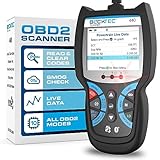
Overview: The BLCKTEC 440 Bluetooth OBD2 Scanner delivers professional diagnostics through a vibrant 2.8-inch color display. Compatible with all OBD-compliant vehicles from 1996 onward, this tool reads and clears codes while offering comprehensive emissions readiness testing and system resets.
What Makes It Stand Out: Live data graphing capability provides visual performance monitoring that basic scanners lack. Printer compatibility enables easy report sharing, while lifetime updates ensure ongoing relevance. The patented design and expert endorsement signal professional-grade quality.
Value for Money: Mid-range pricing offers features typically found in more expensive tools. The inclusion of free lifetime updates and expert support adds significant long-term value, eliminating obsolescence concerns that plague budget scanners.
Strengths and Weaknesses: Pros include the color screen, data graphing, professional build quality, and smog readiness hotkeys. The plug-and-play operation requires no batteries. Cons involve potential Bluetooth connectivity issues in certain vehicles and a steeper learning curve for absolute beginners. Some advanced functions may require manual interpretation.
Bottom Line: Suited for serious DIY enthusiasts and home mechanics wanting professional visualization tools. The BLCKTEC 440 bridges the gap between basic code readers and shop-grade equipment.
9. OBD2 Scanner, CGSULIT SC103 Car Code Reader Diagnose Check Engine Light Smog Check DTCs Scan Tool Live Data Stream Voltage Test for Vehicles Since 1996

Overview: The CGSULIT SC103 is a professional-grade code reader endorsed by renowned mechanic Scotty Kilmer. Designed for vehicles from 1996 (US), 2003 (EU), and 2008 (Asia), this scanner features a 2.8-inch TFT color screen and industrial-grade chip for rapid diagnostics.
What Makes It Stand Out: The dual text and graphical data display provides enhanced monitoring of vehicle sensors. A comprehensive built-in DTC library eliminates online searching, while freeze frame data comparison enables thorough analysis. The brand’s professional reputation adds credibility.
Value for Money: Offering professional features at a DIY-friendly price, the SC103 provides excellent value. The color display and graphical data visualization are typically premium features, making this a cost-effective choice for enthusiasts wanting advanced capabilities without shop scanner prices.
Strengths and Weaknesses: Pros include the vibrant color screen, multiple data display formats, broad protocol support, and trusted brand endorsement. The compact design suits both shops and home garages. Cons are lack of support for new energy vehicles and potential complexity for first-time users. No Bluetooth connectivity limits remote access.
Bottom Line: An excellent choice for automotive enthusiasts who trust expert recommendations. The CGSULIT SC103 balances professional capabilities with user-friendly operation.
10. FOXWELL Car Scanner NT604 Elite OBD2 Scanner ABS SRS Transmission, Check Engine Code Reader for Cars and Trucks, Diagnostic Scan Tool with SRS Airbag, Automotive Diagnostic Tool with Live Data

Overview: The FOXWELL NT604 Elite is a comprehensive 5-in-1 diagnostic scanner covering engine, ABS, SRS, and transmission systems. The 2026 new version comes pre-loaded with software and ready to use, supporting over 60 vehicle makes without additional fees.
What Makes It Stand Out: Multi-system coverage beyond basic OBD2 functions distinguishes this tool. The AUTOVIN feature automatically retrieves vehicle information, while the solid protective case offers superior protection. Lifetime updates ensure the scanner remains current with new vehicle models.
Value for Money: While premium-priced compared to basic readers, the four-system coverage delivers exceptional value. The included protective case and lifetime updates eliminate additional expenses. Comparable shop-grade scanners cost significantly more, making this economical for comprehensive home diagnostics.
Strengths and Weaknesses: Pros include ABS/SRS/transmission diagnostics, AUTOVIN capability, durable case, and lifetime updates. The live data stream and playback functions aid complex troubleshooting. Cons are the lack of maintenance reset functions and higher price point. Some users report occasional AUTOVIN failures requiring manual input.
Bottom Line: Best suited for serious DIY mechanics needing comprehensive system coverage. The FOXWELL NT604 Elite justifies its price through multi-system diagnostics and professional build quality.
Understanding OBD2 Technology and Live Data
On-Board Diagnostics II (OBD2) represents the standardized system that monitors your vehicle’s performance and emissions. Since 1996, all vehicles sold in the United States have been required to include this universal diagnostic port, typically located beneath the dashboard. What separates basic code readers from professional-grade tools is the ability to access live data streams—real-time information flowing directly from your vehicle’s numerous sensors and control modules.
What Makes OBD2 Different from OBD1
OBD1 systems were manufacturer-specific nightmares that required proprietary equipment and knowledge. OBD2 standardized everything, creating a universal language that any compliant scanner can understand. This standardization means one tool can potentially diagnose vehicles from dozens of manufacturers, though advanced features may still vary by make and model.
The Evolution of Live Data Capabilities
Early OBD2 scanners simply read and cleared trouble codes. Modern devices have evolved into sophisticated monitoring systems that can display dozens of parameters simultaneously. This progression from static code reading to dynamic data streaming represents a quantum leap in diagnostic capability for both professionals and enthusiasts.
Why Live Data Matters for Accurate Diagnostics
Static trouble codes tell you what the computer thinks is wrong, but live data reveals what’s actually happening. A code might indicate a lean fuel condition, but live data shows you real-time oxygen sensor readings, fuel trim adjustments, and mass airflow data to pinpoint whether you’re dealing with a vacuum leak, failing sensor, or fuel delivery issue.
Real-Time Monitoring vs. Snapshot Data
Snapshot data captures a single moment in time, while real-time monitoring provides a continuous flow of information. Watching how sensors respond to throttle input, engine load changes, and temperature variations gives you the complete picture that a single data point cannot provide. This dynamic view is essential for diagnosing intermittent problems that may not trigger consistent codes.
Freeze Frame Data vs. Continuous Monitoring
When a trouble code is set, freeze frame data captures engine conditions at that exact moment. While valuable, this represents a single data point. Continuous monitoring allows you to recreate conditions and watch how systems respond, crucial for diagnosing problems that only occur under specific circumstances like highway speeds or cold starts.
Key Features to Look for in OBD2 Scanners
Not all scanners with live data are created equal. The feature set varies dramatically between budget-friendly options and professional equipment. Understanding which capabilities matter most for your specific needs prevents overspending while ensuring you have the diagnostic power required for your situation.
Essential Features for Home Mechanics
For DIY enthusiasts, prioritize scanners that display basic engine parameters like RPM, coolant temperature, oxygen sensor voltages, and fuel trims. Look for graphing capabilities that help visualize trends over time. A user-friendly interface becomes critical when you’re learning to interpret data, and the ability to record and save data streams lets you review information at your convenience.
Advanced Features for Professional Technicians
Professional-grade tools offer bi-directional control, allowing you to activate components, run system tests, and reprogram modules. Advanced graphing with multiple parameter overlays, customizable dashboards, and extensive system coverage including ABS, SRS, transmission, and body control modules distinguish professional equipment from consumer-grade scanners.
Types of OBD2 Code Readers Available
The market offers several form factors, each with distinct advantages. Your choice depends on how you plan to use the tool, your technical comfort level, and your budget constraints.
Handheld Scanners vs. Bluetooth Adapters
Handheld scanners provide an all-in-one solution with dedicated screens and buttons. They work independently without requiring a smartphone or tablet. Bluetooth adapters, typically small dongles that plug into the OBD2 port, pair with smartphone apps to provide more flexibility and often more sophisticated interfaces at a lower cost.
Smartphone App-Based Solutions
App-based systems leverage your phone’s processing power and display capabilities. These solutions frequently offer more frequent software updates, cloud storage for vehicle histories, and community features where users share diagnostic experiences. The app ecosystem approach can provide better long-term value as developers continuously add features.
How to Interpret Live Data Streams
Raw data becomes valuable only when properly interpreted. Understanding normal operating ranges and how parameters interact transforms numbers on a screen into actionable diagnostic information. Learning to read live data is like learning a new language—it takes practice but opens up a world of understanding.
Understanding Fuel Trim Data
Short-term and long-term fuel trims reveal how the engine computer compensates for air-fuel mixture issues. Positive values indicate the computer is adding fuel, suggesting a lean condition. Negative values show fuel reduction, pointing to a rich condition. Watching these values change under different engine loads helps isolate the root cause.
Decoding Oxygen Sensor Readings
Oxygen sensors should rapidly switch between rich and lean voltages. Slow switching indicates a failing sensor. Stuck readings suggest wiring issues or exhaust leaks. Comparing upstream and downstream sensor patterns reveals catalytic converter efficiency. Live data lets you see these patterns in real-time rather than relying on snapshot values.
Professional vs. DIY Use Cases
Your diagnostic needs vary dramatically based on your experience level and intended use. A professional technician requires comprehensive system coverage and advanced functions, while a DIY owner might prioritize ease of use and engine performance monitoring.
Bi-Directional Control Capabilities
Professional scanners can command the vehicle to perform specific actions—cycling ABS solenoids, running EVAP system tests, or controlling electronic throttle bodies. This active testing capability speeds diagnosis significantly but adds cost and complexity that casual users may never utilize.
Graphing and Data Logging Features
Visual representations make patterns obvious that numbers alone might obscure. Multiple parameter graphing reveals correlations—watching how oxygen sensors respond to fuel trim changes, or how ignition timing advances with RPM. Data logging captures extended drives, essential for diagnosing intermittent issues that only occur under specific driving conditions.
Connectivity Options and Compatibility
How your scanner connects to devices and vehicles impacts usability and functionality. Modern scanners offer multiple connection methods, each with practical implications for your workflow.
USB, Bluetooth, and WiFi Compared
USB connections provide stable, fast data transfer for laptop-based diagnostics. Bluetooth offers convenience and portability for smartphone apps but may have slight latency. WiFi connections provide faster speeds than Bluetooth and longer range, useful for monitoring data while working around the vehicle.
Apple vs. Android Compatibility
Some scanners work exclusively with one mobile platform, while others support both. iOS devices require scanners with certified Bluetooth Low Energy (BLE) or WiFi connections due to Apple’s strict hardware protocols. Android devices typically offer more flexibility with standard Bluetooth connections and USB OTG support.
Display and User Interface Considerations
A powerful scanner becomes useless if you can’t navigate its interface or read its display. Screen quality, menu organization, and customization options significantly impact your diagnostic experience.
Screen Quality and Visibility Factors
Handheld scanners need bright, high-contrast displays visible in direct sunlight—the typical garage environment. Touchscreen responsiveness matters when wearing gloves. Screen size affects how much data you can view simultaneously without excessive scrolling or switching between screens.
Ergonomic Design and Portability
Consider where you’ll use the scanner. A compact, rugged design matters for mobile mechanics. For garage use, a larger screen might prioritize over portability. Cable length and connector quality affect how easily you can position the device for comfortable viewing while working.
Software Updates and Longevity
Vehicle technology evolves rapidly, and your scanner needs to keep pace. Update policies vary widely between manufacturers, affecting long-term value and compatibility with newer vehicles.
Update Frequency and Subscription Models
Some manufacturers provide lifetime free updates, while others require annual subscriptions for continued support. Consider the total cost of ownership over several years. Frequent updates indicate active development and better support for new vehicle models and emerging diagnostic capabilities.
Cloud Storage and Report Sharing
Modern scanners often include cloud services for storing vehicle histories, sharing diagnostic reports with customers or mechanics, and accessing repair databases. These features add significant value, especially for those managing multiple vehicles or running a small repair business.
Price Ranges and Value Assessment
OBD2 scanners with live data span from under $50 to over $3000. Understanding what you get at each price point helps align your investment with your actual needs rather than paying for unused capabilities.
Budget-Friendly Options Under $100
Entry-level scanners provide basic code reading and limited live data viewing. They typically show essential engine parameters but lack advanced graphing, recording features, or system coverage beyond the engine. These work well for simple diagnostics and monitoring basic engine health.
Premium Features Worth the Investment
Higher-priced scanners justify their cost through comprehensive system coverage, faster data refresh rates, larger parameter libraries, and professional features like bi-directional control. For serious DIY mechanics or professionals, these capabilities save time and enable diagnostics that budget tools simply cannot perform.
Safety Precautions When Using Scanners
While OBD2 scanners are generally safe, proper usage prevents potential issues. Understanding limitations and following best practices protects both your vehicle and your scanner investment.
Battery and Charging System Tests
Some advanced tests can stress your vehicle’s electrical system. Ensure your battery is fully charged before running extensive diagnostics. Low voltage during testing can trigger false codes or cause modules to behave erratically, leading to misdiagnosis.
ABS, SRS, and Transmission Support
Accessing these systems requires caution. Improper procedures can trigger warning lights or affect system operation. Always follow manufacturer guidelines and understand that some advanced functions may require specific vehicle conditions or procedures to work safely.
Troubleshooting Common Scanner Issues
Even quality scanners encounter problems. Knowing how to resolve common connectivity and communication issues saves frustration and prevents unnecessary returns or repairs.
Connection and Communication Errors
Vehicle compatibility issues, blown fuses, or wiring problems can prevent scanner communication. Try connecting to a different vehicle to isolate whether the problem is with the scanner or the car. Check that the vehicle’s OBD2 port has power and ground—simple but common issues.
Software Glitches and Firmware Updates
Like any digital device, scanners can experience software bugs. Regular firmware updates often resolve these issues. If problems persist, factory resets or reinstalling mobile apps frequently clears corrupted configurations that cause erratic behavior.
Maximizing Your Scanner’s Potential
Owning a capable scanner is only the first step. Learning to use it effectively transforms it from a code reader into a powerful diagnostic ally. Invest time in understanding what each parameter means and how systems interact.
Building Diagnostic Skills
Start with known good vehicles to learn normal parameter ranges. Practice interpreting data during test drives to correlate what you feel with what you see. Join online communities where experienced users share diagnostic approaches and parameter interpretations for specific vehicle issues.
The CAN Bus System Explained
Modern vehicles use Controller Area Network (CAN) bus systems where modules communicate with each other. Understanding this architecture helps you recognize when communication errors indicate module failures versus wiring issues. Live data can reveal which modules are responding and which have dropped off the network.
Future Trends in OBD2 Technology
Vehicle diagnostics continue evolving as cars become more sophisticated. Understanding emerging trends helps you choose a scanner that remains relevant as vehicle technology advances.
Emerging Protocols and Standards
Manufacturers continuously develop new communication protocols. Scanners with upgradable firmware and broad protocol support adapt better to new vehicle models. Some newer vehicles include additional diagnostic ports or wireless diagnostic capabilities that future scanners will need to support.
Integration with Telematics and IoT
Connected car technology enables remote diagnostics and predictive maintenance alerts. Future scanners will likely integrate more deeply with cloud services, offering AI-powered diagnostic suggestions and connecting with vehicle history databases for more accurate troubleshooting.
Frequently Asked Questions
What is live data on an OBD2 scanner?
Live data is real-time information streaming directly from your vehicle’s sensors and control modules while the engine runs. Unlike static trouble codes that only indicate a problem occurred, live data shows actual operating conditions like oxygen sensor voltages, fuel trim percentages, engine RPM, coolant temperature, and dozens of other parameters as they happen, allowing you to see how systems respond to changing conditions.
Do I need a professional-grade scanner for basic troubleshooting?
For most DIY mechanics and vehicle owners, a professional-grade scanner isn’t necessary. Mid-range scanners ($100-$300) typically provide sufficient live data capabilities for common issues like checking engine performance, monitoring emissions readiness, and diagnosing sensor failures. Professional tools become valuable when you need bi-directional control, advanced system access, or work on multiple vehicle makes regularly.
Can OBD2 scanners with live data damage my vehicle?
Standard OBD2 scanners that only read data cannot damage your vehicle. They’re passive devices that monitor information without altering anything. However, scanners with bi-directional control capabilities can potentially cause issues if used improperly—activating components at the wrong time or overriding safety systems. Always follow manufacturer instructions and avoid unfamiliar advanced functions unless you understand their purpose.
What’s the difference between Bluetooth and WiFi scanners?
Bluetooth scanners typically consume less power and pair directly with your smartphone app, offering convenience and portability. WiFi scanners provide faster data transfer speeds and longer connection ranges, useful if you want to monitor data while walking around the vehicle. WiFi connections can also be more stable for data logging over extended periods, though they may drain your phone battery faster.
How often should I update my OBD2 scanner software?
Update your scanner software whenever the manufacturer releases new vehicle coverage or features, typically every 3-6 months. If you own newer vehicles, updates are crucial for maintaining compatibility. Some manufacturers release updates quarterly, while others update less frequently. Check for updates before diagnosing an unfamiliar vehicle to ensure you have the latest protocols and bug fixes.
Will these scanners work on all car makes and models?
All OBD2 scanners work with any 1996 or newer vehicle sold in the United States due to federal mandate. However, the depth of system access varies by manufacturer. European and Asian vehicles may have additional proprietary systems that require enhanced diagnostics. Always verify that a scanner specifically advertises coverage for your vehicle’s make and the specific systems you need to access.
Can I use an OBD2 scanner while driving?
Yes, most scanners are designed for use while driving, and this is often necessary for diagnosing intermittent issues that only occur under specific driving conditions. However, never operate the scanner or app in a way that distracts you from driving. Set up data displays before driving, or have a passenger monitor the data. Some apps include voice alerts for parameter thresholds to minimize driver distraction.
What parameters should I monitor for engine performance issues?
For general engine diagnostics, monitor short-term fuel trim, long-term fuel trim, oxygen sensor voltages, mass airflow sensor readings, coolant temperature, and ignition timing. These parameters reveal air-fuel mixture issues, sensor accuracy, and engine operating conditions. For misfires, add cylinder-specific data and crankshaft position sensor information to isolate problematic cylinders.
Are subscription fees common for OBD2 scanner apps?
Subscription models vary widely. Some apps offer free basic functionality with one-time purchases for premium features. Others require monthly or annual subscriptions for advanced capabilities like enhanced diagnostics, repair databases, or cloud storage. Professional-grade apps more commonly use subscriptions. Factor these ongoing costs into your purchase decision, as they can significantly increase total ownership costs over time.
How do I know if a scanner supports live data before buying?
Check the product specifications for terms like “live data,” “real-time data,” “data stream,” or “sensor graphing.” Reputable manufacturers clearly advertise live data capabilities. Read user reviews focusing on data refresh rates and parameter variety. Avoid scanners that only mention code reading and clearing without specifying live data viewing. Most quality scanners list the number of parameters they can display simultaneously.
See Also
- Stop Wasting Time on Faulty Diagnostics with the 10 Best OBD2 Code Readers This Year
- Stop Guessing Torque Values with the 10 Best Reversible Torque Wrenches This Year
- Stop Guessing Torque Settings with the 10 Best Reversible Torque Wrenches This Year
- Stop Guessing Torque Values with the 10 Best Preset Torque Wrenches This Year
- How to Solve Check Engine Light Confusion with the 10 Best OBD2 Code Readers in 2026